ChronoFrames
- By
Unit frames and nameplates for WoW Forever: three styles, buffs and debuffs, neon cast bars, threat colours and one settings window.
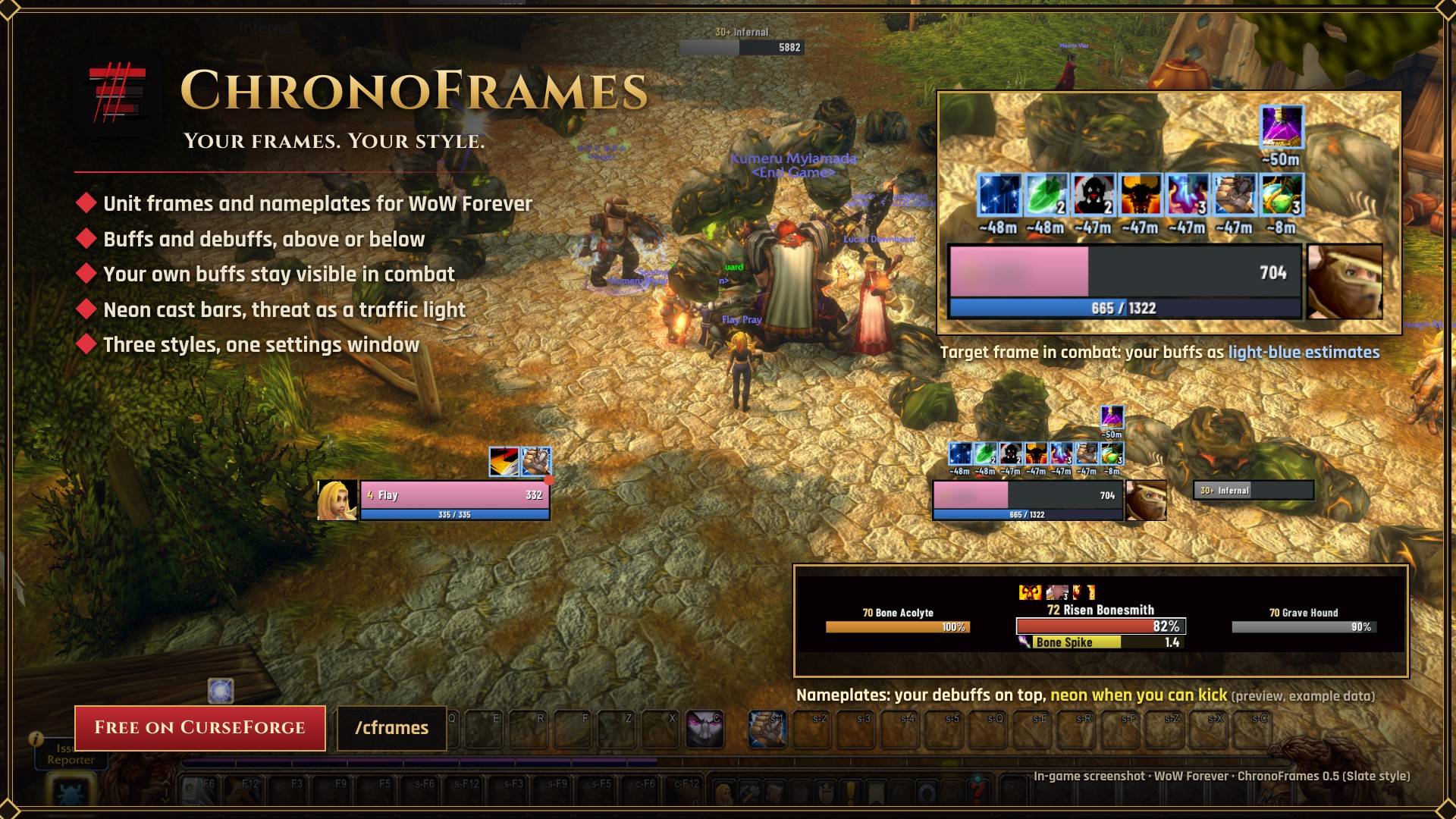
Your own buffs stay visible in combat as light-blue estimates, above or below your frames as you choose. Nameplates show your debuffs on top and turn neon when you can kick a cast. In-game screenshot, Slate style.
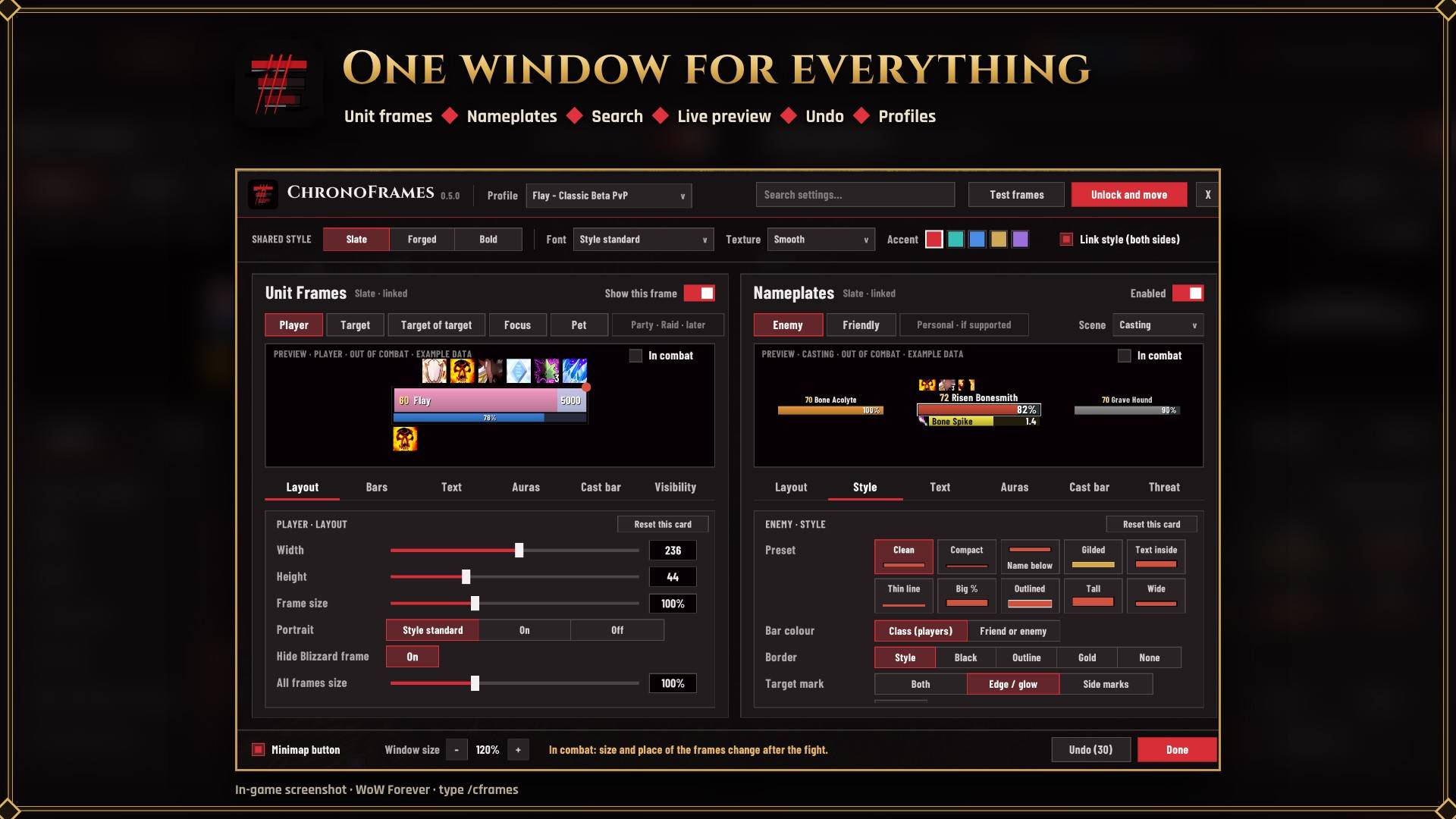
Unit frames on the left, nameplates on the right, one shared style on top. Search any setting, see every change live in the preview, undo with one click and keep profiles per character. Open it with /cframes.
Description
ChronoFrames
Unit frames and nameplates for WoW Forever, in the style you choose: with buffs and debuffs, built for PvE and PvP.
ChronoFrames replaces the game's player, target, target of target, focus and pet frames and its nameplates. Everything is set up in one window, with a live preview of what you change. Made for the WoW Forever client and tested on it.
Three styles
- Slate: flat, thin lines, out of the way.
- Forged: bronze and gold, round portraits, level in a diamond.
- Bold: a coloured band with the name, big numbers, square portraits.
Unit frames and nameplates share one style, or each gets its own.
Unit frames
- Five frames: player, target, target of target, focus and pet. Left-click to target, right-click for the menu.
- Health with shields and incoming heals, power, name and level (elite +, rare R, boss), portrait, cast bar, raid marker, threat glow, combat and resting icons.
- Buffs and debuffs: place each group above or below the frame. Auto puts an enemy's debuffs above and its buffs below, and yours the other way round. Filters: mine, all, dispellable or purgeable. Icon size, timers and stacks.
- Dead, Ghost and Offline instead of a frozen health bar; mobs tagged by someone else turn grey.
- Visibility: show a frame only in combat, or let it fade out of combat.
- Unlock and move: drag the frames; they line up with each other.
Nameplates
- Cast bars you read at a glance: neon when you can kick it, grey with a silver shield and a lock when you cannot, with the spell icon. Below or over the health bar.
- Your debuffs and crowd control above every plate, with timers.
- Target and focus marks: a glowing edge and side marks on your target, a blue mark on your focus.
- Threat as a traffic light: DPS and healers see red, orange, then neon yellow when they pull aggro. Tanks see green, yellow, then red when they lose it.
- Purge / Enrage alert: a big glowing icon when an enemy has a buff you can purge or steal (out of combat).
- Smaller pets, totems and small adds, dim the other plates, stacking plates that never overlap.
- Name above, inside or below; health as percent, value or both; class colours for enemy players; 10 presets to start from.
The settings window
- One window with two halves: unit frames on the left, nameplates on the right.
- Search any setting and jump right to it.
- Live previews, with an "In combat" view.
- Sliders with a number box, "Reset this card", Undo.
- Profiles: copy or start fresh, switch per character.
- Window size from 60 to 130%.
Commands
/cframes settings · /cframes unlock / lock · /cframes test · /cframes reset · /cframes style slate|forged|bold · /cframes plates · /cframes minimap
Good to know
WoW Forever hides some things from addons, and ChronoFrames works within that:
- Buffs and debuffs cannot be read in combat. ChronoFrames then keeps your own as light-blue estimates, timed from your cast or remembered from before the fight. Others' auras return when the fight ends, and a dispel in combat cannot be seen.
- Health and power numbers can be shown but not shortened (no "12.3k").
- Size and place of the frames cannot change in combat; changes wait until the fight is over.
Coming next
Party and raid frames, rules per NPC for the nameplates.
Status
Beta. Built for the WoW Forever client 1.60.1. Please report problems with the error text (BugSack helps) and a screenshot.
Licence and credits
A massive thank you to MetaForge and ForeverChanges for allowing me to use their data. Your generosity and hard work help make this project possible!
- Code: GNU GPL v2. Spell lists partly based on the WeakAuras class templates (GPL-2.0).
- Spell data: WoW Forever spell data from MetaForge and ForeverChanges, used with permission.
- Fonts: The included fonts are under the SIL Open Font License 1.1.
ChronoFrames Team