


ChromaChat
- By
Know who's talking at a glance with intelligent speaker colors, custom rules, and mention alerts.
ChromaChat_Screenshot2.png
ChromaChat_Screenshot1.png
Description
ChromaChat
Know Who's Talking at a Glance.
ChromaChat is a lightweight World of Warcraft chat enhancement addon designed to make conversations easier to follow and important messages harder to miss.
Instead of overhauling the entire WoW chat system, ChromaChat focuses on speaker identification, intelligent color rules, custom player recognition, mention alerts, chat copying, and useful URL handling while preserving the familiar Blizzard chat experience.
Whether you're following a busy raid conversation, keeping track of guildmates and friends, or simply trying to tell who said what, ChromaChat makes chat easier to read without turning it into a completely different interface.
🎨 Intelligent Speaker Coloring
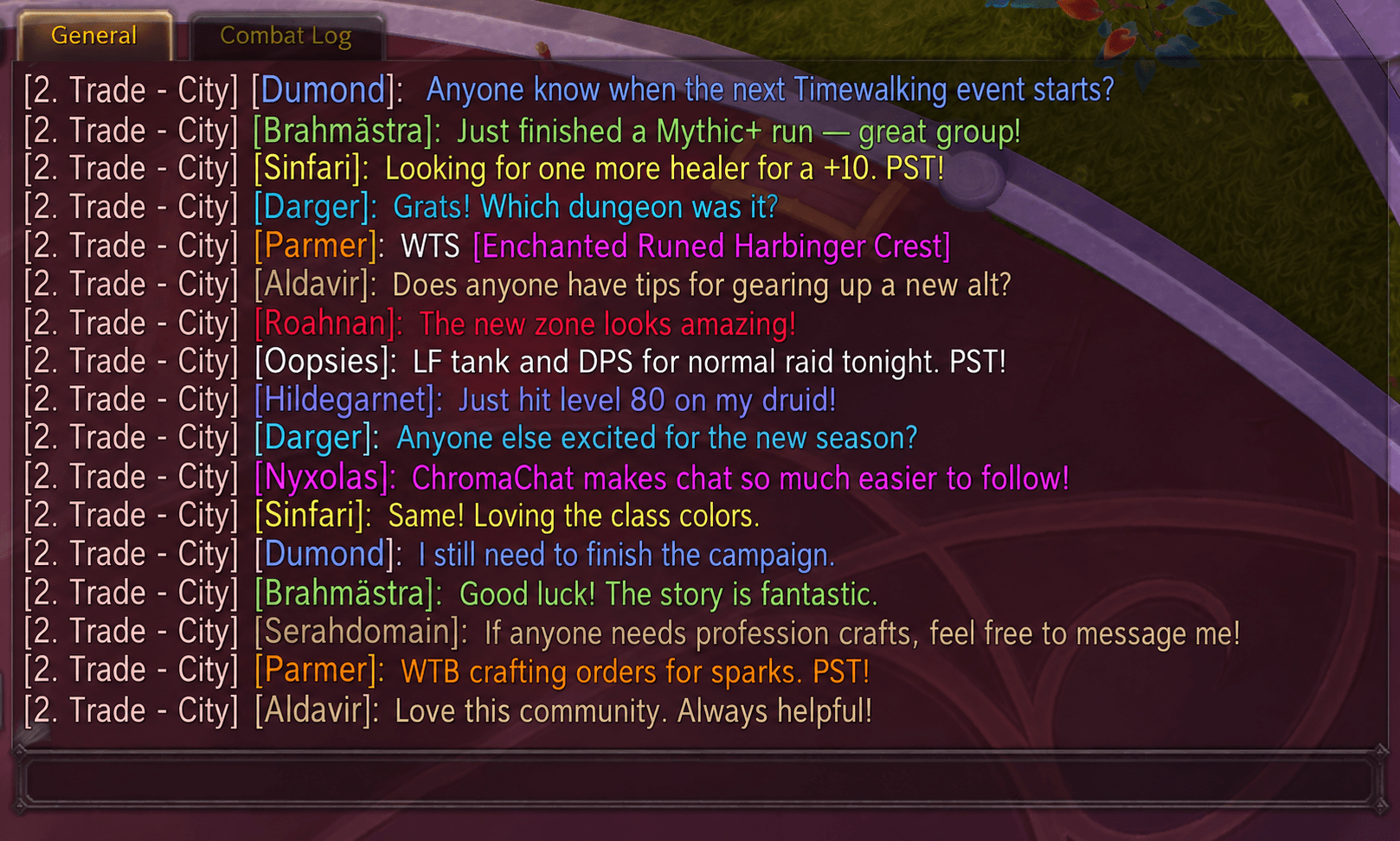
ChromaChat can automatically color chat based on who is speaking.
Choose whether colors are applied to:
- Name Only
- Message Only
- Name + Message
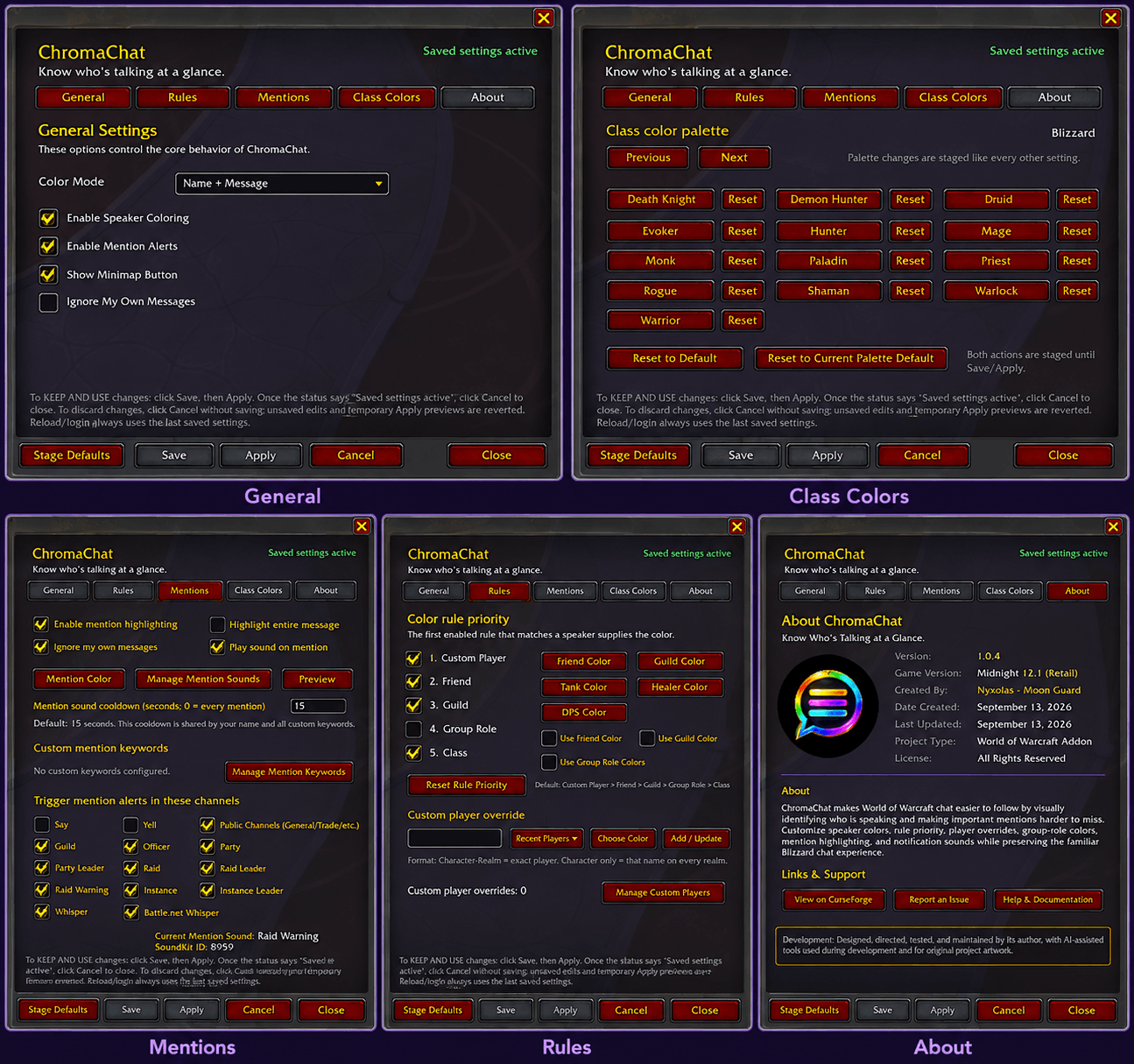
Speaker colors can be determined using several different rules, including:
- Custom Player
- Friend
- Guild Member
- Group Role
- Class
You control which rules are enabled and the order in which they take priority.
For example:
Custom Player → Friend → Guild → Group Role → Class
The first enabled rule that matches the speaker determines the color.
🌈 Fully Customizable Class Colors
Don't like the default class colors?
ChromaChat allows every class color to be customized individually using WoW's color picker.
You can also:
- Restore individual class colors
- Reset all class colors
- Apply predefined color palettes
- Restore the currently selected palette
Prefer Blizzard's normal class colors? Leave them alone and ChromaChat will use them automatically.
👤 Custom Player Colors
Certain players can be given their own colors regardless of their class.
Custom player overrides support:
- Character-Realm for an exact player
- Character to match that character name across realms
ChromaChat also keeps track of recently encountered players, making it easier to select someone without manually typing their full name.
The Manage Custom Players window lets you review, edit, recolor, or remove existing player overrides.
👥 Friend, Guild & Group Role Colors
Want your friends or guildmates to immediately stand out?
ChromaChat can assign dedicated colors to:
- Friends
- Guild members
- Tanks
- Healers
- DPS players
Relationship and role coloring are completely optional and can be enabled individually.
Group role colors are only used where role information is relevant, such as Party, Raid, Raid Warning, and Instance chat.
💬 Per-Channel Control
Choose exactly where ChromaChat applies its speaker coloring.
Supported chat types include:
- Say
- Yell
- Public channels such as General and Trade
- Guild
- Officer
- Party
- Party Leader
- Raid
- Raid Leader
- Raid Warning
- Instance
- Instance Leader
- Whisper
- Battle.net Whisper
You can enable or disable ChromaChat processing for individual channel types.
🔔 Mention Alerts
ChromaChat can alert you when somebody says your character's name or uses one of your configured keywords.
Your character name is automatically recognized, and you can create additional custom mention keywords.
Mention alerts support:
- Character-name detection
- Custom keywords
- Configurable highlight color
- Optional entire-message highlighting
- Optional sound alerts
- Multiple selectable notification sounds
- Custom SoundKit IDs
- Configurable sound cooldown
- Ignore-your-own-messages option
- Per-channel mention controls
The sound cooldown helps prevent a busy conversation from repeatedly triggering notification sounds. Set the cooldown to 0 seconds if you want every qualifying mention to play a sound.
🔊 Custom Mention Sounds
ChromaChat includes a dedicated Mention Sounds manager with a selection of recognizable World of Warcraft sounds.
You can preview sounds before selecting them or enter a custom WoW SoundKit ID for advanced customization.
Your currently selected sound and SoundKit ID are always visible from the Mentions settings page.
⭐ Self Identification
ChromaChat can optionally add a small visual marker to your own messages, making them easier to locate when reviewing a busy conversation.
The marker can be configured without interfering with Blizzard's normal clickable player names.
📋 Copy Chat Text
Need to copy something someone posted in chat?
Hover over a standard chat window and use your assigned ChromaChat Copy Chat Text keybind to open its recent messages as selectable plain text.
Select the text you want and press Ctrl+C to copy it to your clipboard.
You can also use the /cc copy or /chromachat copy slash commands instead of assigning a keybind.
The Chat Copy interface is designed to provide clean, readable text while removing unnecessary WoW formatting codes.
⌨️ Built-In Keybinding Management
ChromaChat includes its own Keybindings settings page, so you don't have to search through WoW's entire Key Bindings interface to configure ChromaChat.
From there you can assign or clear the ChromaChat Copy Chat Text shortcut.
Keybinding changes participate in ChromaChat's staged Save and Apply workflow, and ChromaChat stays synchronized with changes made through Blizzard's own Key Bindings settings.
🔗 Clickable Web URLs
ChromaChat automatically recognizes common web addresses posted in chat, including:
https://http://www.
Click a detected URL and ChromaChat opens a compact copy utility with the address already selected and ready for Ctrl+C.
The URL copy utility:
- Automatically closes after 10 seconds
- Can be moved anywhere on screen
- Remembers its last position
- Can be closed immediately with Escape or its close button
- Updates to the newest URL and restarts its timer if another URL is clicked
This provides a convenient way to copy links from WoW without requiring ChromaChat to access your operating system clipboard.
⚙️ Safe, Familiar Chat Behavior
ChromaChat is designed to enhance Blizzard's existing chat system rather than replace it.
It preserves important native functionality such as:
- Clickable player names
- Item, spell, quest, achievement, and other Blizzard links
- Shift+Click item linking into chat
- Ctrl+Click Dressing Room item previews
- Channel formatting
- Blizzard chat prefixes
- Existing hyperlink behavior
The goal is to make chat more useful and easier to follow without making it feel unfamiliar.
💾 Save, Apply & Preview Changes
ChromaChat uses a staged configuration system so you can experiment without accidentally overwriting your saved setup.
Save stores your current configuration.
Apply lets you preview your staged configuration immediately.
Cancel discards unsaved changes and restores the previously active configuration.
Your saved configuration is automatically restored after logging in or reloading the UI.
🗺️ Minimap Button
ChromaChat includes a draggable minimap button for quick access to its settings.
Move it around the minimap to your preferred location, or hide it if you don't need it.
Restoring ChromaChat's default settings does not reset your chosen minimap button position.
⌨️ Slash Commands
Use:
/chromachat
or
/cc
to quickly access ChromaChat.
To open Chat Copy for the chat window you're currently hovering over, use:
/chromachat copy
or
/cc copy
Additional commands are available for common addon functions and testing mention sounds.
🎯 What ChromaChat Is Designed For
ChromaChat isn't intended to replace your entire chat interface with dozens of unrelated modules.
Its focus is simple:
Make WoW chat easier to follow by visually identifying who is speaking, making important mentions impossible to miss, and providing useful tools for working with chat content.
If you've ever looked at a busy Guild, Party, Raid, or Whisper conversation and had to stop to figure out who said what, ChromaChat was built for you.
ChromaChat v1.1.32
World of Warcraft: Midnight 12.1
Created by Nyxolas - Moon Guard
Created: September 13, 2026
Last Updated: September 14, 2026
Know Who's Talking at a Glance.
Development
ChromaChat was designed, directed, tested, and maintained by its author, with AI-assisted tools used during development and for original project artwork.
The ChromaChat Team

