CheapWrits
- By
Screenshot 2026-11-16 142547.png
Screenshot 2026-11-16 142616.png
Screenshot 2026-11-16 142633.png
Screenshot 2026-11-16 142641.png
Description
CheapWrits — Writs & Crates
Find the cheapest Craftsman's Writs and Waylaid Crates on the Auction House, and buy everything you need in a few clicks.
WoW Forever's merchant system rewards you for completing Craftsman's Writs (trade reputation) and Waylaid Crates (Merchant's Favor). Each one needs extra items to complete, and working out which is cheapest by hand means a lot of searching. CheapWrits does that for you. It scans the Auction House, pairs every writ and crate with the cheapest way to complete it, and shows the best deals in a tab right inside the Auction House.
How it works
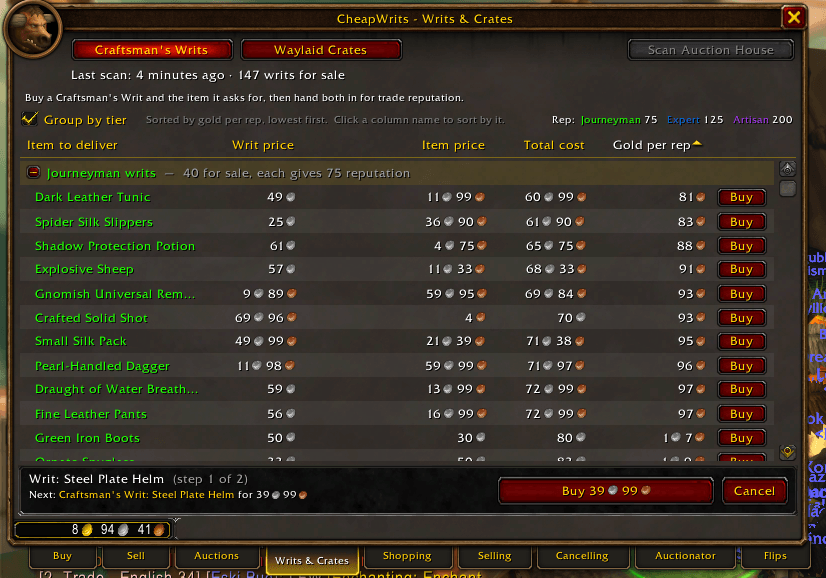
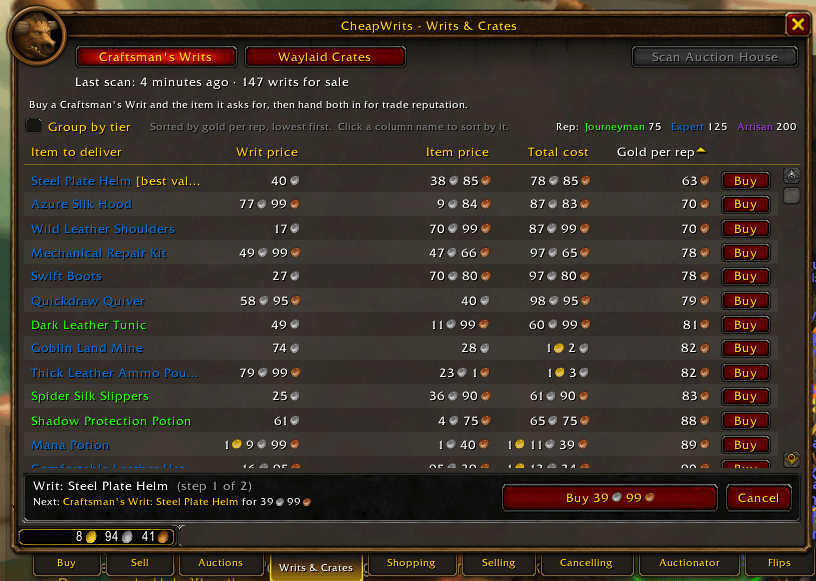
Craftsman's Writs. Buy the writ and the item it asks for, then hand both in for trade reputation. CheapWrits shows the writ price, the item price, the total, and the gold per reputation point.
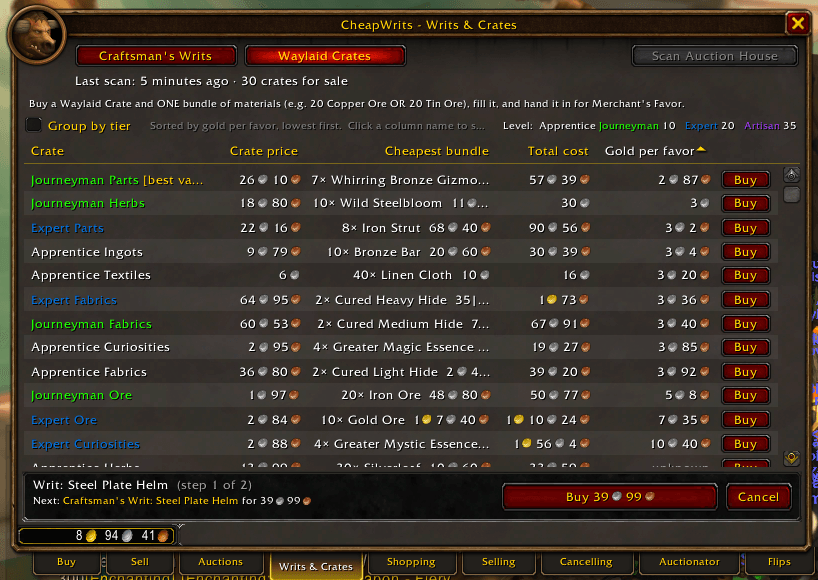
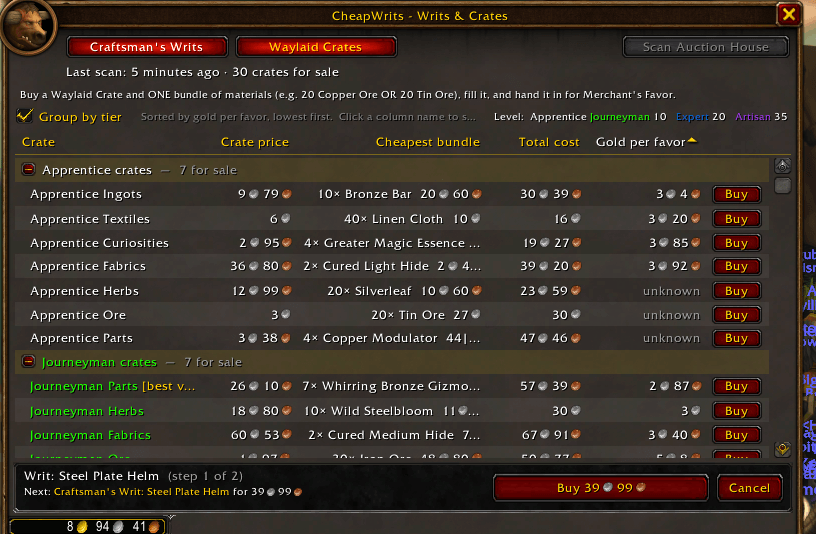
Waylaid Crates. Each crate is filled with one bundle of materials, for example 20 Copper Ore or 20 Tin Ore. CheapWrits knows the bundles for all 30 crate types, prices every one, and shows the cheapest next to the crate's price.
Features
Everything in one Auction House tab
- A Writs & Crates tab on the Auction House's tab row, next to Buy, Sell and Auctions.
- Switch between Craftsman's Writs and Waylaid Crates with one click.
- Works alongside Auctionator and other Auction House addons. Click any other tab to switch back.
One-click scanning
- Finds every writ and crate for sale, plus the price of everything they need.
- Matches items by their exact name, so "Mana Potion" is never confused with "Major Mana Potion".
- A progress bar shows how far the scan has got. A full scan takes 1–2 minutes.
- Your last scan is saved, and the addon warns you when prices may be out of date.
Buy everything in a few clicks
- Every row has a Buy button that buys the writ or crate and what it needs.
- The bottom bar walks you through each purchase and shows the live price before you pay.
- Items you already have in your bags are skipped automatically.
- Warns you if a price has risen since your scan, and fetches a new price if a listing sells out.
Clear prices and best value
- Columns for container price, item or bundle price, total cost and gold per reward point (per reputation for writs, per Merchant's Favor for crates).
- The single best gold-per-reward deal is tagged [best value].
- Writs and crates you already own are tagged [in bags].
Sort and group your way
- Click any column name to sort by it, and click again to reverse.
- Group by tier: Journeyman / Expert / Artisan for writs, Apprentice to Artisan for crates. Click a tier heading to collapse it. Collapsed tiers still show their cheapest deal.
Helpful details
- Hover a writ to see the item's tooltip, its tier, the reputation reward, and how many of the writ and item are for sale.
- Hover a crate to see every bundle it accepts, with prices and how much you already have.
- Click a row to search for the item in the Buy tab, or Shift-click to search for the writ or crate.
- Right-click a writ to correct its tier if it was detected wrongly. Your choice is saved.
- Plain-language labels and tooltips on every button and column.
How to use
- Open the Auction House and click the Writs & Crates tab.
- Click Scan Auction House and wait 1–2 minutes.
- Choose Craftsman's Writs or Waylaid Crates at the top.
- Find a deal you like and click Buy.
- Click the big Buy button at the bottom once for each purchase.
Slash commands
| Command | What it does |
|---|---|
/writs |
Open the Craftsman's Writs list |
/crates |
Open the Waylaid Crates list |
/writs scan |
Start a scan |
/writs stop |
Stop a scan or cancel a purchase |
/writs debug |
Show step-by-step buying messages in chat (for bug reports) |
/writs error |
Show the last error message |
The Auction House must be open for these to work.
Good to know
- One click per purchase: Blizzard only allows one Auction House purchase per click, so buying a writ and its item takes two clicks on the Buy button.
- Estimated bundle prices: crate bundle prices in the list are estimated from the lowest listed price per item. You always see the exact price before confirming.
- Writ tiers are detected from the writ's tooltip or item quality. If one is wrong, right-click it to fix it.
- Merchant's Favor amounts are known for some crates only. The others show "unknown" in the gold-per-favor column.
- One item per writ: each writ is assumed to need one of its item.
- Avoid searching the Auction House yourself during a scan, since the scan reads the same search results.
Compatibility
- Built for WoW Forever.
- Compatible with Auctionator.
Found a bug or have an idea? Leave a comment! Bug reports with a screenshot of /writs debug output are extra helpful.
CheapWrits Team