CheapBids
- By
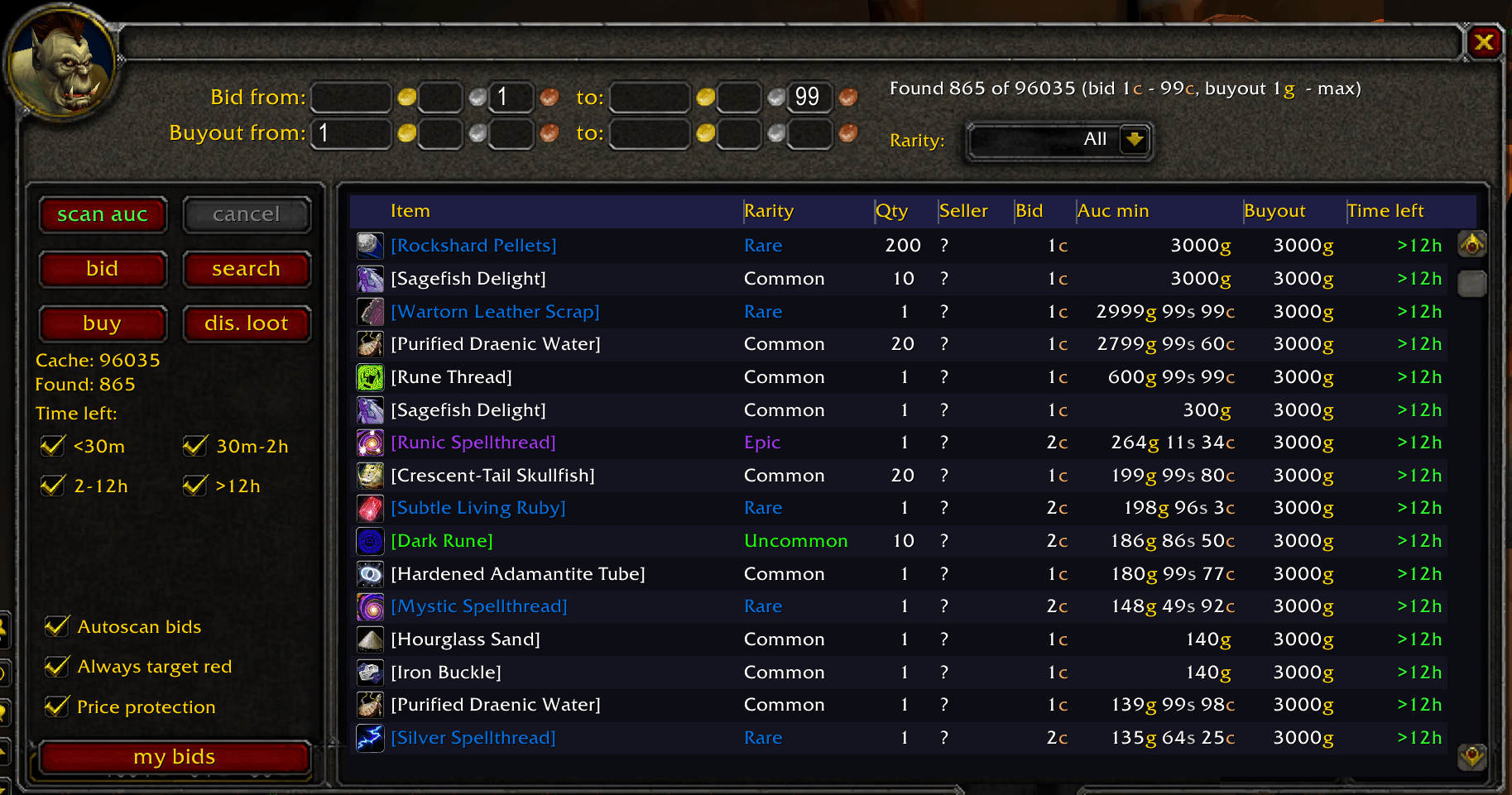
curseforge-screenshot.png
Description
CheapBids
Now and then someone lists an item with a 1 copper starting bid and nobody notices. CheapBids is built to find those lots. It scans the whole auction house in one go and shows everything in your bid range (1-99 copper by default) in a table you can sort.
You place every bid and buyout yourself, one click at a time. It's not a bot and it won't buy anything on its own.
What it does
- Scans the whole auction house in one pass without freezing the game. The server only allows a full scan about every 15 minutes.
- Filters by bid and buyout range (gold, silver, copper), rarity and time left.
- Sorts by item, rarity, quantity, seller, bid, buyout, market price or time left.
- Click a row and press
bidorbuy. Double-clicking a row also bids, and you can bind a hotkey. - Asks first if a bid or buyout looks too expensive for the item.
- The
my bidsview lists your bids with the outbid ones on top in red, so you can re-bid.
Prices on your items
Every full scan remembers the lowest buyout of each item. That price then shows up as "Auc min" in the table and on item tooltips, including your bags, recipes, loot and mail, so you can see what things are worth without opening the auction house.
Prices stay saved after you log out and update with your next full scan. Hold Shift over an item to see the price for the whole stack.
Optional modules
They come in the same download. If you don't want one, untick it in the AddOns list.
- Disenchant adds to the tooltip what an item disenchants into, with chances and an estimated value. It also unlocks the
dis. lootview, which lists lots worth buying out and disenchanting. - Prospect shows which gems an ore can give and which ores a gem comes from.
- CompactBrowse turns the default Browse tab into a dense list of thin rows.
How to use it
- Open the auction house and pick the CheapBids tab.
- Press
scan auc. - Set your filters and press
search. - Select a row and press
bidorbuy. Don't wait too long after the scan, because the results go stale.
/cb opens the tab. Options are in Interface -> AddOns -> CheapBids.
Using it with other auction addons
CheapBids works fine next to Auctionator, so you can leave it on. Auctioneer is different: turn it off while you bid, because it overwrites the auction list and your bids fail.
Credits
CheapBids is free software under the GNU GPL v2 or later. Source code: https://github.com/Reactobus/CheapBid
- The Disenchant and Prospect modules use data and logic from Enchantrix by Norganna's AddOns, GPL v2 or later.
- The CompactBrowse module is derived from Auc-Util-CompactUI, part of Auctioneer by Norganna's AddOns, GPL v2 or later.
CheapBids Team