ChatView
- By
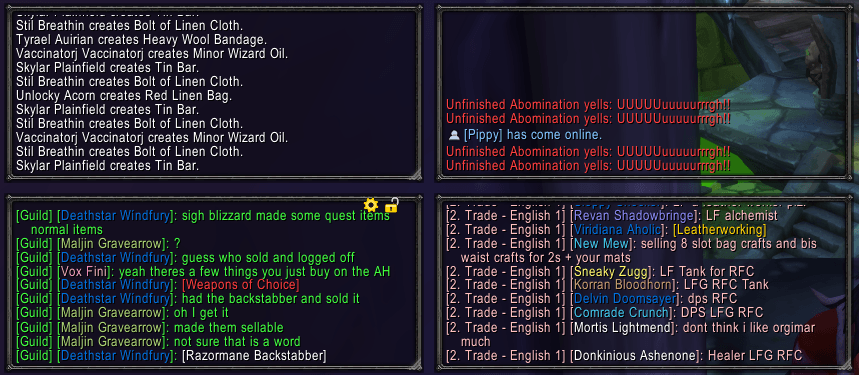
ChatView adds chat windows with no typing line, so you can keep an eye on guild chat, party talk, Trade, or anything else without it getting in the way.
Screenshot 2026-11-08 124141.png
Screenshot 2026-11-08 124009.png
Description
ChatView
ChatView adds chat windows with no typing line, so you can keep an eye on guild chat, party chat, Trade, or anything else without it getting in the way. Each window shows its own choice of chat, picked from the same list as the game's own chat settings.
FEATURES
What each window shows
- Read-only: just the chat, with no line to type in
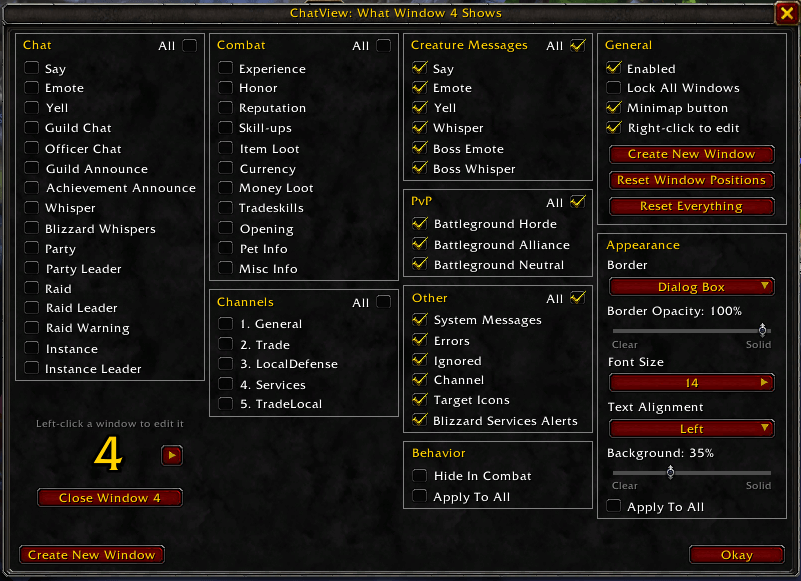
- Choose what it shows: the same choices as the game's chat settings: Say, Guild, Whisper, Party, Raid, creature messages, loot, experience, system messages, and any channel you've joined, like General or Trade
- Works like chat: except the fact you can't talk from here. Names and items can be clicked, and the mouse wheel scrolls (hold Shift to jump to the top or bottom)
Windows
- As many as you like: guild chat can have one window and Trade another. New windows find an empty spot, so they don't cover your other windows or the game's chat window
- Window settings: right-click a window, click its gear, click the minimap button, or type /chatview. While they're open, each window shows its number. Left-click a window, or use the arrow beside the big number, to switch to another one
- Move and resize: drag a window anywhere, and drag its bottom-right corner to resize it
- Lock one window: hover over it and click its padlock to stop it moving or resizing
- Lock them all: Lock All Windows stops every window moving or resizing, turns off right-clicking, and hides the gear and X.
General
- On or off: from the General section, or right-click the minimap button. The button greys out and shows a purple "no" sign while ChatView is off
- Right-click to edit: untick it if you'd rather right-clicking a window did nothing
- Start over: Reset Window Positions puts the windows back where they started, and Reset Everything puts all of ChatView back to how it was when you first installed it
- Settings are saved per character
COMMANDS
- /chatview or /cview opens the window settings
- /cview new adds a window
- /cview reset moves the windows back to their starting spots
- /cview channels lists the channels you've joined and what each window shows, then reports the next few channel messages (for troubleshooting)
KNOWN LIMITS
- During some fights, the game hides parts of chat from addons. ChatView still shows those messages, just without clickable names.
- Other addons that change how the game's chat looks don't change ChatView's windows.
COMPATIBILITY
Built and tested for WoW: Forever (Interface 16001).
FEEDBACK
If this is at all useful, let me know. It's kind of something I'm just doing for myself. If there is a problem, let me know about it. If it makes your life better in any way, let me know. It's just nice knowing if I have helped anyone.
LICENSE
MIT. Made by QuinicAcid
ChatView Team