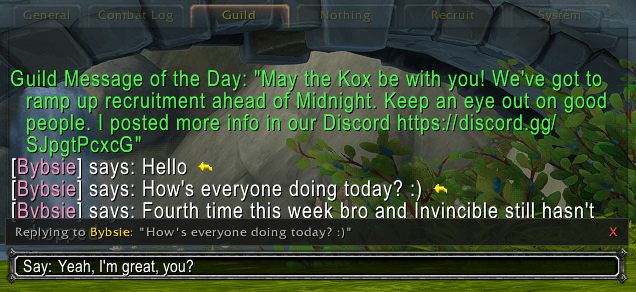
It works with all chat modes - say, whisper, guild, etc.
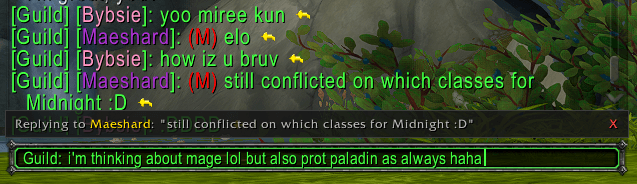
Is mage good for Midnight btw?
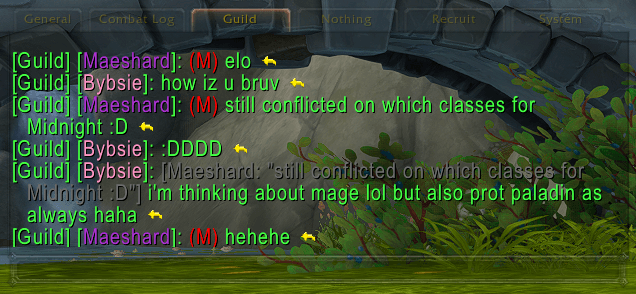
I don't think mage is good, he laughed at me, im mad now bye
Description
ChatReply
Discord-style replies, right in your WoW chat.
Ever wanted to reply to a specific message in WoW chat the way you do on Discord or Slack? ChatReply adds a small clickable reply icon to the end of every chat message. Click it, type your response, and your reply is sent with quoted context so everyone knows what you're responding to.
Features
- Reply icon on every message — a small clickable icon appears at the end of each chat message
- Visual reply indicator — a slim bar above the edit box shows who you're replying to and a preview of their message
- Inline quoted context — other ChatReply users see the original message quoted inline, so replies always have context
- Works everywhere — guild, officer, party, raid, say, yell, whisper, and custom channels
- Slash commands — use
/replyor/rrto reply from the keyboard without clicking - Lightweight — no libraries, no dependencies, session-only message history that cleans itself up
How to Use
Method 1: Click the Reply Icon
Every chat message gets a small reply icon at the end. Click it and the edit box opens, pre-filled with the correct channel. A reply indicator appears above the edit box showing who you're replying to. Type your message and hit Enter.
Method 2: Slash Command
/replyor/rr— reply to the most recent message in your history/reply PlayerNameor/rr PlayerName— reply to the most recent message from a specific player
The edit box opens in the same channel as the original message. Type your reply and send.
Cancelling a Reply
Press Escape or click the X on the reply indicator to cancel and go back to normal chat.
Slash Commands
| Command | Description |
|---|---|
/reply |
Reply to the last message in history |
/reply PlayerName |
Reply to the last message from that player |
/rr |
Shorthand for /reply |
/rr PlayerName |
Shorthand for /reply PlayerName |
/reply on |
Enable the addon |
/reply off |
Disable the addon |
/reply links |
Toggle reply icon visibility on/off |
/reply embed |
Toggle embedded quote prefix on/off |
For Other Addon Users
When both you and the person you're replying to have ChatReply installed, replies include the full quoted context displayed inline — the original sender's name and a snippet of their message appear in grey before the reply text. This makes threaded conversations easy to follow, even in a busy guild chat.
Players without the addon still see your reply with context — by default, ChatReply embeds a short [@Name: "excerpt"] prefix in the actual message text so everyone can follow the conversation. You can toggle this off with /reply embed if you prefer clean messages for addon-only groups.
Compatibility
- WoW Retail 12.0.0+
- No dependencies or libraries required
- Works alongside other chat addons
Screenshots
Screenshots coming soon
ChatReply Team