ChatGuard - Simple Chatfilter
- By
intro.png
Description
Tired of endless “layer” spam flooding your Classic WoW chat?
Yeah, we’ve all been there.
ChatGuard is your personal bouncer for World of Warcraft chat. It quietly stands at the door of your chat box and kicks out all the nonsense you don’t want to see. Spam, ads, gold sellers, or just that one word that drives you crazy – gone.
No complicated menus, no heavy setup. Just a few quick commands, and you’re in control:
Block words or phrases you never want to see again.
Instantly start/stop filtering if you want to take a break.
Turn on debug mode if you’re curious about what got filtered.
It’s lightweight, efficient, and made for players who just want a clean, peaceful chat without drowning in spam.
Simple. Effective. Plug & play.
How To Commands:
/chatguard add <word>
Adds a word to the filter list.
Example:
/chatguard add layer
/chatguard rm <word>
Removes a word from the filter list.
Example:
/chatguard rm layer
/chatguard list
Shows all currently filtered words in a comma-separated list.
/chatguard start
Activates the filter.
/chatguard stop
Pauses the filter.
/chatguard debug
Toggles debug mode. Shows messages in chat only when they contain blocked words.
/chatguard help
Displays a summary of all available commands.
🛡️ ChatGuard v1.9.3 – Changelog (Only TBC Classic)
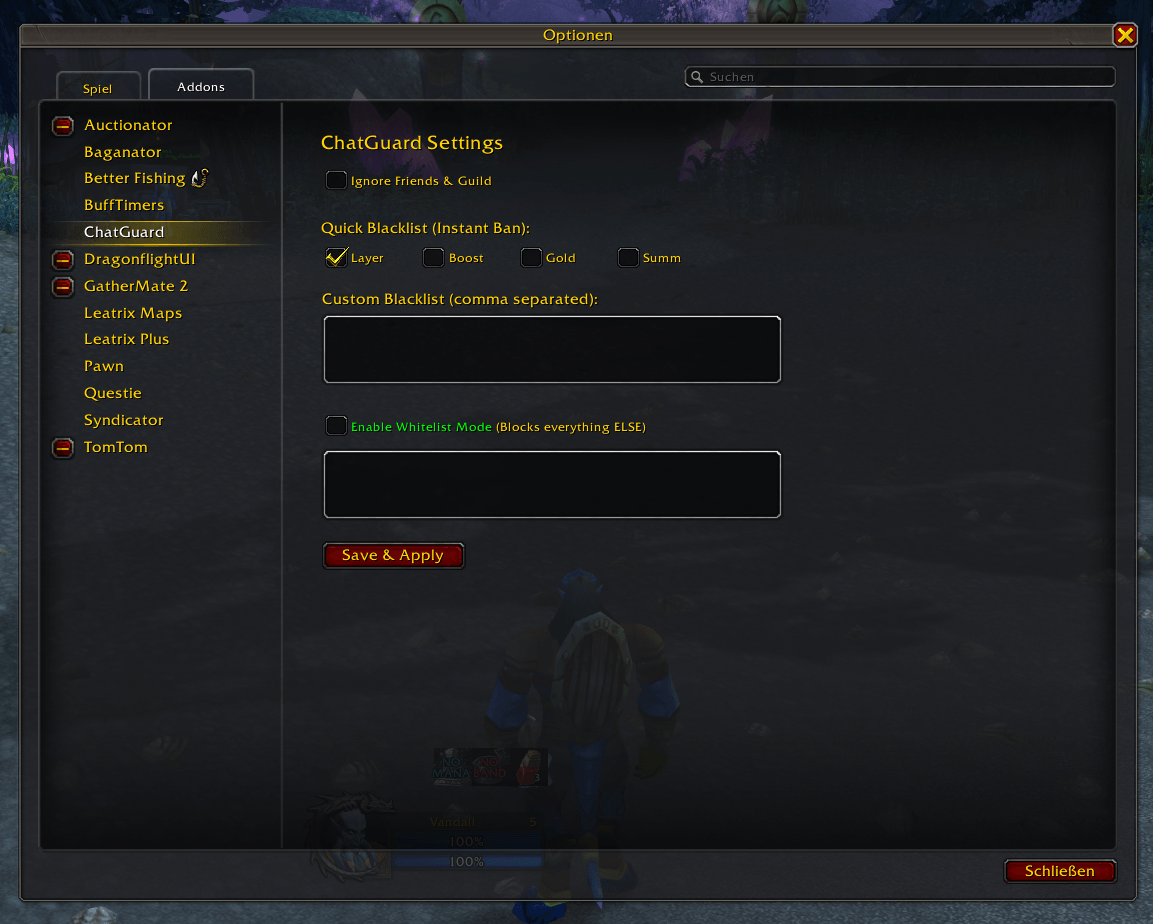
NEW: Quick-Filter Panel (One-Click Ban)
Instant Blacklist: Added a new section with checkboxes for the most annoying TBC spam terms: Layer, Boost, Gold, and Summ.
Zero-Effort Filtering: Checking these boxes instantly bans these words without you having to manually type them into the custom list.
NEW: UI & Layout Optimization
Streamlined Design: Resized the Blacklist and Whitelist text areas to fit the new Quick-Filter section perfectly onto a single page without scrolling.
Improved Visual Hierarchy: Standardized spacing and font sizes for a more professional "Blizzard-native" look in the Addon settings.
NEW: Robust Filtering Logic
Manual Regex Trimming: Replaced the unreliable global trim() function with a custom Lua-pattern match. This ensures that words followed by accidental spaces or commas are still caught by the filter.
Enhanced Performance: Optimized the search loop to prioritize Quick-Filters, keeping your CPU usage near zero even in high-population cities like Shattrath or Ironforge.
Current Commands:
/cg – Opens the settings menu.
/cg wl – Instantly toggles between Blacklist and Whitelist modes.
ChatGuard - Simple Chatfilter Team