
ChatAssistant Classic
- By
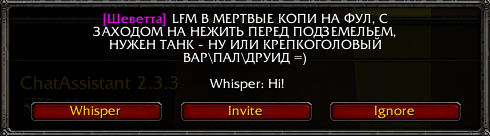
Notification with possible action displayed for message found by criteria. Autohide after 22sec: after that the same message will be skipped until other message will be found by criterias.

Dialog will be displayed after timeout, specified in options. Autohide after 30 sec.
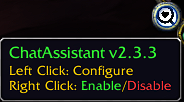
Minimap Icon and current Enabled or Disabled status of ChatAssistant. Minimap Icon can be disabled by command: /CA mmi
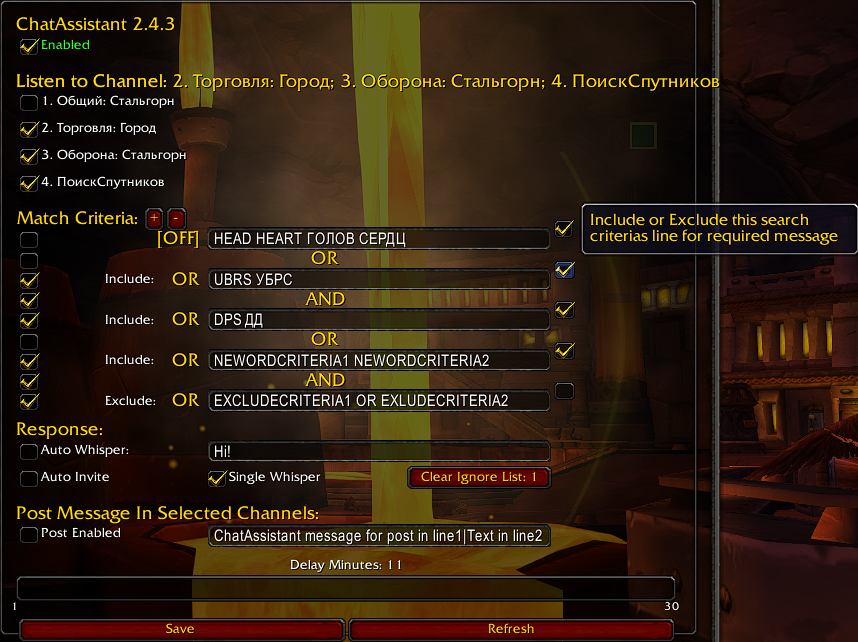
Options page. This Default values are able to demonstrate the logic of search criteria configuration and each line activation when they are need. To set default values just type /ca reset
Description
ChatAssistant Classic
WoW chat channels under control: helps to respond to messages in channels and send messages.
Tired of watching chat to find a group or selling offers?
Tired of manually sending chat messages on a timer to sell something or find someone for a group or help?
Tired of sitting and reading chat instead of enjoying the game of gouging out a murloc's eye?
ChatAssistant watches chat for you and notify when search phrases are matches...
Just set what criteria to watch (for e.g. DPS in 1st criteria line and RFC in second criteria line)
and ChatAssistant will alert you when there is a match! In reply you can whisper defined message, invite or ignore player messages (for next notification).
ChatAssistant useful for more than just group searches...
Set ChatAssistant to watch for `WTB` or `WTS` chat messages too, the possibilities are literally endless ∞
The AutoPost feature will be enabled right after checkbox is checked.
You can send messages in multiple lines in channel, just use separator | for Post Message Box.
### FEATURES ###
Enable/Disable (Right mouse click on mini-map icon).
Channel Selection and current search channels list status.
Dynamic Set of Search Criteria with OR and AND operator for each criterias line.
Each line with criterias can be temporarily disabled if needed.
Include\Exclude modifier for each criterias line to filter what you will or not notified for (see screenshots for details).
Feature to explicitly indicate 'start from' and 'end with' specified search criteria in the word from message with symbols \- (see Example Configuration section below).
UTF-8 support.
Auto or Manual Whisper on Match.
Default Single Whisper mode: After The First Whisper Response, The Player Will Be Added To The ChatAssistant Ignore List.
Custom Whisper Messages.
Auto or Manual Invite on Match.
Send message after manual confirmation in selected channel(s) by timer (up to 30 min; by 1 min customisation).
Multi-line message sending also is possible.
You can watch multiple channels for different things... like /2 and /3 and /4 for "WTS" and "DPS".
Ignoring the same message for the last notification in case when you did not react on him.
Disable minimap icon with cmd line command.
### Commands ###
Show Help: /CA help
Enable/Disable: /CA or /ca or Right Mouse Click on MiniMapIcon
Enable/Disable MiniMapIcon: /CA mmi
Update Defaults to current release: /CA reset
Configure: /CA config
### Example Configuration ###
1. You will see it in default options configuration - or screenshot in Images tab
2. Added feature to explicitly indicate 'start from' and 'end with' specified search criteria in the word from message with symbols \- in the beginning or end of search criteria.
Example: Search criteria is \-LF\- (this is mean that !before and !after symbols 'LF' there is must be space or no any other symbol in message to compare)
As result:
- OK Message sample is: 'lf group'
- Does not fit: 'LFG to BRD' and 'Half Life'
### Chosing the Right Criteria -- Troubleshooting ###
If you think you may be missing some chat messages, keep an eye on chat to see whats being said
Did someone say `LF1M` and you were only matching on `LFM`?
Matches are case-insensitive, so no need to add `DPS` and `dps` etc...
If some Options UI elements aren't showing up after an update, click the `Defaults` button to reset
_______________________________________________________________________
The original code before rework is taken from the lfg-classic addon with a MIT license.
For previous version and updates description look at the lfg-classic addon original page https://www.curseforge.com/wow/addons/lfg-classic
Big Thanks for the original LFG addon author: igotthis80 (Founder: SeeMyWings).
©lfg-classic : igotthis80 (Founder: SeeMyWings).
This version is just an attempt to share what I got after the improvements and what I'm successfully using.
ChatAssistant Classic Team
