
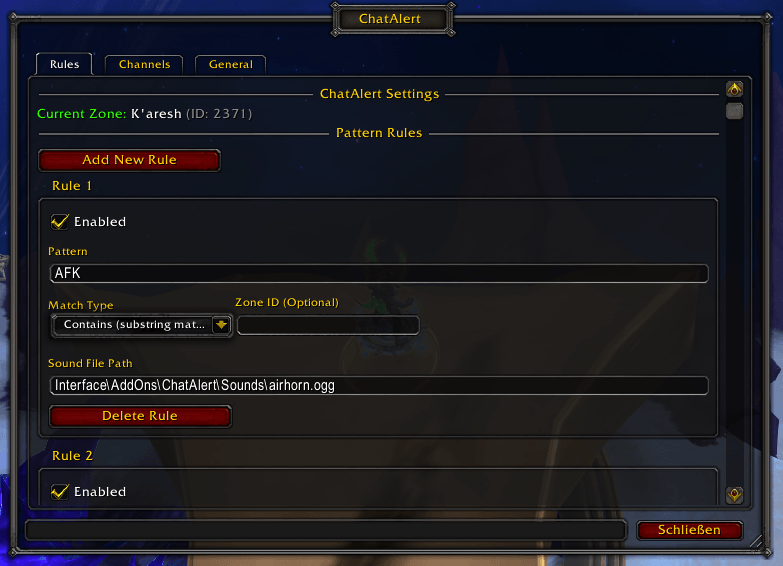
ChatAlert_Rules.png
Description
ChatAlert - Never Miss Important Chat Messages
ChatAlert monitors your WoW chat channels and plays customizable alert sounds when messages match your configured patterns. Perfect for catching group invites, raid calls, whispers, or any other important messages while you're focused on gameplay.
✨ Key Features
- 🎯 Smart Pattern Matching - Create custom rules to match specific keywords or phrases
- 🔊 Customizable Alerts - Use your own sound files or WoW's built-in sounds
- 📍 Zone-Specific Rules - Trigger alerts only in specific zones (e.g., only alert "LFG" in capital cities)
- 💬 Multi-Channel Support - Monitor Say, Yell, Guild, Whisper, Party, Raid, Instance Chat, Battle.net Whispers, and more
- 🛡️ Instance Protection - Automatically disables in dungeons/raids to prevent API issues
- ⚙️ Easy Configuration - Intuitive in-game interface built with Ace3
- 🎚️ Flexible Control - Enable/disable rules and channels on the fly
- 🐛 Debug Mode - Optional troubleshooting mode to monitor addon behavior
🎮 Perfect For
- Raiders - Never miss raid leader calls or ready checks
- Traders - Get alerted when someone mentions items you're looking for
- Group Finders - Catch LFG/LFM messages for the content you want
- PvPers - Alert on specific call-outs in battlegrounds or arenas
- Social Players - Never miss whispers or guild chat mentions
🚀 Quick Start
- Install the addon via CurseForge client (auto-updates enabled!)
- Open settings with
/chatalertor/ca - Add your first rule:
- Pattern:
inv(matches "inv", "invite", "inviting") - Match Type: Contains
- Sound: Default airhorn
- Pattern:
- Enable channels you want to monitor
- Done! You'll now get alerts when someone sends an invite
📋 Usage Examples
Example 1: Alert on Group Invites
Pattern: inv
Type: Contains
Zone: (any)
Alerts when anyone types "inv", "invite", or "inviting" in monitored channels.
Example 2: Trade Chat Alerts
Pattern: WTS
Type: Contains
Channels: Enable only "Channels" (Trade/General)
Get notified when someone is selling items in trade chat.
Example 3: Zone-Specific LFG
Pattern: LFG
Type: Contains
Zone: 1519 (Stormwind City)
Only alerts for LFG messages while you're in Stormwind.
Example 4: Name Mentions
Pattern: YourCharacterName
Type: Exact match
Sound: Custom sound file
Alerts when someone types exactly your character name.
⚙️ Configuration
Access settings via:
/chatalertor/cacommand- ESC → Interface → AddOns → ChatAlert
Creating Rules
Each rule can have:
- Pattern - Text to match (case-insensitive)
- Match Type - "Contains" or "Exact match"
- Zone ID - Optional zone restriction (current zone shown in settings)
- Sound Path - Custom sound file or default
- Enable/Disable - Quick toggle without deleting
Channel Selection
Choose which channels to monitor:
- Say / Yell
- Guild / Officer
- Party / Party Leader
- Raid / Raid Leader / Raid Warning
- Whisper
- Channels (General, Trade, LocalDefense, etc.)
🎵 Custom Sounds (Optional)
Want a custom alert sound?
- Find a royalty-free sound file (
.oggor.mp3) - Place it in
Interface\AddOns\ChatAlert\Sounds\ - Set the sound path in your rule
Sound Resources:
🛠️ Commands
/chatalertor/ca- Open configuration panel
📦 What's Included
- Lightweight and performance-optimized
- Built with industry-standard Ace3 framework
- All required libraries bundled (no additional downloads needed)
- Persistent settings across characters and sessions
💡 Tips & Tricks
- Zone IDs are displayed at the top of the settings panel
- Test your rules by typing
/say testto see if they trigger - Case doesn't matter - "LFG", "lfg", and "LfG" all match
- Multiple rules can exist for different scenarios
- Disable rules temporarily instead of deleting them
🐛 Troubleshooting
Sound not playing?
- Check sound file path is correct
- Enable "Use Fallback Sound" in settings
- Verify WoW master volume is not muted
- Try the default WoW sound first
Rules not triggering?
- Ensure the rule is enabled (toggle switch ON)
- Check the channel is enabled in settings
- Verify you're in the correct zone (if zone-specific)
- Test with
/saycommand
Addon not loading?
- Enable it at character selection screen
- Update to latest version via CurseForge
- Check for conflicts with other chat addons
🔗 Links
📜 License
This addon is provided as-is for personal use. Free to use and modify.
💖 Support
Enjoying ChatAlert? Please consider:
- ⭐ Rating it on CurseForge
- 📝 Leaving a comment with your use case
- 🐛 Reporting bugs to help improve it
- 🔄 Sharing it with friends who might find it useful
Built with ❤️ using Ace3 framework
ChatAlert Team
