Chat Ping
- By
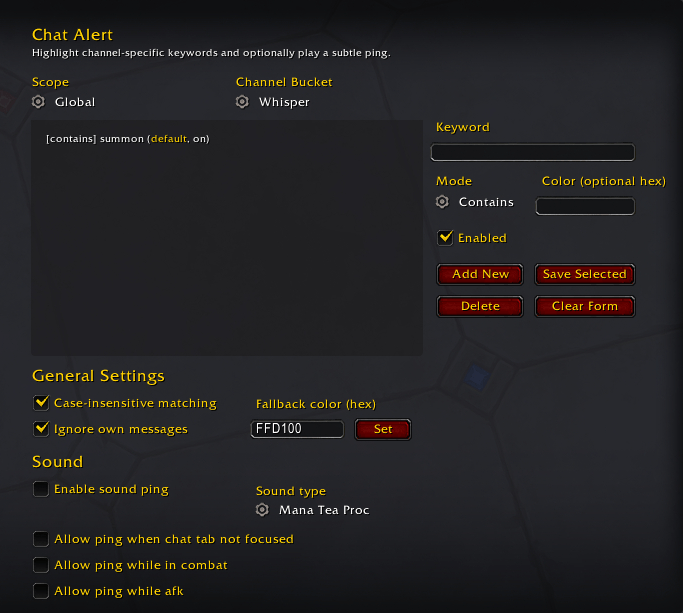
Chat Ping highlights matched keywords by channel using global or character-specific rules, and can play sound pings when important messages appear.
screenshot.png
Description
Chat Ping
Never miss the messages that matter.
Chat Pinghighlights your chosen keywords in chat and can optionally play a subtle sound ping when a match appears.
Features
- Highlight keywords in chat messages in real time.
- Organize keywords by channel bucket.
- Use
Globalkeywords (all characters) orCharacterkeywords (current character only). - Pick
ContainsorStarts withmatching mode for each keyword. - Set an optional per-keyword color, plus a global fallback highlight color.
- Enable optional sound pings with smart conditions.
- Ignore your own messages (enabled by default).
Channel Buckets
| Bucket | Covers |
|---|---|
| Whisper | Whisper and Battle.net whisper |
| Guild | Guild and Officer |
| Party / Raid | Party, Raid, and Raid Warning |
| Instance | Instance chat |
| Say / Yell | Say and Yell |
| Trade / General | Trade and General channels |
| Other | Remaining supported chat events (including emotes, system, and achievements) |
Quick Start
- Type
/cato open settings. - Pick a
ScopeandChannel Bucket. - Enter a keyword, choose mode, optionally set a color, then click Add New.
- Turn on Enable sound ping if you want audio alerts.
Chat Alert includes one starter keyword by default: summon.
Slash Commands
/caor/chatalert- Open settings./ca show- Open settings./ca add <global|char> <bucket> <contains|starts_with> <keyword> [hexColor]/ca remove <global|char> <bucket> <keyword>/ca list [global|char] [bucket]/ca sound <on|off>/ca smart [on|off](with no argument, prints current smart-condition status)
Bucket Tokens for Commands
whisper, guild, party, raid, instance, say, yell, trade, general, other
Short aliases also work: w, g, pr, inst, tg.
Notes
- Hex colors must be 6 digits, for example
FFD100or#FFD100. - Single-word keywords in
Containsmode match whole words to reduce false positives. - If the same keyword exists in both scopes, the
Characterversion takes priority.
Chat Ping Team