CharExporter
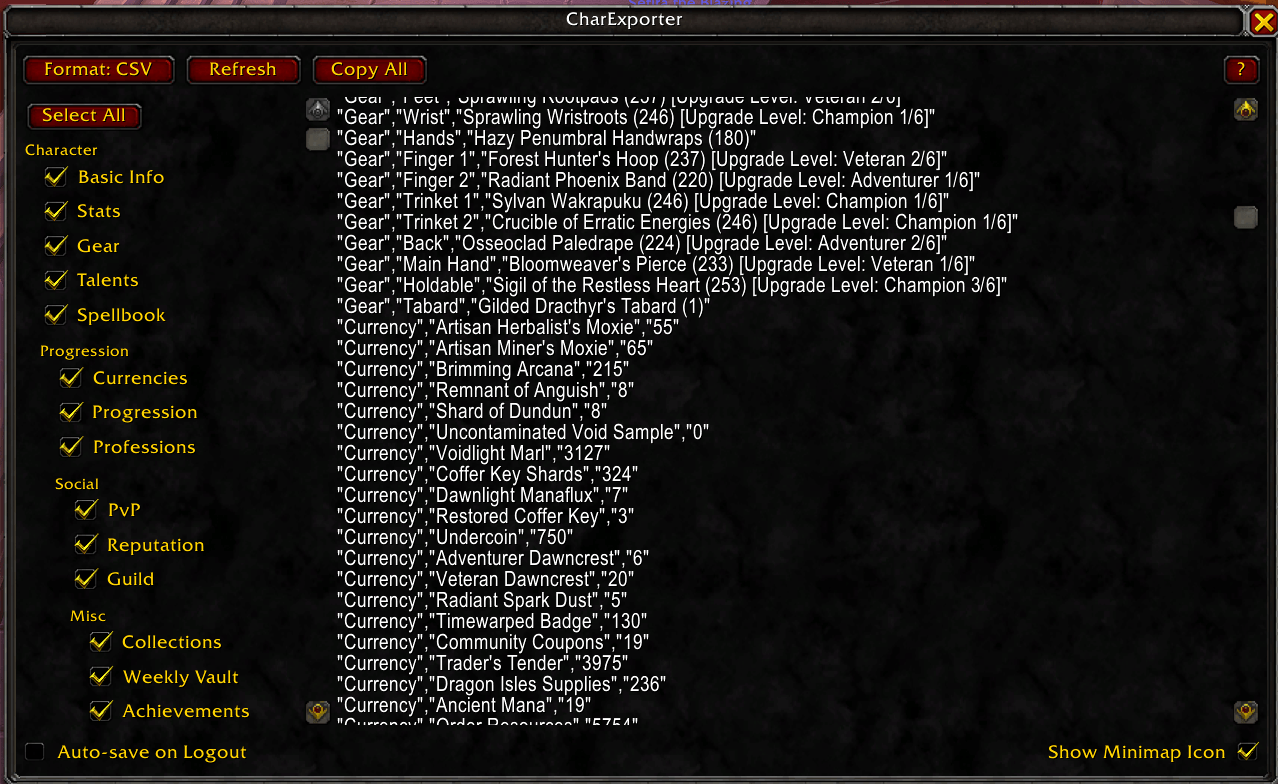
Instantly export your character's stats, gear, talents, and currencies into a clean, copy-pasteable CSV format.
Description
CharExporter
A World of Warcraft addon that exports your character's stats, gear, talents, and currencies into a clean, copyable format. Designed specifically to quickly feed your character data into external tools, chatbots, or spreadsheets.
Features
- Multiple Output Formats: Toggle between CSV (Comma Separated Values) for spreadsheets or JSON for developers and automated scripts.
- Comprehensive Data Categories:
- Basic Info (Name, Realm, Class, Spec, Item Level, Race, Faction, XP, Max XP, Rested XP)
- Primary & Secondary Stats
- Equipped Gear (Item names, iLvls, enchants, and gems)
- Active Talents (Smartly filters unpurchased nodes and includes Hero Talents)
- Spellbook (Active spells and passives)
- Currencies (Auto-detects and deduplicates every currency you own, including Gold)
- Progression (Mythic+ Dungeon Score, per-dungeon scores, raid encounter completions per instance)
- Professions (Profession names, skill levels, specialization trees, knowledge points, concentration)
- PvP (Honor level, Conquest, rated ratings, War Mode status)
- Reputation (Faction standings, Renown levels, Paragon progress)
- Collections (Mounts, Pets, Toys, Transmog appearances — collected vs total)
- Guild (Name, rank)
- Weekly Vault (Activity progress for M+, Raid, PvP, World)
- Achievements (Total achievement points)
- Play Time (Total played and at-level time)
- Delves (Season, highest unlocked tier)
- Interactive UI & Help: Easily customize your export by toggling specific data categories using checkboxes. Includes an in-game "Help" button for quick documentation.
- Auto-Save on Logout: Check this option to silently save your exported character data to the addon's
SavedVariablesfile every time you log out, allowing external tools to read your data automatically without manual copy-pasting. - Refresh button: Re-gather your character data without reopening the UI.
Usage
- Type
/charexportin the in-game chat to open the CharExporter window. - Use the Categories checkboxes on the left to select exactly what data you want to export.
- Use the Format button to switch between CSV and JSON formats.
- Click inside the text box on the right and press
Ctrl+Cto copy your data to the clipboard. - Alternatively, check the Auto-save on Logout box to automatically write the current data to
World of Warcraft\_retail_\WTF\Account<YOUR_ACCOUNT_NAME>\SavedVariables\CharExporter.luaupon logout.
Installation
Extract the CharExporter folder into your World of Warcraft/_retail_/Interface/AddOns/ directory.
Known Issues / API Notes
Due to combat-lockdown rules, this addon blocks itself from running while in combat to prevent LUA errors. Please ensure you are out of combat when using the /charexport command.
Feedback and Bug Reports
If you encounter any issues, missing currencies, or have feature requests, please leave a comment on the Curseforge project page!
Search Tags: Export, Character Export, CSV Export, JSON Export, Data Dump, Gear Export, Talents Export, Spreadsheet, Utility, SavedVariables
CharExporter Team