Character Gear Optimizer Vanilla
- By
Multi Objective Optimizer that handles stat caps really well, and lets you plug in your own stat weights.
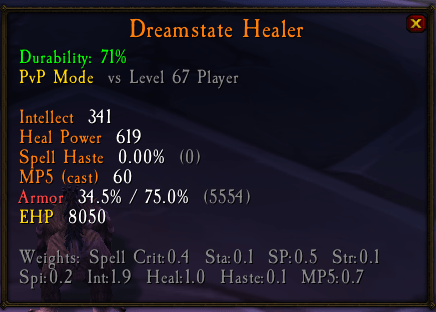
image (50).png
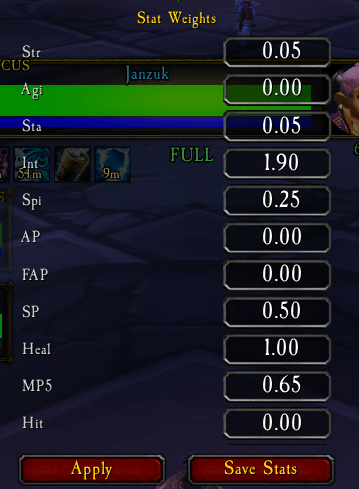
image (52).png
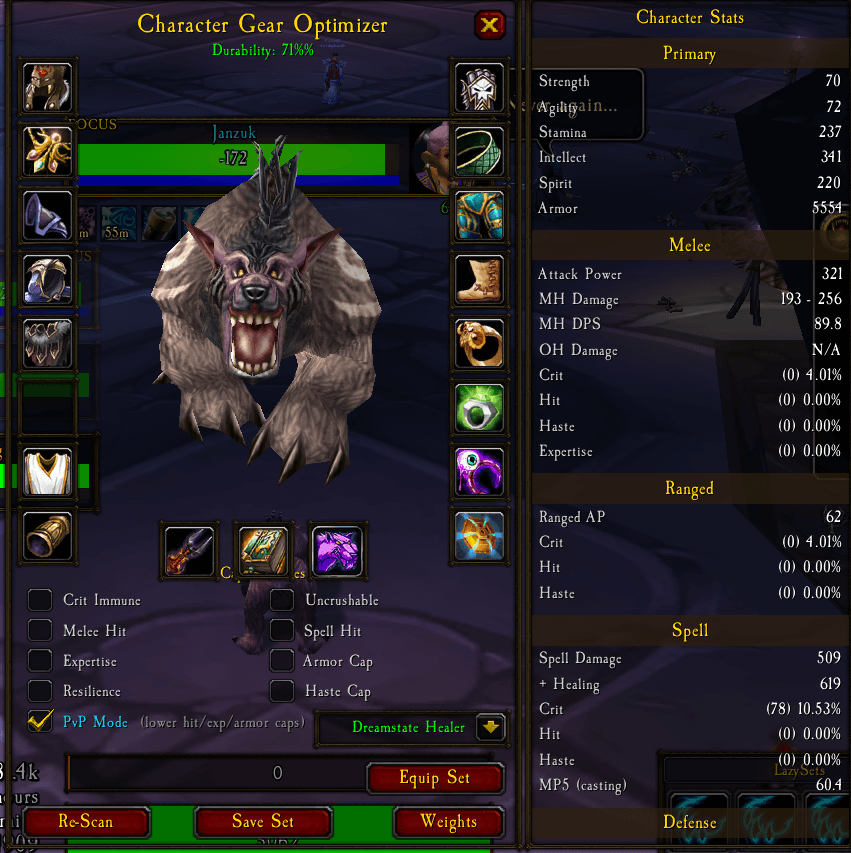
image (51).png
Description
CharacterGearOptimizer scans every item in your bags and equipped gear, scores them against configurable stat weights, and tells you the best combination to wear, including cap-aware optimization for defense, hit, expertise, spell hit, resilience, haste, armor, and uncrushable. It replaces the default Character panel (press C) with a themed paperdoll that shows your optimized gear in each slot, lets you compare alternatives in a flyout picker, and save named gear sets you can equip with one click.
Features:
- Automatic Best-In-Bag: Scans all equipped and bag items, scores them using weighted stat values, and assigns the optimal item to every slot
- Cap Priority System: Toggle checkboxes for Crit Immune, Uncrushable, Melee Hit, Spell Hit, Expertise, Armor Cap, Resilience, and Haste Cap. The optimizer uses MOO-style (Minimize Objective Over) iterative swaps to reach each cap while losing the least overall score
- Built-In Stat Weights: Pre-configured weights for every class and spec in TBC (Protection Paladin, Fury Warrior, Resto Shaman, Shadow Priest, etc). Select from a dropdown or create and save your own custom stat profiles
- Stat Weight Editor: Click Weights to open a scrollable editor where you can tweak every stat value. Save custom profiles with Save Stats for reuse across sessions
- Character Stats Panel: Side panel showing all your combat stats including melee, ranged, spell, defense, avoidance, and more, organized by category with rating breakdowns
- Spec HUD: Minimap-toggled floating display showing your specs key breakpoints (defense cap, hit cap, etc) with green and red indicators, plus a summary of your role stats
- Item Picker Flyout: Hover or click any slot to see all scored alternatives ranked by weight. Flyout opens to the left so it never covers the game tooltip
- Tooltip Integration: Every item tooltip in the game shows a score comparison vs your current gear, plus cap breakpoint contributions (defense, hit, expertise, etc) with green and red coloring
- Drag and Drop: Drag items out of slots to your bags, or drop items from your cursor onto a slot to equip them, just like the default character sheet
- Gear Set Manager (LazySets): Save named gear sets with class-themed icons. A floating HUD shows all your saved sets as icon buttons, click any to equip instantly. Manage sets with a + button that opens a dropdown to delete sets (with confirmation) or create new ones
- Session Persistence: Your selected spec, cap priorities, optimized gear, and set data are saved per-character and restored on login
- Replaces Character Sheet: Press C or click the Character micro-button to open CharacterGearOptimizer instead of the default PaperDollFrame
JSON Schema:
{
"strength": 0,
"agility": 0,
"stamina": 0,
"intellect": 0,
"spirit": 0,
"attackPower": 0,
"feralAttackPower": 0,
"spellPower": 0,
"healing": 0,
"mp5": 0,
"hitRating": 0,
"spellHitRating": 0,
"critRating": 0,
"spellCritRating": 0,
"meleeCritRating": 0,
"hasteRating": 0,
"expertiseRating": 0,
"defenseRating": 0,
"dodgeRating": 0,
"parryRating": 0,
"resilienceRating": 0,
"armorPenetration": 0,
"blockRating": 0,
"blockValue": 0,
"armor": 0,
"spellPenetration": 0,
"fireResistance": 0,
"frostResistance": 0,
"natureResistance": 0,
"shadowResistance": 0,
"arcaneResistance": 0
}
JSON Schema:
{
"strength": 0,
"agility": 0,
"stamina": 0,
"intellect": 0,
"spirit": 0,
"attackPower": 0,
"feralAttackPower": 0,
"spellPower": 0,
"healing": 0,
"mp5": 0,
"hitRating": 0,
"spellHitRating": 0,
"critRating": 0,
"spellCritRating": 0,
"meleeCritRating": 0,
"hasteRating": 0,
"expertiseRating": 0,
"defenseRating": 0,
"dodgeRating": 0,
"parryRating": 0,
"resilienceRating": 0,
"armorPenetration": 0,
"blockRating": 0,
"blockValue": 0,
"armor": 0,
"spellPenetration": 0,
"fireResistance": 0,
"frostResistance": 0,
"natureResistance": 0,
"shadowResistance": 0,
"arcaneResistance": 0
}
The Character Gear Optimizer Vanilla Team