ChangeGatherer
- By
2.png
1.png
Description
ChangeGatherer
A lightweight gathering assistant for dual-profession farmers in TBC Classic.
ChangeGatherer automatically rotates between Find Herbs and Find Minerals minimap tracking while you're out of combat, so you never miss a node. It also provides real-time skill progress bars, Druid flight form detection, and an Outland zone node guide — all in a compact, draggable HUD.
Built for players who run Herbalism + Mining and want to maximize gathering efficiency without constantly switching tracking manually.
Features
- Dual Tracking Rotator — Seamlessly alternates between Find Herbs and Find Minerals on a configurable timer. Pauses automatically when entering combat and resumes when combat ends.
- One-Click Manual Swap — Instantly switch your active tracking via the HUD button or a slash command. No macros needed.
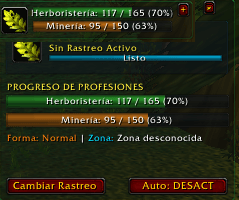
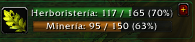
- Profession Skill Bars — Displays real-time Herbalism and Mining skill progress with color-coded status bars showing current rank, max rank, and percentage.
- Druid Flight Form Awareness — Detects Flight Form and Swift Flight Form, displaying a visual indicator so you know when instant herb-looting is available.
- Outland Zone Node Guide — Shows the required skill level for herbs and ores available in your current Outland zone (Hellfire Peninsula, Zangarmarsh, Nagrand, Shadowmoon Valley, etc.).
- Compact & Expanded Modes — Toggle between a minimal floating widget (icon + skill bars only) and a full control panel with all details and buttons.
- Draggable Minimap Button — Quick-access button that can be repositioned anywhere around your minimap by dragging.
- Persistent Settings — All preferences, window positions, and gathered stats are saved per account via SavedVariables.
- GCD Cooldown Indicator — Visual radial cooldown animation on the tracking icon after each swap, showing exactly when the next swap is available.
- Loot Counter — Tracks total herbs gathered and nodes mined across your session.
- Multi-Language Support — Spell and skill detection works in both English and Spanish game clients.
Slash Commands
| Command | Description |
|---|---|
/cg |
Toggle the main HUD window (show/hide) |
/cg compact |
Switch between Compact and Expanded interface modes |
/cg cambiar |
Manually swap between Find Herbs and Find Minerals |
/cg auto |
Enable or disable automatic tracking rotation |
/cg reset |
Reset all settings and window position to defaults |
/cg debug |
Toggle debug mode for troubleshooting |
/changegatherer |
Alias for /cg |
/dg |
Legacy alias (backward compatibility) |
How It Works
- Install the addon by placing the
ChangeGathererfolder into yourInterface/AddOns/directory. - Log in to any character with Herbalism, Mining, or both.
- The HUD appears automatically showing your active tracking and skill levels.
- Use
/cg autoto enable automatic rotation, or click the Swap button to manually alternate tracking. - The addon pauses all tracking changes during combat and resumes when you leave combat.
Compatibility
- Game Version: World of Warcraft — The Burning Crusade Classic / TBC Anniversary
- Interface: 20504 (Client 2.5.4)
- Classes: Works with any class that has Herbalism and/or Mining. Druid-specific features (flight form detection) activate only for Druid characters.
- Dependencies: None. Fully standalone, no libraries required.
FAQ
Q: Do I need to be a Druid to use this addon? A: No. ChangeGatherer works for any class with gathering professions. The Druid flight form indicator is an optional bonus feature that only appears for Druid characters.
Q: Does the auto-rotation work in combat? A: No. Tracking swaps are automatically paused when you enter combat and resume when combat ends. This respects WoW's secure action restrictions.
Q: Will this addon conflict with other tracking addons? A: ChangeGatherer uses standard WoW API calls for tracking. It should work alongside most addons, but using two addons that both try to control minimap tracking simultaneously is not recommended.
Feedback & Bug Reports
Found a bug or have a feature request? Please use the Issues tab on this project page to report it. Include your game client language and any error messages if possible.!
ChangeGatherer Team