


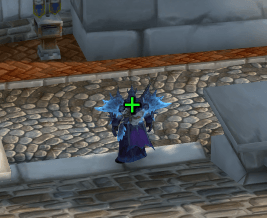
Screenshot 2025-11-29 131823.png
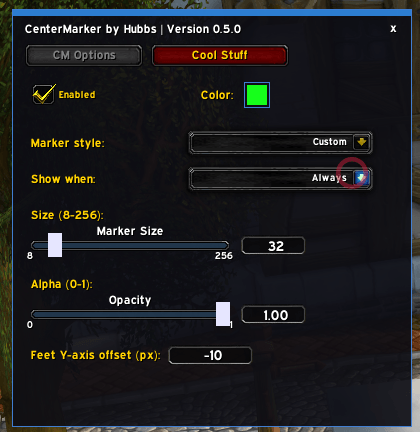
Screenshot 2025-11-29 131644.png
Description
CenterMarker by Hubbs
Feature Overview
- Always-visible anchor: Places a crisp "+" at screen center; adjust size (1-256 px) and opacity (0-1).
- Color control: Pick any color via swatch; changes apply instantly and persist.
- Visibility modes: Show always, only in combat, only out of combat, only in instances, or only outside instances.
- Marker style choice: Select +, x, dot (•), or asterisk (*).
- Vertical offset: Shift the marker up/down from center with a numeric Y-offset (supports negatives).
- Quick toggle: Enable/disable the marker without reloading UI.
- Slash commands:
/cmopens the panel;/cm size <px>,/cm alpha <0-1>,/cm toggle;/cm kbopens keybinds quickly;/cm cdmopens Cooldown Manager settings. - Auto combat logging: Toggle under Cool Stuff to start/stop
/combatlogautomatically in raids and Mythic+. - Healer mana tracker: Enable under Cool Stuff to show your party healer's mana percent in 5-player groups (uses
UnitPowerPercent); drag the number to reposition.
How to Install
- Copy the
CenterMarkerfolder intoWorld of Warcraft/_retail_/Interface/AddOns/orWorld of Warcraft/_beta/Interface/AddOns/. - In-game, enable CenterMarker, then
/reloadif needed.
How to Use
- Open settings:
/cm - Set size via slider or number box.
- Set alpha via slider or number box.
- Pick a color from the swatch.
- Choose marker style (+, x, •, *).
- Choose when to show the marker: Always, In Combat, Not in Combat, In Instance, or Not in Instance.
- Adjust feet Y-offset to nudge the marker vertically from center.
- Open Quick Keybinds with
/cm kb. - Open Cooldown Manager settings with
/cm cdm. - Enable auto combat logging from the Cool Stuff tab if you want
/combatloghandled automatically in group content. - Enable the healer mana tracker from Cool Stuff to see the healer's mana percent in 5-player groups; drag the display to move it.
Notes
- Settings persist between sessions (
CenterMarkerDB). - If the marker doesn't appear in combat, ensure "Show when: In Combat" is selected and the addon is enabled.
- Auto combat logging defaults to on for raids and Mythic+, and can be toggled off in the config. Announces when it switches states.
CenterMarker Team
