CCat - CopyChat
- By
Lightweight CC tab to easily copy chat history with text selection and clickable links.
Screenshot 2026-10-12 030944.png
Screenshot 2026-10-12 030927.png
Description
## Feedback & bug reports
Found a bug or have an idea? Please leave a comment or open a ticket on the project page. When reporting a problem, tell us your game version (Retail, Classic Era, …) and, if there was a Lua error, include the error text.
# CCat - CopyChat
**Copy your chat – with colors. Per tab. Even after a relog.**
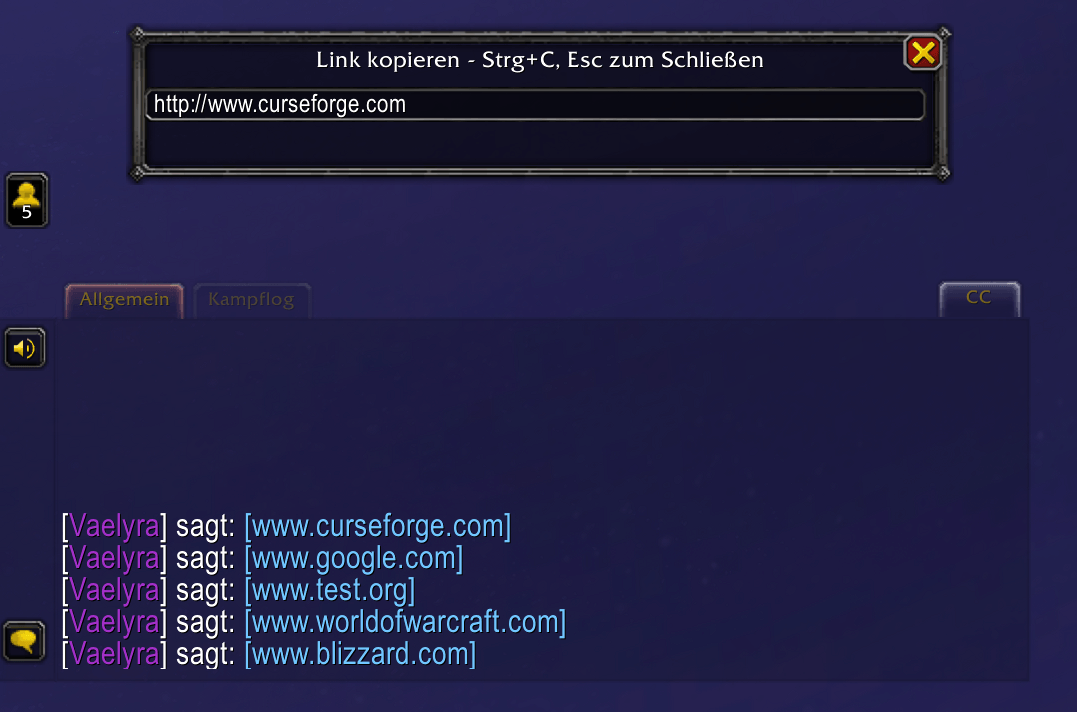
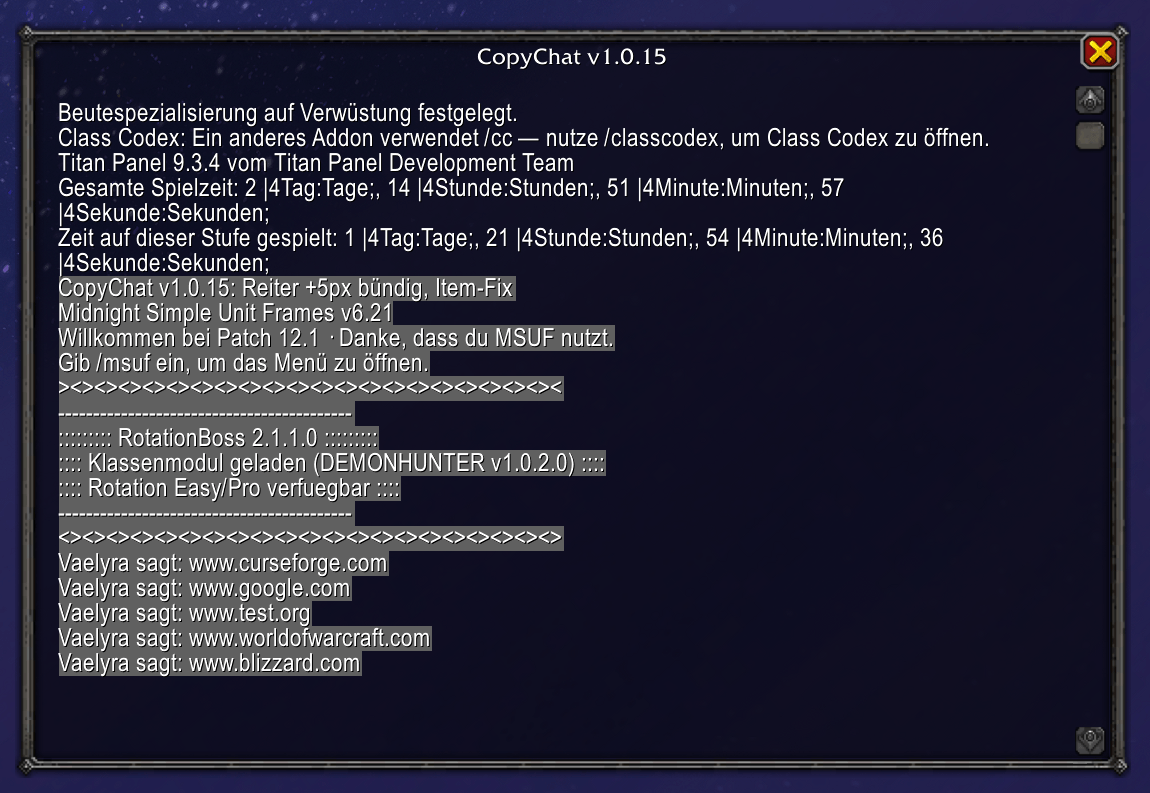
CCat adds a small **CCat button** to your chat window. One click opens a clean copy window with the full history of the current chat tab, ready to select and copy with `Ctrl+A` / `Ctrl+C`. Channel colors, class colors and colored links are kept, so what you copy looks like what you saw. Links in chat become clickable and open a small window that lets you copy the URL.
Made for Retail 12.1.5, Classic Era, TBC Anniversary, Mists of Pandaria Classic and WoW Forever.
---
## Features
### Copy window
- Click the **CCat button** at the chat window, the **minimap button** or type `/ccat open` to open the history of the **currently selected chat tab**.
- Plain, selectable text – copy a whole conversation, a single line or anything in between.
- Works with every chat tab, including temporary windows such as whisper tabs.
- Keeps up to 1000 lines per tab.
### Colors that match your chat
- Channel colors, class colors and colored links (items, spells, achievements, quests, …) are preserved in the copy window.
- Hyperlink data is stripped so you get readable text, but the visible `[Link Name]` stays.
- Lines that come without a channel color (for example messages from other addons) are shown in white instead of the editor's default gray.
### Persistent history
- Your chat history is saved between sessions, so it is still there after a relog or a reload.
- Saved per chat tab, stored in the `CCatDB` saved variable.
### Clickable links
- URLs in chat are turned into clickable links.
- Clicking one opens a small popup with the address selected – press `Ctrl+C` and the popup closes by itself right after copying.
### Whisper control
- Whispers are saved by default.
- Switch it off whenever you do not want private conversations stored in your history (messages that are already saved are kept).
### A CCat button that looks like part of the chat
- Matches the Blizzard chat tabs: size, text position, orange highlight and fading.
- **Lock it:** a locked button cannot be moved at all.
- **Unlock it:** hold **Shift** and drag it **anywhere on the screen**.
- Drop it near the chat window and it **docks into the tab row** automatically.
- Does not fit your UI? **`/ccat hide`** removes it from the chat window – the copy window stays available through the minimap button and `/ccat open`.
### Minimap button
The minimap button shows the CCat logo and lists every function in its tooltip. It is enabled by default and can be dragged around the minimap.
| Action | Function |
|---|---|
| **Left-click** | Open the CCat window |
| **Right-click** | Lock / unlock the CCat Button |
| **Shift + Left-click** | Reset the CCat Button position |
| **Shift + Right-click** | Save / don't save whispers |
Each action prints a short confirmation in your chat.
**Works with minimap button bars:** CCat registers through LibDataBroker / LibDBIcon (when available), so addons like HidingBar or Minimap Button Bag collect it together with all your other addon buttons. Without those libraries CCat uses its own minimap button.
### Slash commands
Type **`/ccat`** to list all commands in the chat.
| Command | Description |
|---|---|
| `/ccat open` | Open the copy window |
| `/ccat lock` | Lock / unlock the CCat Button |
| `/ccat reset` | Reset the CCat Button position |
| `/ccat whisper` | Save / don't save whispers |
| `/ccat hide` | Hide / show the CCat Button at the chat window |
| `/ccat minimap` | Show / hide the minimap button |
### Languages
English, German, French, Italian, Spanish (Spain & Mexico) and Russian. The addon follows your game client language. Every other client language automatically uses English.
---
## Compatibility
| Game version | Supported |
|---|---|
| Retail (Midnight, patch 12.1.5) | ✔ |
| Classic Era | ✔ |
| TBC Classic Anniversary | ✔ |
| Mists of Pandaria Classic | ✔ |
| WoW Forever (beta) | ✔ |
### Built for Retail 12.x
Since Midnight, chat messages can be flagged as *secret* by the game during Mythic+ runs and encounters. Addons that replace chat functions can cause Lua errors or even break the chat in those situations. CCat is built to stay out of the way:
- It never replaces `ChatFrame:AddMessage` or `SetItemRef` – it only observes them with secure hooks, so Blizzard's own chat code stays untainted.
- Clickable links are added through chat event filters and are skipped while chat is locked down.
**Please note:** lines that WoW marks as secret cannot be read by any addon. During such phases (for example inside a Mythic+ run) those lines will not appear in the copy window or the saved history. This is a restriction of the game, not of CCat.
---
## Installation
1. Download and extract the zip.
2. Copy the `CCat` folder into the `Interface\AddOns` folder of your game version (`_retail_`, `_classic_era_`, `_anniversary_`, `_classic_` or the WoW Forever folder).
3. Start the game and make sure CCat is enabled in the AddOns list.
Upgrading from an older version: simply replace the old `CCat` folder. Your saved history and settings are kept.
---
## FAQ
**How do I open the copy window?**
Left-click the **minimap button**, click the **CCat button** at the chat window, or type `/ccat open`.
**The CCat button is stuck / I cannot move it.**
It is locked. Right-click the minimap button (or type `/ccat lock`) to unlock it, then hold **Shift** and drag.
**I moved the CCat button somewhere strange. How do I get it back?**
Shift + left-click the minimap button, or type `/ccat reset`. It returns to the top right of your chat window.
**The CCat button does not fit my UI.**
Type `/ccat hide` to hide it (and again to show it). The copy window stays available through the minimap button.
**I do not want whispers in my history.**
Shift + right-click the minimap button, or type `/ccat whisper`.
**I cannot see the minimap button.**
It may be collected by a minimap button bar (for example HidingBar) – look there. You can also type `/ccat minimap` to toggle it, or `/ccat` to see all commands.
**Some lines are missing in the copy window during Mythic+.**
Retail marks chat lines as secret in some situations and addons are not allowed to read them. See the compatibility section above.
---
**Author:** Element0815 / Destina-Madmortem
CCat - CopyChat Team