CC_Assist
- By
CC_Assist is a lightweight addon that makes marking targets and tracking Crowd Control (CC) in combat extremely easy.
Ring.JPG
Testansicht.JPG
Tracker1.JPG
Optionen.JPG
Description
Features & Capabilities
-
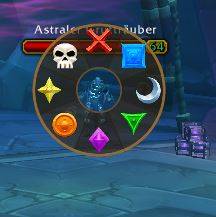
Radial Marking Menu (Pie Menu): A clear, circular menu that lets you assign raid markers (skull, star, cross, etc.) lightning-fast.
-
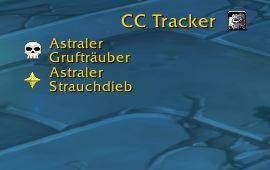
Real-time CC & Target Tracker: Automatically displays all marked targets—including active CC effects (e.g., Polymorph, Sap), spell icons, remaining timer duration, and the respective caster.
-
Important Note: The tracker captures and updates targets via active nameplates in your visible field of view. As soon as a marked target has a visible nameplate, tracking kicks in.
-
-
Smart Target Control:
-
Left-click on a tracker row to target the unit directly.
-
Right-click to target the unit and automatically set it as your focus target.
-
-
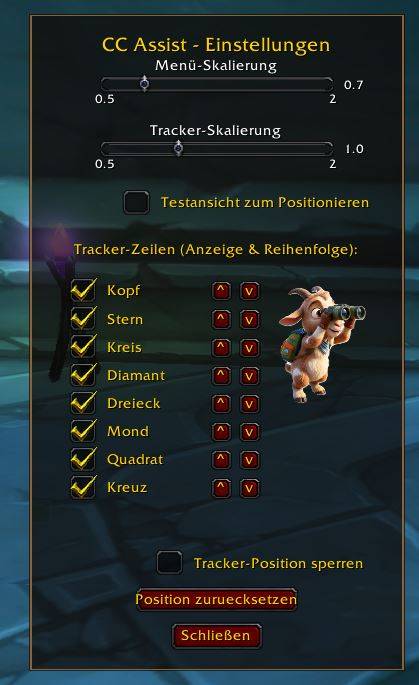
Flexible Layout & Filters: Customize the order of marker rows, completely hide unused markers, and smoothly scale both the tracker and the radial menu.
-
Persistent Storage: All window positions and settings are automatically saved and preserved across
/reloadcommands or relogins.
Usage & Controls
-
Open Options:
Type
/ccassistor/ccain chat to open the settings window. Alternatively, click the small gear icon directly in the tracker's title bar. -
Position the Tracker:
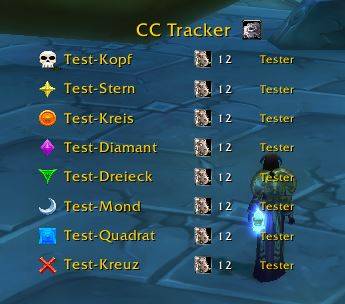
Enable the "Test View" in the options to display all rows as placeholders. This allows you to position the tracker perfectly on your UI and lock it into place using the "Lock Tracker Position" option.
-
Use the Radial Menu:
Open the circular menu via the assigned toggle button or a custom keybinding. A single click on an icon marks your current target in a fraction of a second.
Deutsche Beschreibung:
Was es kann (Funktionen)
-
Radial-Markierungsmenü (Pie-Menu): Ein übersichtliches, kreisrundes Menü, mit dem du Schlachtzugsmarkierungen (Totenkopf, Stern, Kreuz etc.) blitzschnell zuweisen kannst.
-
Echtzeit CC- & Ziel-Tracker: Zeigt alle markierten Ziele automatisch an – inklusive aktivem CC-Effekt (z.B. Verwandlung, Kopfnuss), Zaubersymbol, verbleibender Timer-Dauer und dem jeweiligen Caster.
-
Wichtiger Hinweis: Der Tracker erfasst und aktualisiert Ziele über die aktiven Namensplaketten (Nameplates) im sichtbaren Bildbereich. Sobald ein markiertes Ziel ein sichtbares Nameplate hat, greift die Verfolgung.
-
-
Intelligente Zielsteuerung:
-
Linksklick auf eine Tracker-Zeile visiert das Ziel direkt an.
-
Rechtsklick visiert das Ziel an und setzt es automatisch als Fokusziel.
-
-
Flexibles Layout & Filter: Du kannst die Reihenfolge der Marker-Zeilen anpassen, nicht benötigte Marker komplett ausblenden und sowohl den Tracker als auch das Radialmenü stufenlos skalieren.
-
Dauerhafte Speicherung: Alle Fensterpositionen und Einstellungen bleiben nach einem
/reloadoder Relogin automatisch erhalten.
🎮 Handhabung & Bedienung
-
Optionen öffnen:
Gib
/ccassistoder/ccain den Chat ein, um das Einstellungsfenster zu öffnen. Alternativ kannst du auch auf das kleine Zahnrad-Icon direkt im Titel des Trackers klicken. -
Tracker positionieren:
Aktiviere in den Optionen die „Testansicht“, um alle Zeilen als Platzhalter einzublenden. So kannst du den Tracker perfekt auf deinem UI platzieren und die Position anschließend über die Option „Tracker-Position sperren“ gegen Verrutschen sichern.
-
Radialmenü nutzen:
Öffne das Kreis-Menü über den zugewiesenen Toggle-Button oder ein frei belegbares Tastenkürzel (Keybindings). Ein Klick auf ein Symbol markiert dein aktuelles Ziel im Bruchteil einer Sekunde.
CC_Assist Team