Carryall
- By
All your bags in one window, sorted into your own categories, with item locks and one-click mailing to your alts.
Description
Carryall
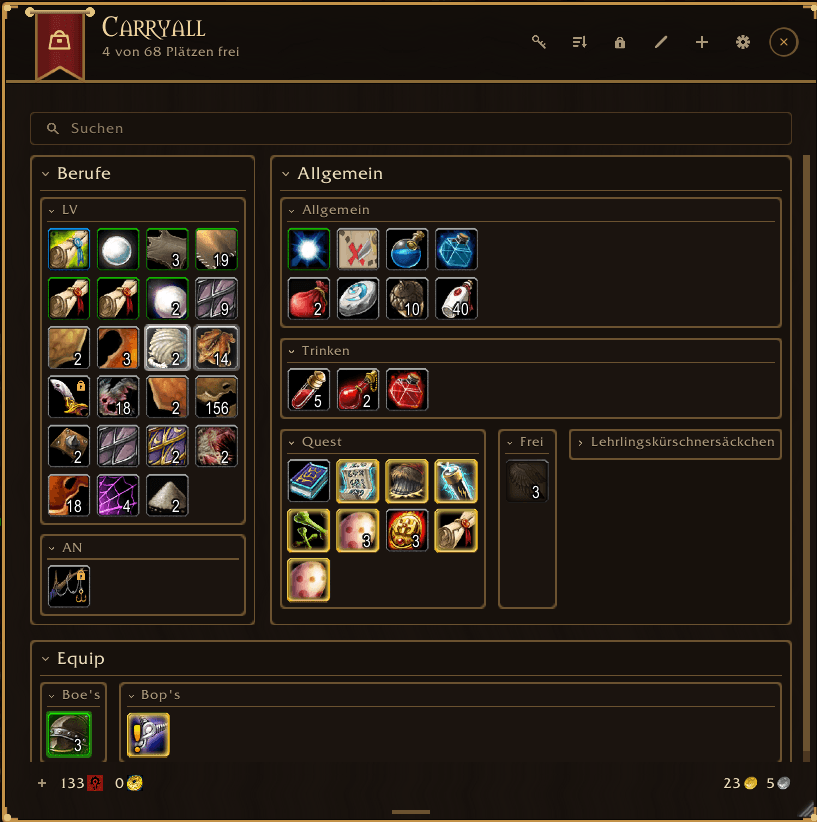
Carryall shows all your bags in one window, and you decide where everything goes. Nothing is sorted behind your back: drag an item onto a category once, and every item of that kind goes there from then on, on all your characters. Automatic sorting happens only where you switch it on.
Available in English, German, Spanish, French, Portuguese, Russian, Korean and Chinese (simplified and traditional). It follows your game language; you can choose another one in the settings.
Updating from an earlier version ("Sammelstelle: Carryall")? Since 1.0 the addon folder is simply called Carryall. Please delete the old folder Sammelstelle_Carryall from your AddOns folder. WoW stores settings under the folder name, so your categories and settings start fresh.
Features
- Your own categories: create categories and subcategories, then drag items into them.
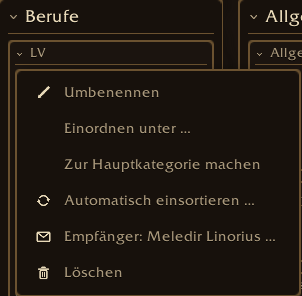
- Automatic sorting where you want it: tick rules on a category, such as soulbound gear or bind-on-equip gear. Your own assignments always come first.
- Free layout: place categories side by side or one below the other, nest them, set columns or a maximum number of rows, and collapse any category with a click.
- Easy to read: identical items show as one stack with the total count, empty slots as one slot with a number, and special bags (such as skinning bags) get their own category.
- Search: a search field at the top finds items by name in your bags and bank; what does not match turns faint.
- Lock items: locked items stay where they are when you send mail or move items between bags and bank. While locking, a bar at the top shows that the mode is on.
- Mail to your alts: give a category a recipient. At the mailbox, one click sends everything in it that is not locked or bound, mail after mail. A parent category sends all its subcategories at once, each to its own recipient.
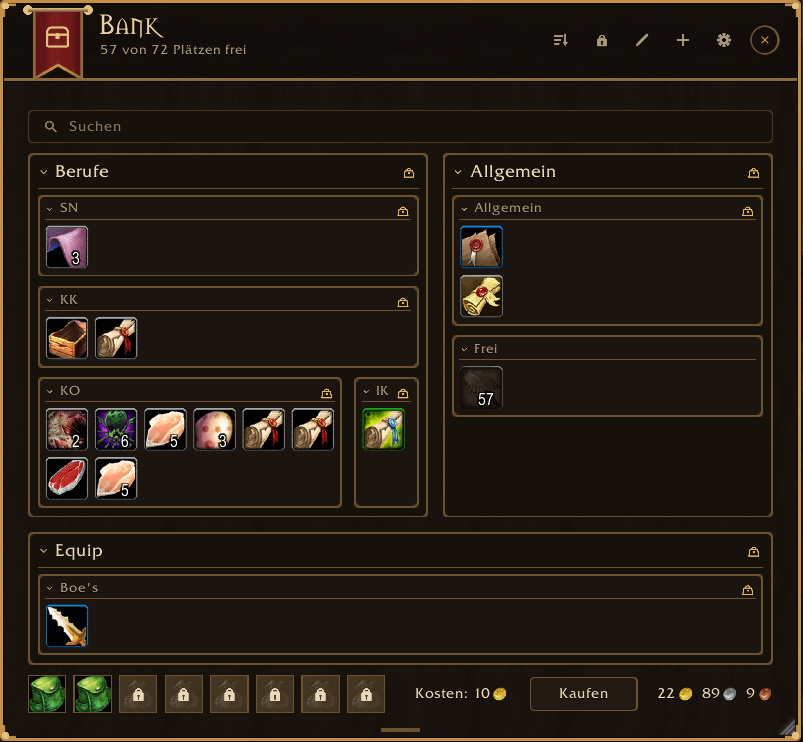
- Your bank too: at the banker, your character bank opens in the same style with your categories. Right-click or drag to move items, and one click on a category's bank button puts everything in it into the bank; in the bank window, the bag button brings it back to your bags. Locked items stay where they are.
- Bank bag slots like the original: bought slots with their bag, slots not bought yet with a padlock; swap bags and buy the next slot right in the bank window.
- Tidy up: one button tidies your bags (or the bank) like Blizzard's "Clean Up Bags", combining partial stacks. Your categories stay as they are.
- Key ring and currencies: show your key ring as its own category with one click, and pin up to three currencies at the bottom of the bag window.
- Zoom: drag the grip at the bottom right to make the windows bigger or smaller.
- Three designs: Great Hall (dark wood and brass, the default), Classic (like the WoW interface) or Modern; choose in the settings.
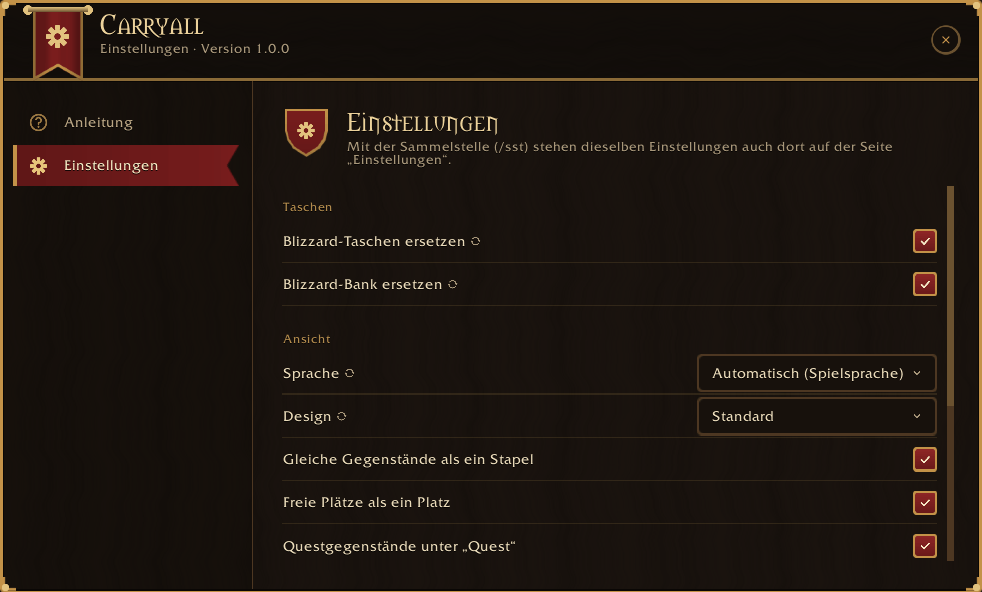
- Explained in game: a step-by-step guide in the settings window and a tooltip on every button.
- Replaces the default bags and bank: the B key, the bag bar, merchants, the mailbox and the bank all open Carryall. You can turn both off.
- Works on its own. Together with the Sammelstelle hub it also gets a tile there.
Getting started
- Press B. At first everything is under "General".
- Click + in the header to create a category, then drag items into it.
- Click the pencil to arrange your categories and the lock to lock items.
- Type /carryall help to open the guide at any time.
Slash commands
- /carryall: open or close your bags
- /carryall help: open the guide
- /carryall version: show the version
Deutsch
Carryall
Carryall zeigt alle deine Taschen in einem Fenster, und du bestimmst, wo alles hingehört. Nichts wird hinter deinem Rücken sortiert: Zieh einen Gegenstand einmal auf eine Kategorie, und jeder Gegenstand dieser Art landet künftig dort, auf allen deinen Charakteren. Automatisch sortiert Carryall nur, wo du es einschaltest.
Auf Deutsch, Englisch, Spanisch, Französisch, Portugiesisch, Russisch, Koreanisch und Chinesisch (vereinfacht und traditionell). Carryall folgt der Sprache des Spiels; in den Einstellungen lässt sich eine andere wählen.
Update von einer früheren Version („Sammelstelle: Carryall“)? Seit 1.0 heißt der Addon-Ordner einfach Carryall. Bitte den alten Ordner Sammelstelle_Carryall aus deinem AddOns-Ordner löschen. WoW speichert die Einstellungen unter dem Ordnernamen, deshalb beginnen deine Kategorien und Einstellungen neu.
Was Carryall kann
- Eigene Kategorien: Kategorien und Unterkategorien anlegen, dann Gegenstände hineinziehen.
- Automatisch einsortieren, wo du es willst: Regeln an einer Kategorie anhaken, zum Beispiel seelengebundene oder beim Anlegen gebundene Ausrüstung. Deine eigene Zuordnung geht immer vor.
- Freie Anordnung: Kategorien nebeneinander oder untereinander stellen, ineinander einordnen, Spalten oder höchstens so viele Zeilen einstellen und jede Kategorie per Klick zuklappen.
- Gut lesbar: Gleiche Gegenstände stehen als ein Stapel mit der Gesamtzahl da, leere Plätze als ein Platz mit Zahl, Spezialtaschen (zum Beispiel Kürschnersäckchen) haben eine eigene Kategorie.
- Suche: Ein Suchfeld oben findet Gegenstände nach ihrem Namen, in Taschen und Bank; was nicht passt, wird blass.
- Gegenstände sperren: Gesperrtes bleibt, wo es ist, beim Verschicken und beim Umlagern zwischen Taschen und Bank. Solange du sperrst, zeigt eine Leiste oben, dass der Modus an ist.
- An deine Twinks verschicken: Gib einer Kategorie einen Empfänger. Am Briefkasten verschickt ein Klick alles darin, was nicht gesperrt oder gebunden ist, Brief für Brief. Eine Oberkategorie verschickt alle ihre Unterkategorien auf einmal, jede an ihren Empfänger.
- Auch die Bank: Am Bankier öffnet sich deine Charakterbank im selben Stil mit deinen Kategorien. Rechtsklick oder Ziehen lagert um, und ein Klick auf den Bank-Knopf einer Kategorie legt alles darin in die Bank; im Bankfenster holt der Taschen-Knopf es zurück in die Taschen. Gesperrtes bleibt, wo es ist.
- Taschenplätze der Bank wie im Original: gekaufte Plätze mit ihrer Tasche, noch nicht gekaufte mit Schloss; Taschen tauschen und den nächsten Platz kaufen direkt im Bankfenster.
- Aufräumen: Ein Knopf räumt die Taschen (oder die Bank) auf wie Blizzards „Taschen aufräumen“ und legt angebrochene Stapel zusammen. Deine Kategorien bleiben, wie sie sind.
- Schlüsselbund und Währungen: Den Schlüsselbund zeigst du mit einem Klick als eigene Kategorie, bis zu drei Währungen heftest du unten ans Taschenfenster.
- Zoom: Am Griff unten rechts ziehst du die Fenster größer oder kleiner.
- Drei Designs: Festsaal (dunkles Holz und Messing, Standard), Klassik (wie die WoW-Oberfläche) oder Modern; Wahl in den Einstellungen.
- Im Spiel erklärt: eine Anleitung Schritt für Schritt im Einstellungsfenster und ein Tooltip an jedem Knopf.
- Ersetzt Taschen und Bank von Blizzard: Die Taste B, die Taschenleiste, Händler, Briefkasten und Bank öffnen Carryall. Beides abschaltbar.
- Läuft allein. Mit dem Hub Sammelstelle bekommt es dort zusätzlich eine Kachel.
Erste Schritte
- Drück B. Am Anfang steht alles unter „Allgemein“.
- + im Kopf legt eine Kategorie an, dann ziehst du Gegenstände hinein.
- Der Stift ordnet deine Kategorien an, das Schloss sperrt Gegenstände.
- /carryall hilfe öffnet jederzeit die Anleitung.
Befehle
- /carryall: Taschen öffnen oder schließen
- /carryall hilfe: Anleitung öffnen
- /carryall version: Version zeigen
Weitere gute Addons: Guildatrix: https://www.curseforge.com/wow/addons/guildatrix/
Carryall Team