CallipsoUsedIn
- By
Hover any reagent to see every recipe it's used in, with a crafting tree and your learned recipes highlighted.
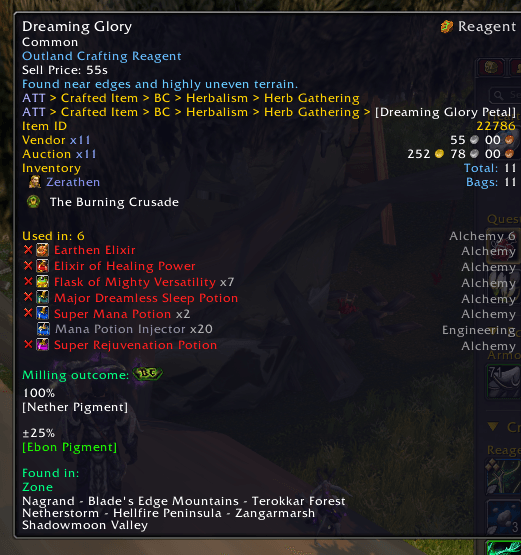
image_2026-11-19_11-31-08.png
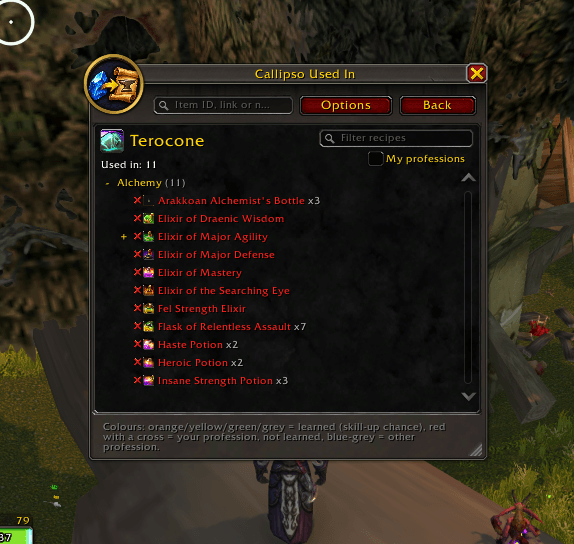
image_2026-11-19_11-30-52.png
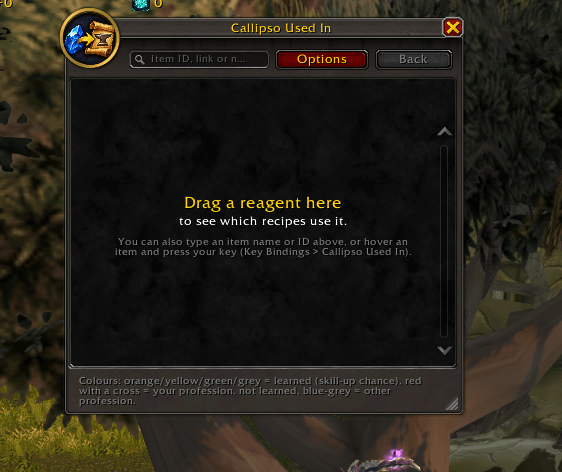
image_2026-11-19_11-30-24.png
Description
Callipso Used In (Mendeleev)
Hover any reagent and see where it is used.
Supports World of Warcraft Retail and World of Warcraft: Forever.
Callipso Used In shows which recipes need an item, in which professions, and what those crafted items are used for next. It brings back the classic "used in" tree of the old Mendeleev addon, written from scratch for today's game — with your character's learned recipes highlighted, all expansions, and a full recipe browser.
Features
Tooltip
- "Used in" on every reagent — how many recipes use it, with recipe names, professions and quantities.
- Learned or not at a glance — Ready Check style marks: a green tick for recipes you know, a red cross for recipes of your professions you have not learned yet, a grey dot for other professions. Learned recipes keep their skill-up colour (orange / yellow / green / grey).
- Learned count — the header shows how many you already know: "Used in: 7 (learned 3)".
- Recipe ranks — ranked recipes appear as one line with stars, like the Professions window (Retail).
- Shift: crafting tree — follow the chain: what the crafted items are used for next, up to 5 levels deep.
- Alt: all recipes — the complete list grouped by profession, from every profession, as many lines as fit on your screen.
- Big lists made readable — items like Crystal Vial (300+ recipes) get a short summary instead of a wall of text.
"Used In" window
- Open it with
/usedin, your key binding or the minimap button. - Search by item name, ID or link — or simply drag a reagent into the window.
- Recipes in three sections — Learned, Not learned and Other professions — each grouped by profession and expansion; big groups fold up.
- Click a line to follow the crafted item, right-click or Back to go back; filter box for recipe names.
- "My professions" check box — one click to show only recipes from your professions.
- Resize from the bottom-right corner, up to the full screen (4K and ultrawide included).
Options
- Options panel right beside the window, and the same settings in the game's Settings.
- Tooltip on/off, My professions, optional and finishing reagents, learned / not learned marks, rank stars, Professions-window panel, minimap button.
- Text size (80–150 %), tooltip line limits, Shift tree depth, and a "Reset window and text size" button.
More
- Professions window panel — see where the item made by the selected recipe is used.
- Key binding — Key Bindings → Callipso Used In → "Show where the hovered item is used".
- Minimap button — left-click: window; right-click: options; drag: move (can be hidden).
- Works great with ItemEra — if you use ItemEra, the recipe list continues right under its profession line, without repeating it.
- No dependencies — works on its own.
Usage
- Hover over a reagent — "Used in" tooltip
- Hold Shift — crafting tree; hold Alt — all recipes
/usedin(or/cui) — open the window/usedin <item link or ID>— open the window for an item/usedin panel— options beside the window/usedin options— game settings/usedin help— list of commands
Game Compatibility
| Game | Status | Content |
|---|---|---|
| World of Warcraft Retail | ✅ Supported | 11,082 recipes, 149 professions, all expansions |
| World of Warcraft: Forever | ✅ Supported | 2,521 recipes, 17 professions |
One download works in both games. Install the same CallipsoUsedIn folder into the AddOns folder of each game; the addon automatically loads the right recipe data. Settings are saved separately for each game.
Languages
English, Deutsch, Español (EU and Latin America), Français, Italiano, Português (Brasil), Русский, 한국어, 简体中文 and 繁體中文 — chosen automatically from your game client.
Item, recipe, profession and expansion names come directly from your game client in your language. Interface translations have not yet been reviewed by native speakers; corrections are welcome.
Works With
- ItemEra (optional) — ItemEra shows the expansion and which professions use a reagent; Callipso Used In adds the exact recipes right under it. Both addons work fine on their own too.
Data
Recipe data is exported directly from each game client (Retail 12.1.5 and WoW: Forever 1.60.1), covering every profession and expansion. Learned recipes are read live from the game for your current character — open your profession windows once after logging in.
Known Limitations
- Salvage recipes (prospecting, milling and similar) are not included yet.
- Pressing Shift or Alt while a tooltip is already open does not redraw it — move the mouse away and back.
- Recipes added by future game patches appear after a data update.
Support the Project
Callipso Used In is free and will always stay free. If it saves you time and you'd like to support further development, you can buy me a coffee:
☕ buymeacoffee.com/mrcalipsouy
Support is completely optional — every bug report, suggestion and kind word helps just as much. Thank you!
Feedback & Bug Reports
Found a wrong or missing recipe, or a bug? Please leave a comment or write to callipso.support@gmail.com with the item name, the game (Retail or Forever) and what you expected to see.
Author
Created by MrCallipsoUa. Inspired by the Mendeleev addon; no Mendeleev code is included.
CallipsoUsedIn Team