Cadence DPS Helper
- By
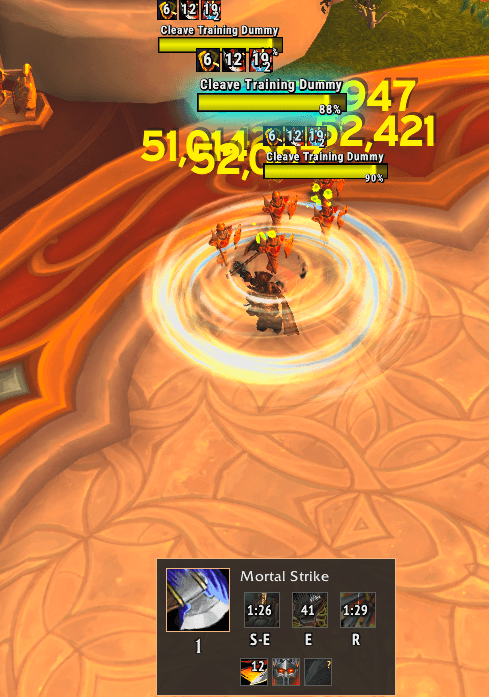
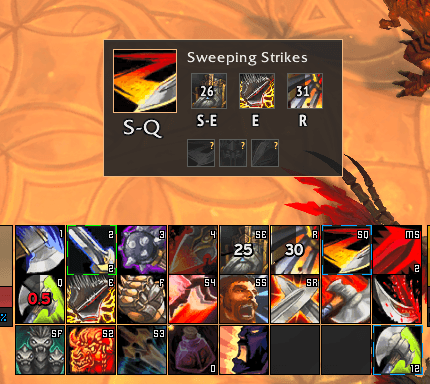
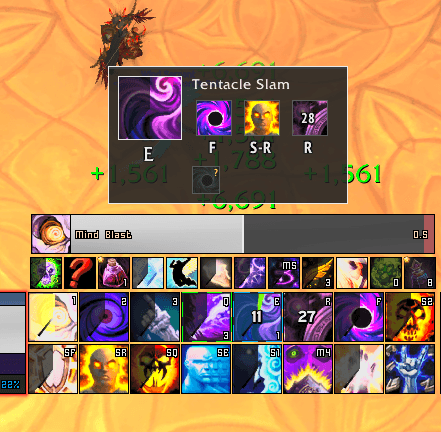
A compact, class-colored DPS HUD with Blizzard-guided spell suggestions, cooldown tracking, keybind hints, and tracked-buff displays.
Screenshot 2026-11-16 182715.png
Screenshot 2026-11-16 182814.png
Screenshot 2026-11-16 183145.png
Description
Cadence
Your next cast. Less clutter.
Cadence is a compact, class-colored DPS HUD that brings spell suggestions, keybind hints, cooldowns, and tracked buffs together—without covering your screen.
Features
- Blizzard-guided spell suggestions with a prominent next-cast icon.
- Readable keybind hints, detected from your action bars or set manually.
- Spec-specific cooldown monitors that follow learned abilities and native spell replacements.
- Tracked-buff displays mirrored from Blizzard’s Cooldown Manager.
- Profiles for all 27 Retail DPS specializations.
- Automatic hiding on unsupported specs, including tanks and healers.
- Movable, scalable layout with saved positioning and class-colored accents.
How it works
Cadence uses Blizzard’s Assisted Combat recommendations rather than maintaining a separate rotation engine. You still choose your targets and cast every spell yourself—there is no casting or input automation.
When Blizzard’s recommendation is unavailable, Cadence does not invent a fallback rotation.
Arms note: The current alpha substitutes Cleave for Rend suggestions.
Getting started
Install Cadence and log into a supported DPS specialization. Target a hostile enemy to receive suggestions when Blizzard makes them available.
For buff tracking:
- Add the desired buffs to Blizzard’s Cooldown Manager tracked-buff list.
- Cadence mirrors their native displays when accessible.
- You can hide Blizzard’s tracked-buff display afterward.
A ? can appear for an inactive, untracked, or unavailable buff presentation; it does not confirm zero stacks.
Useful commands
/caddps unlock       Unlock the HUD for dragging
/caddps lock         Lock its position
/caddps scale 1.2    Adjust the HUD scale
/caddps hide         Hide the HUD
/caddps show         Show it on a supported spec
/caddps status       Show diagnostic information
Early alpha
All 27 DPS profiles are included, but live testing is ongoing and coverage varies by specialization. These are focused monitor sets, not complete spellbook displays or guarantees of optimal play.
When reporting an issue, include your specialization, talents, what happened, and a screenshot or relevant /cadps status output.
Cadence DPS Helper Team