Buggys_TankAssistant
- By
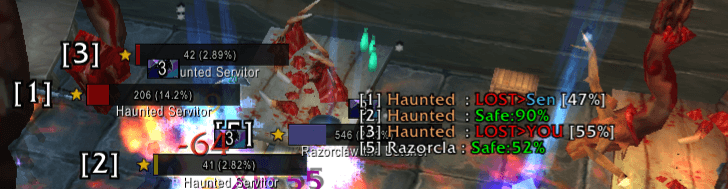
A lightweight commander's dashboard for Classic tanks that syncs numbered nameplates with a real-time threat grid, displaying detailed aggro percentages, spell casts, and target highlights.
Screenshot 2026-01-02 153532.PNG
Description
Buggy's Tank Assistant
The Commander's Dashboard for Classic Tanks
Buggy's Tank Assistant is a lightweight, standalone addon designed to fill the gap between nameplates and threat meters. It provides a "Mult-Target Enemy Grid" that lists every mob you are in combat with, numbering them [1], [2], [3]... and syncing those numbers directly to your nameplates.
This tool is built for decision-making. While nameplates handle your split-second reflexes, Buggy's Tank Assistant tells you who is catching up on threat on multiple enemies.
Key Features
1. Synced Nameplate Numbering
-
Automatically adds clear white numbers (
[1],[2],[3]) to the left of every enemy nameplate. -
These numbers match the dashboard list perfectly, allowing for precise communication (e.g., "Kick Star" or "Focus [3]").
-
Universal Support: Works on top of Plater, ElvUI, or the default Blizzard nameplates.
2. Intelligent Threat Dashboard
Stop guessing if you are "Safe." The grid gives you precise data based on your current status:
-
When Tanking: Shows the Chaser's Percentage.
-
Safe: 12%(You are miles ahead). -
WARN: 95%(A DPS is about to rip aggro—be ready).
-
-
When Aggro is Lost: Shows Threat Deficit.
-
LOST > Mage [95%]: You have 95% of the Mage's threat. Do not Taunt. One Sunder/Heroic Strike will win it back. -
LOST > Rogue [15%]: You are far behind. Taunt immediately.
-
3. Visual Clarity & Alerts
-
Range Fading: Mobs further than ~28 yards (out of Taunt/Intercept range) turn Grey, keeping your focus on the enemies you can actually hit.
-
Execute Phase: Mobs below 20% HP turn Faded Orange, signaling you to save your Rage/Energy for healthier targets.
-
Class Colors: If you lose aggro, the name of the player who stole it is Class Colored (e.g., Light Blue for Mage, Brown for Warrior), allowing for faster reaction times.
-
Raid Marks: Automatically displays {Skull}, {X}, etc., in place of numbers.
4. Accurate Cast Tracking
-
Displays spell casts and channeled spells (like Blizzard or Drain Life) next to the mob's name.
-
Cyan: Interruptible.
-
Grey: Uninterruptible / Shielded.
How to Use
-
Move the Grid: Hold Left Alt + Drag anywhere on the window.
-
Customization: Type
/btaor/buggyto open the command list.
Slash Commands
-
/bta scale 1.2— Increase window size by 20%. -
/bta fontsize 14— Change text size (Default: 13). -
/bta rows 10— Set the maximum number of mobs to show (Default: 15). -
/bta togglenumbers— Enable/Disable the nameplate numbers[1]. -
/bta togglegrid— Show/Hide the main dashboard window. -
/bta reset— Reset all settings to default.
Built for Classic Era, Season of Discovery, and Hardcore.
The Buggys_TankAssistant Team