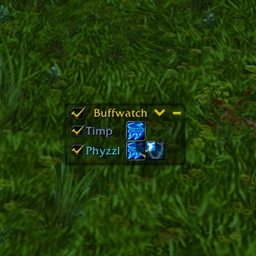
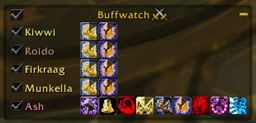
Based on Buffwatch++ & Buffwatch Classic.
Buffwatch is a buff monitoring tool for all classes which lets you easily and clearly keep track of any buffs on yourself or your party/raid, and also allows you to quickly recast your buffs at the click of a button.
You choose which buffs you want to monitor and Buffwatch lets you know when they have run out, with clickable buttons to recast them.
Please note that Forever has combat restrictions the same as Retail, and therefore buffs are not shown as expired until out of combat.
How to use :
- Make sure the buffs you want to monitor are on the relevant players
- Tick the checkbox next to each player which locks those buffs to the player (alternatively tick the checkbox at the top to lock them all)
- Hide the buffs you are not interested in, using the following methods :
- Alt-Right click to remove the selected buff
- Alt-Left click to remove all buffs apart from the selected one
Any players that are locked and have no monitored buffs can be hidden by toggling the Hide Unmonitored arrow in the top right
Buffs that have expired will turn red (when out of combat), clicking on them will recast the buff on the player (if you have the spell and are in range)
Buffs for players that are dead or offline will turn grey
Other features :
- Locked buff settings are saved between sessions or players joining/leaving your group
- Left click a player name to target that player
- Right click a player name to assist that player
- Right click the Buffwatch header for options/help
- Filter on buffs your player can cast or buffs you have cast
Type /buffwatch or /bfw in-game for further info.
Buffwatch Forever Team

Owner