
Buffinator
- By
Smart one-click group buff manager for Priest, Mage, and Druid in TBC Classic Anniversary Edition.
Buff Interface.png
Buff Interface Expanded.png
Config.png
Description
Buffinator
Smart group buff manager for WoW TBC Classic Anniversary Edition.
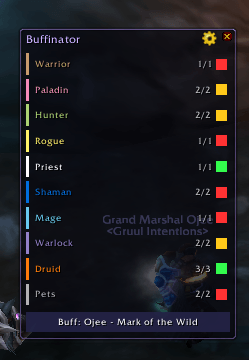
Buffinator shows the buff status of every class in your party or raid at a glance and lets you cast the right buff on the right target with a single click — no macro writing, no manual targeting.
Supported Classes
| Player Class | Buffs Managed |
|---|---|
| Priest | Power Word: Fortitude / Prayer of Fortitude, Divine Spirit / Prayer of Spirit, Shadow Protection / Prayer of Shadow Protection |
| Mage | Arcane Intellect / Arcane Brilliance |
| Druid | Mark of the Wild / Gift of the Wild, Thorns |
Pets (Hunter, Warlock) are tracked as a separate row and can be buffed independently.
Features
- At-a-glance status — one row per class, colour-coded dot shows full (green), partial (yellow), or missing (red) buff coverage
- Smart targeting — always casts on the group member who needs the buff most (missing first, then soonest expiring)
- Group & single-target — left-click casts the group version (Prayer of Fortitude, Gift of the Wild, etc.), right-click casts the single-target version
- Buff All button — one-click to cast the single most urgent buff across the entire raid
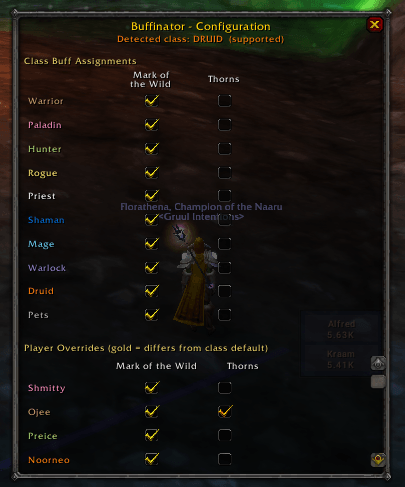
- Per-class and per-player config — enable or disable individual buffs for each class, or override a specific player
- Pet support — tracks and buffs Hunter/Warlock pets alongside the rest of the group
- Spell awareness — only shows and casts spells you have actually trained; unlearned ranks are ignored automatically
- Combat safe — uses
SecureActionButtonTemplateso casting works correctly in all situations
Installation
- Download the latest release from CurseForge
- Extract so the folder sits at:
World of Warcraft/anniversary/Interface/AddOns/Buffinator/ - Launch WoW and enable Buffinator in the AddOns list on the character-select screen
- Log in — the Buffinator window appears automatically
Usage
Main Window
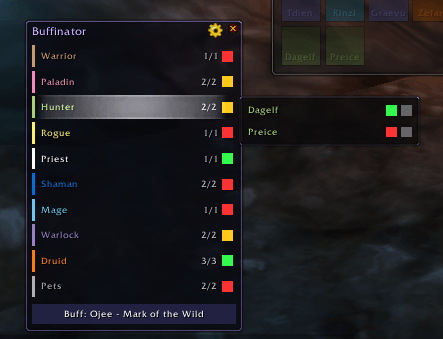
The main window shows one row per class present in your group.
| Click | Action |
|---|---|
| Left-click a class row | Cast the group/greater buff on the highest-priority target of that class |
| Right-click a class row | Cast the single-target buff on the highest-priority target of that class |
| Hover over a class row | Open a flyout showing each individual member with per-buff status dots |
| Left-click Buff All | Cast the group version of the globally most urgent buff |
| Right-click Buff All | Cast the single-target version of the globally most urgent buff |
| Gear icon | Open the Configuration window |
The window is draggable — click and drag the title bar to reposition it.
Configuration Window
Open with the gear icon or /bfn config.
- Class Buff Assignments — check/uncheck which buffs to cast on each class
- Player Overrides — override the class default for a specific player (highlighted gold when it differs from the class setting)
Slash Commands
/buffinator or /bfn
| Command | Description |
|---|---|
/bfn show |
Show the main window |
/bfn hide |
Hide the main window |
/bfn config |
Open the configuration window |
/bfn reset |
Clear all saved settings (requires /reload) |
/bfn debug |
Print diagnostic information to chat |
Compatibility
- Game: WoW TBC Classic Anniversary Edition
- Interface: 20502 – 20505
License
MIT License — see LICENSE for full text.
Credits
Created by Eagletalon.
Inspired by PallyPower's approach to group buff management.
Buffinator Team
