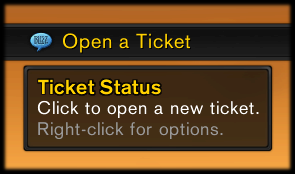
Broker Ticket Status on a bar-style DataBroker display, with the tooltip shown.
Description
<big>DataBroker plugin to monitor your GM Help ticket.</big>
- Click the plugin to edit your ticket, or submit a new one.
- Middle-click the plugin to abandon your ticket (with confirmation dialog).
- Right-click the plugin for options.
Language Support
Works in all languages. Translated into English, Deutsch, Español, and Português. To add or update translations for any locale, enter them on the CurseForge project page and then send me a PM to let me know that you’ve made changes.
Feedback
Post a comment on WoWInterface. If you are reporting a bug, please first make sure you have the latest version from this page, and then include detailed instructions I can follow to reproduce the bug myself, whether the bug still happens when all other addons are disabled, and the exact text of the accompanying error message (if any).
If you do not have a WoWInterface account, and don’t want to create one, you can post on the WowAce forums with your Curse account instead.
Broker Ticket Status Team

Owner