
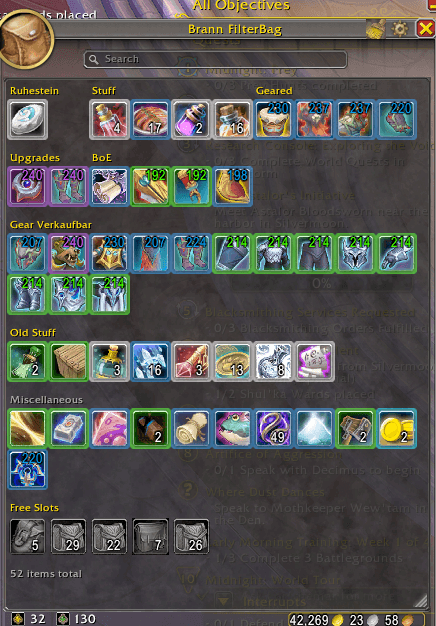
Brann Filter Bag Example.png
Description
BrannFilterBag
Native bag replacement with virtual filter groups for World of Warcraft (Retail)
BrannBagFilter replaces all native bag windows with a single, fully configurable master bag. Create custom filter rules to automatically sort your items into virtual groups — never lose track of your inventory again.
Features
Virtual Bags & Filter Groups
- Create any number of virtual groups with custom names and icons
- 15 filter fields combinable with AND / OR and per-rule NOT inversion:
| Field | Description |
|---|---|
| Item Name | Free-text search (substring match) |
| Quality (exact / min / max) | Poor through Heirloom (0–7) |
| Item Level (min / max) | Numeric comparison |
| Equipable | Yes / No |
| Slot | Head, Chest, Ring, Trinket, … |
| Type / Class | Free-text match on WoW item type |
| Bind Type | Soulbound / BoE / Warband / Not bound |
| Housing Item | Furniture & decoration |
| In Gear Loadout | Any set / specific set / no set |
| Expansion | Classic through Midnight |
| Is Item Upgrade | Comparison with currently equipped gear |
| Already Filtered | Item was already matched by a previous group |
- Exclusive groups — items only appear in the exclusive group, preventing duplicates
- "Other" section — automatic catch-all for unfiltered items
Reagent Bag
- Separate window with independent filter groups for the reagent bag (Bag 5)
- Toggleable via button on the master bag
Sell at Merchant
- Each filter group shows a sell button (coin icon) when at a merchant
- Only items that are actually visible in the group will be sold
UI & Interaction
- Drag & drop to reorder filter groups
- Icon picker with full macro icon library and search
- Integrated search bar — filters by name, type, and subtype
- Item level display on equipment with quality-colored text
- Quality borders in the corresponding rarity color
- Comparison tooltips when hovering over gear
- Free slots display (optionally per physical bag)
- Sort button using
C_Container.SortBags() - Adjustable column count (1–10) via resize handle
- Opacity slider in settings
- Shift+Click inserts item link into chat
- Movable windows with saved positions
Keybindings & Slash Commands
- Custom keybinding via WoW keybinding menu (
BrannBagFilter – Toggle Bags) - Overrides native bag keybinds (Backpack, Bags 1–4, Reagent Bag)
/bbf reset— reset settings and reload UI
Configuration
Open settings via the gear icon in the master bag title bar.
Settings tab:
- Opacity
- Search bar on/off
- "Other" group on/off
- Free slots per bag on/off
Filters tab:
- Create, edit, delete, and drag & drop reorder filter groups
- Separate lists for main bags and reagent bag
- Rule editor with column headers and AND/OR/NOT logi
BrannFilterBag Team
