Boost
- By
Boost is a professional addon for dungeon boost sellers to track customers, manage runs, process payments, and automate invites. Features a powerful live UI, auto-invite system, and real-time gold tracking—everything you need to run your boost business e
boostie details.png
advertisement.png
auto invite.png
whispers.png
end.png
Description
Boost — Professional Dungeon Boost Management
Boost is a comprehensive, feature-rich addon designed specifically for dungeon boost sellers in WoW Classic Anniversary Edition. Manage multiple customers, track payments, automate invites, and streamline your boost business with an elegant, easy-to-use interface.
🎯 Core Features
Customer Management
- Track Multiple Boosties — Manage unlimited customers with individual run counts, payments, and balances
- Automatic Gold Detection — Instantly detect and record gold trades with balance updates
- Smart Balance Tracking — Color-coded balances (red = owes money, green = has credit)
- Total Paid Audit Trail — Separate tracking of actual gold received vs manual adjustments for reliable auditing
- Per-Customer Cost/Run — Set custom rates for individual customers
- Refund Detection — Smart notifications when giving gold back to customers with balance adjustment
- Credit Notifications — Alerts when customers have positive balance
Automation & Efficiency
- Auto-Invite System — Keyword detection in SAY, YELL, and CHANNEL (Trade/General) with manual confirmation popups
- Watch Keywords — Configure comma-separated keywords to detect (e.g., "boost,carry,run")
- Ignore Keywords — Configure comma-separated keywords to skip (e.g., "selling,wts")
- Level Range Filtering — Set min/max level for auto-invite confirmations
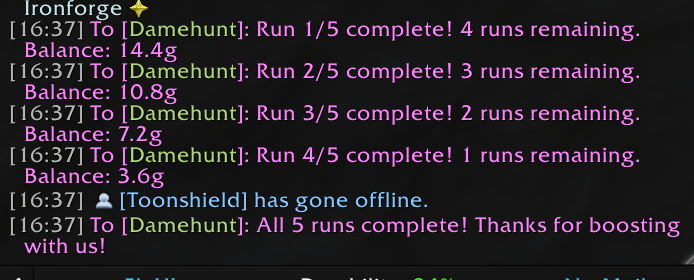
- Instance Reset Detection — Automatically tracks dungeon resets and notifies customers via whisper
- Auto-Reset Runs — Automatically resets completed runs to 0 when all runs are finished
- Real-Time Updates — All windows update instantly when trades occur or data changes
- Auto-Add on Invite Accept — Customers automatically added when they accept your invite
Advertisement & Communication
- Quick Advertise — Send ads to Trade, General, Yell, or all channels at once with one click
- Customizable Messages — Save your advertisement text with auto-save as you type
- Multi-Channel Broadcast — "All" button sends to General, Trade, AND Yell simultaneously
- Auto-Invite Integration — Settings embedded in advertisement window for convenience
- Minimap Button — Left-click for main UI, right-click for advertisement window
Professional UI & Polish
- Gold-Themed Styling — Beautiful gold borders (DialogBorderTemplate) and gold input text throughout
- Consistent Dark Theme — All windows use matching dark backgrounds with subtle borders
- Smart Focus Management — Click anywhere on windows to unfocus inputs, Enter/Escape key support
- Main Dashboard — Sortable boostie list with complete customer information
- Individual Detail Windows — Manage each customer with dedicated popup windows
- Multiple Popups — Open several customer windows simultaneously for easy comparison
- Draggable & Persistent — All windows remember positions between sessions
- Centered Titles — Clean, professional window titles across all interfaces
📋 Main Window Features
Customer List
- Sortable list with name, runs (completed/total), balance, and cost/run
- Color-coded balances for quick status assessment
- Click any customer to open their detail window
Quick Actions
- Add Boostie — Add new customer (from target)
- Add 5 Runs — Add 5 runs to ALL boosties in your list (no target required)
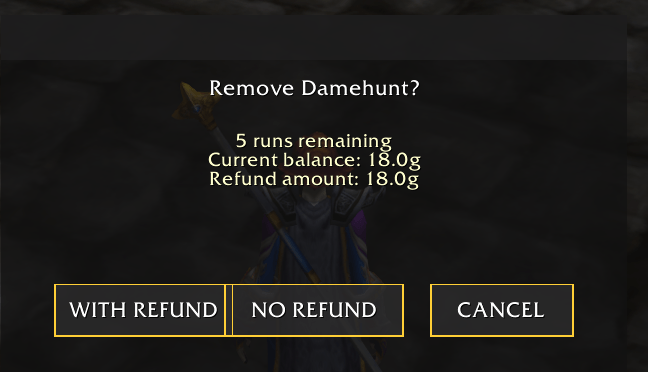
- Remove — Remove customer from list (from target)
- Reset Dungeon — Calls ResetInstances() API and processes resets for all customers
- Mark All Paid — Mark all customers with negative balance as fully paid
Loot Management
- Loot Method Dropdown — FFA, Master Loot, Group Loot, Round Robin, Need Before Greed
- Auto-Apply Settings — Automatically applies your preferred loot method when forming groups
- Combat-Safe — Protected against combat taint errors
Cost Configuration
- Default Cost/Run — Set your standard rate with gold format support (e.g., "3.5g")
- Instant Updates — Changes apply immediately to new customers
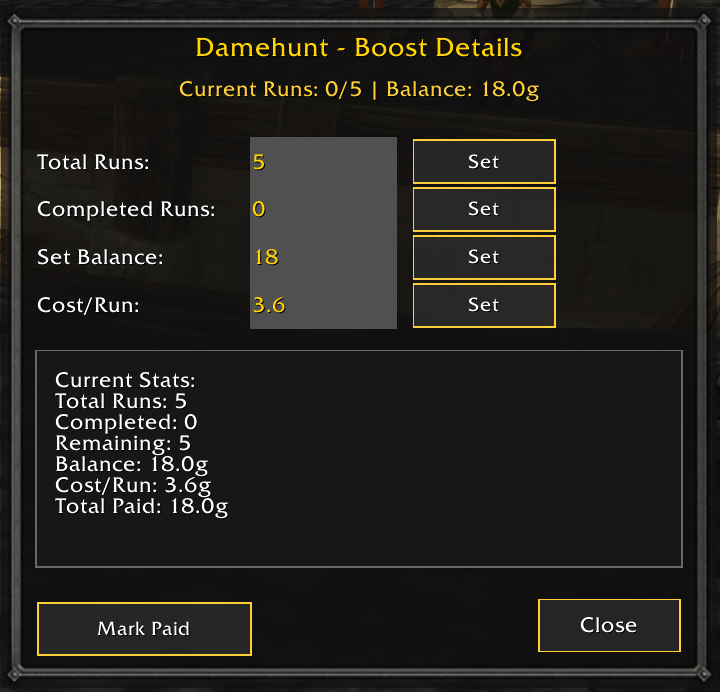
🪟 Boostie Detail Window
Each customer gets a dedicated management window with gold-themed inputs:
Run Management
- Set Total Runs — Define how many runs purchased with input field and Set button
- Set Completed — Update completed run count with input field and Set button
- Real-Time Stats — Live display of total runs, completed, remaining, balance, cost/run, and total paid
- Auto-Update — All displays update instantly when you make changes
Payment Management
- Set Balance — Manually adjust customer balance with gold-formatted input
- Custom Cost/Run — Override default rate per customer (respects gold format)
- Mark Paid — Automatically calculates full payment for all runs at current cost/run rate
- Total Paid Tracking — Shows actual gold received separate from balance adjustments
Live Information Display
- Current runs (completed/total)
- Remaining runs calculated automatically
- Current balance (color-coded: red = owes, green = credit)
- Custom cost per run for this customer
- Total gold actually paid (reliable audit trail)
Window Features
- Gold Input Fields — All inputs use beautiful gold-colored text
- Smart Focus — Click anywhere to unfocus, Escape key support, Enter clears focus
- Subtle Borders — 2px dark borders on all input fields for clarity
- Real-Time Sync — Updates instantly when trades occur while window is open
- Multiple Popups — Open multiple customer windows at once for easy comparison
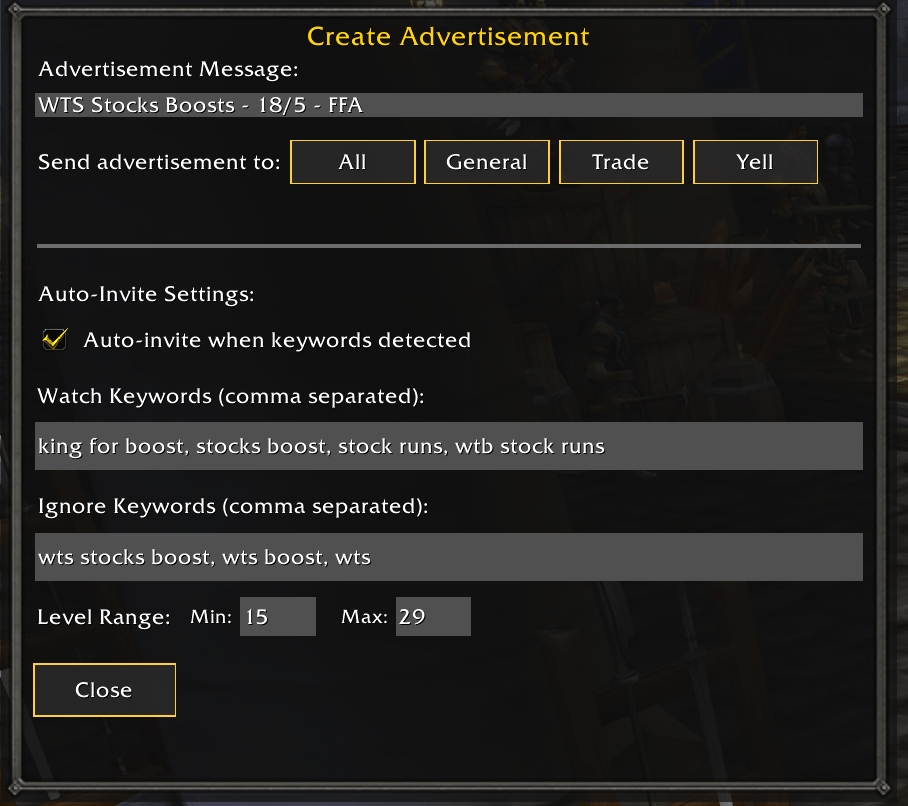
📢 Advertisement Window
Message Management
- Editable Advertisement — Customize your boost advertisement with multiline support
- Auto-Save — Message automatically saved as you type (persisted across sessions)
- Gold Input Text — Advertisement input uses gold-colored text for style consistency
- Quick Send — One-click send to individual channels or all at once
- Smart Focus — Enter key clears focus (prevents accidental newlines), click anywhere to unfocus
Channel Options
- All — Send to General, Trade, AND Yell simultaneously with one click
- General — Send to General chat (Channel 1)
- Trade — Send to Trade chat (Channel 2)
- Yell — Send to /yell
Auto-Invite Settings (Integrated)
- Enable/Disable Checkbox — Toggle auto-invite system on/off
- Watch Keywords Input — Comma-separated keywords to detect (e.g., "boost,carry,run")
- Ignore Keywords Input — Comma-separated keywords to skip (e.g., "selling,wts,wtb")
- Level Range Inputs — Set min/max level for auto-invite confirmations (e.g., 1-60)
- All Settings Auto-Save — Changes persist automatically
Auto-Invite Popup Features
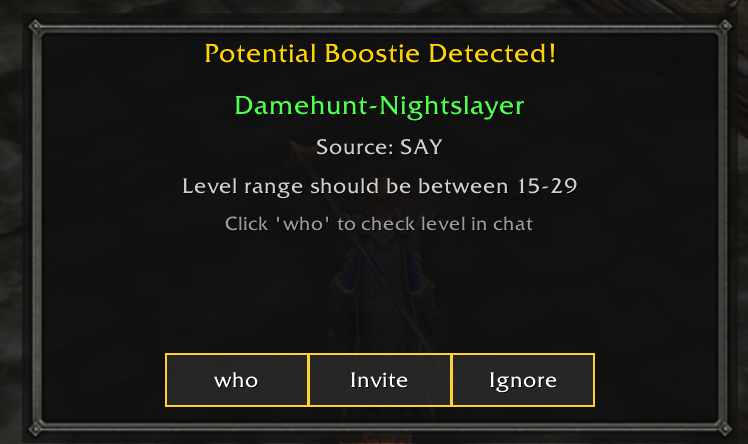
- Manual Confirmation — Shows "Potential Boostie Detected!" popup for each keyword match
- Source Display — Shows actual channel (SAY, YELL, Trade, General, etc.)
- Player Info — Displays player name and level range requirements
- Invite Button — Sends whisper with your ad message and party invite
- Ignore Button — Dismisses popup without action
- Auto-Add Integration — When they accept invite, they're automatically added as a boostie
- Party Member Check — Won't show popups for players already in your group
- Popup Stacking — Multiple popups offset for handling several requests at once
🎮 Slash Commands
Window Management
/boostor/boost ui— Toggle main window/boost advertise— Open advertisement window
Customer Management
/boost addruns <name|%t> <amount>— Add runs to customer/boost addpayment <name|%t> <amount>— Add payment without runs/boost clearruns <name|%t>— Remove customer from list/boost resetruns— Clear ALL customer data
Settings
/boost debug— Toggle debug mode/boost minimap hide|show|reset— Control minimap button/boost resetpositions— Reset all window positions to center/boost help— Show command list
🔧 Technical Features
Modular Architecture
Built with 9 focused modules for stability and maintainability:
- Utils — Utility functions and formatting
- DataManager — Data persistence and player management
- TradeDetection — Automatic trade detection and processing
- Settings — Settings UI and configuration
- Advertisement — Advertisement system
- Minimap — Minimap button integration
- BoostiePopup — Individual customer windows
- UI — Main window interface
- Core — Event coordination and commands
Safety & Protection
- Combat Taint Protection — Safe loot method changes
- Nil Safety — Comprehensive checks prevent conflicts with other addons
- SavedVariables Integrity — Reliable data persistence
- Debug Mode — Toggle debug messages for troubleshooting
Gold Format Support
All gold inputs support flexible formats:
3.5gor3.5= 3 gold 50 silver350s= 3 gold 50 silver35000c= 3 gold 50 silver- Plain numbers treated as gold
📦 Installation
- Download and extract to
World of Warcraft/_classic_/Interface/AddOns/ - Ensure folder is named
Boost(notBoost-1.0.0or similar) - Launch WoW and enable the addon in character select
- Type
/boostto open the main window
💡 Example Workflows
Starting a Boost Session
- Target customer → Click "Add Boostie"
- Customer trades you gold → Balance automatically updates
- Click customer in list → Set total runs and cost/run
- Begin dungeon runs
During Runs
- Complete dungeon → Click "Reset Dungeon" button
- Customer is automatically notified of progress
- Balance updates based on runs completed
- Repeat until all runs complete
Managing Payments
- Click customer in list to open detail window
- View "Total Paid" to see actual gold received
- Use "Set Balance" for manual adjustments
- "Mark Paid" button calculates full payment instantly
Advertising
- Click minimap button (right-click) or
/boost advertise - Customize your message (auto-saves)
- Click "All" to spam General, Trade, AND Yell
- Configure auto-invite to detect keywords
🆘 Support
- In-Game Help — Type
/boost helpfor command list - Debug Mode —
/boost debugto enable detailed logging - Reset Windows —
/boost resetpositionsif windows are off-screen
🎯 Designed For
Professional dungeon boost sellers who need:
- Multi-customer tracking
- Automated payment detection
- Quick advertising tools
- Reliable data persistence
- Clean, efficient workflow
Built for WoW Classic Anniversary Edition (Interface 110002)
Transform your boost business with professional-grade customer management tools.
Boost Team