Boons QoL Pack
LightWeight QoL addon using Blizz API/Frames

Screenshot 2026-07-03 at 11.56.17.png
Screenshot_2026-06-19_at_10.49.02.png
Description
BoonsUI
BoonsUI is a lightweight quality-of-life suite for players who prefer Blizzard’s default UI but want smarter automation, cleaner visuals, healer tools, Mythic+ utilities and lightweight combat information without a full UI replacement.
BoonsUI is built to stay responsive and low-impact while keeping its features under one simple umbrella:
One Menu — /bui
Typing /bui opens the unified BoonsUI configuration hub.
From there you can access:
- Action Tracker
- Aura Frames
- Damage Meters
- General / QoL
- Keybinds
- Raid Tools
Existing shortcuts such as /bkb, /baf, /bat, /bdm and /keys are still available.
Key Features
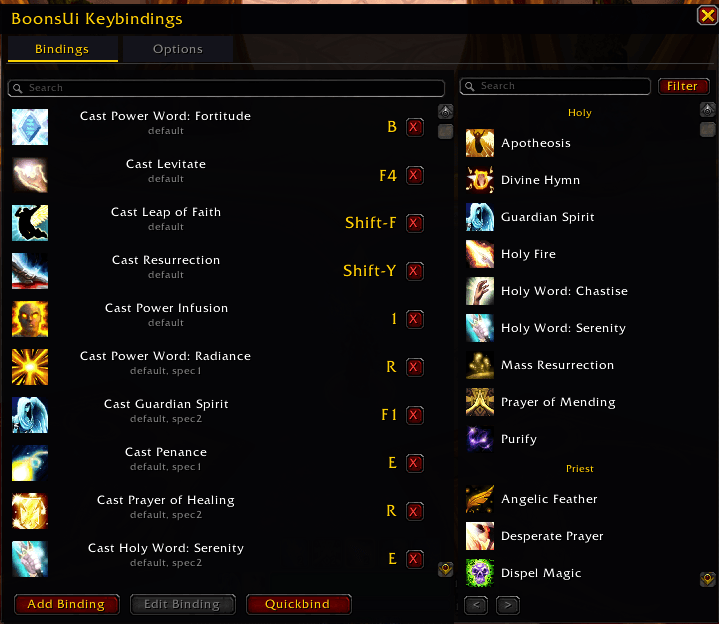
- Built-in Keybindings — mouseover/click-casting bindings with spec/role support
- Aura Frames — custom raid-frame colouring for Atonement, Echo, Prescience, Lifebloom, Renewing Mist, Riptide and Beacon of the Savior
- Pandemic Highlighting — custom Pandemic colour support for tracked healing auras
- Debuff Overrides — optionally prioritise Magic, Curse, Disease, Poison and Bleed colouring
- Lightweight Damage Meters — Blizzard-powered Current, Overall and boss-fight history with up to 3 configurable windows
- Raid Tools — role-aware group splitting, melee/ranged balancing, manual adjustments and raid-roll tracking
- Action Tracker — displays your last 3–5 abilities with configurable size, spacing, fade and growth direction
- Party Keystone Tracker — quickly view your group’s current keystones with
/keys - Mythic+ Timers — +2, +3 and overtime tracking
- Mythic+ Teleports integrated into Group Finder
- Party-aware LFG filtering
- Movable Battle Rez Tracker
- Brewmaster Stagger %
- Inspect Item Level display
- Combat Cursor Ring — optional combat-only cursor ring with live preview, configurable size, thickness, opacity and colour
- Class Colour Cursor — optionally match the combat cursor ring to your current class colour
- Cursor Trails — optional lightweight Soft Trail, Glow or Sparks effects with adjustable trail length and opacity
- Bonus Roll Protection — confirmation prompt before spending a bonus roll, including your active loot specialization
- Pass Confirmation — optional confirmation before passing on an available bonus roll
Automation & QoL
- Auto Combat Logging
- Auto Gossip
- Auto Repair
- Auto Sell Junk
- Auto Dismount
- Auto Skip Cinematics
- Auto-Slot Mythic Keystone
- Druid Travel Form handling
- Quick Loot
- Auction House current-expansion filtering
- Solo Shuffle chat disable
- Mute Combat Shouts
- Confirm Bonus Rolls
- Confirm Passing Bonus Rolls
- Combat Cursor Ring
- Optional Cursor Trails
UI Cleanup
- Hide Bag Bar
- Hide Class Power Bar
- Hide Blizzard Raid Tools
- Hide Talking Head
- Hide Zone Text
- Show/Hide BoonsUI minimap button
Main Commands
/bui— Unified BoonsUI settings/bkb— Keybindings/baf— Aura Frames/bat— Action Tracker/bdm— Damage Meters/keys— Party Keystone Tracker/bui rt— Raid Tools
Recent Additions
- Added a fully customizable combat-only mouse cursor ring
- Added live cursor preview directly inside
/bui - Added adjustable Ring Size, Thickness, Opacity and Custom Colour
- Added optional Class Colour mode for the cursor ring
- Added lightweight Soft Trail, Glow and Sparks cursor trail effects
- Added configurable Trail Length and Trail Opacity
- Added Bonus Roll confirmation to prevent accidental Nebulous Voidcore spending
- Bonus Roll confirmation displays your active loot specialization before confirming
- Added optional Pass confirmation for bonus-roll opportunities
- Improved Lifebloom AuraFrame layering so Blizzard role icons and names remain visible above the aura tint
- Improved Battle Rez tracker self-recovery during Mythic+ if its frame is unexpectedly hidden
- Improved mouseover keybinding reliability during healing and combat transitions
- Improved Cooldown Manager utility-bar centering when switching between characters with different icon counts
- Improved action-bar and Blizzard UI compatibility under WoW’s newer secret-value/taint restrictions
Designed For
Players who want to keep Blizzard’s default UI while adding useful automation, healer tools, Mythic+ features and lightweight quality-of-life improvements without unnecessary bloat.
Simple. Lightweight. Integrated.
Boons QoL Pack Team