Blitz Toolkit
- By
Bundle of tools for Battlegrounds with focus on Rated Battleground Blitz
Blitz Toolkit is a set of battleground helpers built for Battleground Blitz (rated solo RBG) that also works in normal battlegrounds. It turns the things the game makes you guess (base lock timers, capping progress, cart arrival times, orb damage, rune respawns) into clean, movable timer bars with optional alerts, and cleans up the battleground UI while you play.
Every feature is optional and fully customizable: size, textures, fonts, colors, icons, alert style and sound. The timers and trackers have a test mode, so you can place and style them outside a battleground.
Features at a glance
- Base Timers: 45s post-capture lock and capping countdown for every base (Arathi Basin, Deepwind Gorge, Battle for Gilneas, Eye of the Storm).
- Battleground Start Timer: a bar counting down to the gates opening.
- Mine Cart Timers: time left until each cart reaches its depot (Silvershard Mines, Deephaul Ravine), with track switch alerts.
- Capture Bar: a bigger, movable replacement for the cart / tower capture slider.
- Orb Tracker: damage taken by each orb carrier (Temple of Kotmogu).
- Power-up Rune Timer: 90s rune respawn timer (Deepwind Gorge).
- Carrier Frames: fade or hide the flag / orb carrier frames.
- General: hide the quest tracker in battlegrounds, queue Rated Blitz with one key, PvP gear reminder.
Features
Base Timers
Arathi Basin, Deepwind Gorge, Battle for Gilneas, Eye of the Storm
In Blitz, a captured base on Arathi Basin and Deepwind Gorge is locked for 45 seconds before it can be assaulted again. Blitz Toolkit shows a countdown bar for every locked base, so you know exactly when to go back in.
- Lock bars (shield icon) count down the 45s post-capture lock (Blitz on Arathi Basin / Deepwind Gorge).
- Capping bars (sword icon, faded color, "- Capping" tag) count down the assault before a base is captured: 30s in Blitz, 60s in other modes. Battle for Gilneas, Eye of the Storm and non-Blitz games get only these bars, since their bases are not locked.
- Show all bases (optional): adds a row for every base without a running timer. Open bases show a key icon and "Open"; held bases whose time is unknown show "--".
- "About to unlock" alert: a warning a few seconds before a base can be assaulted again.
- "About to be captured" alert (off by default): a warning a few seconds before an assaulted base flips.
- Per-match base selection: choose which bases trigger alerts this match (for example only the ones your team is going for). The selection frame can pop up at the start of each match.
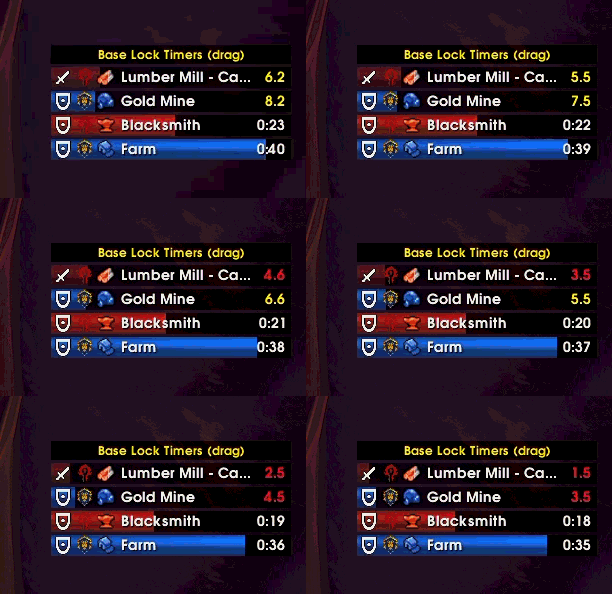
Customize: bar width, height, spacing, texture, growth direction, Alliance / Horde / background colors, capping bar opacity, font, size, outline and color, warning and critical time colors, faction icon, base icon, timer type icon, alert timing, alert style and sound.
Battleground Start Timer
Every battleground (on by default)
A bar counting down to the moment the gates open. Can also hide Blizzard's own start bar (the big countdown numbers still show).

Customize: bar size, texture, colors, icon, font.
Mine Cart Timers
Silvershard Mines, Deephaul Ravine
One bar per mine cart counting down to its arrival at the depot, colored by the team holding it and labelled with its track: Top, Middle or Lava.
- "- Long" is added when the cart is headed down the long branch, and the timer adds the extra time on its own.
- An up arrow on the Top / Lava bars shows that the track's lever is on the long branch right now. It follows the lever, not the cart: a cart already past the fork keeps its own route.
- "About to arrive" alert: a warning a few seconds before a cart reaches its depot.
- "Track switched" alert (Silvershard Mines): tells you the moment a lever switches the Top or Lava track, and highlights the carts that will take the new route. Uses the battleground messages on English clients; other languages get the alert when a cart takes the other branch.
- Carts whose time can't be known (for example after joining a match in progress) can be shown as "--".
On Deephaul Ravine the two carts (Top and Bottom) have no switch and arrive together, so they share one Carts bar: filled with a team's color when that team holds both carts, split into a top half (Top cart) and a bottom half (Bottom cart) when each team holds one.
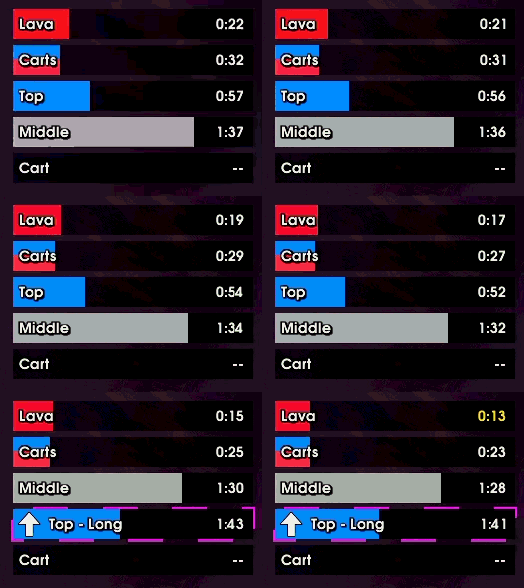
Customize: bar size, spacing, texture, growth direction, faction / neutral / background colors, font, track name, "Long" label, time, warning and critical colors, faction icon, long track arrow, both alerts.
Capture Bar
Silvershard Mines, Deephaul Ravine, Eye of the Storm (non-rated)
Replaces the game's small Alliance / Horde capture slider (carts and towers) with a bigger, clearer bar you can place anywhere.
- Shows who controls the point, the capture percent and movement arrows.
- Swap sides to put Alliance on the left.

Customize: bar size, texture, zone opacity, all colors including the indicator, font, faction icons, text shown, hide or keep Blizzard's bar.
Orb Tracker
Temple of Kotmogu
Four squares, one per orb, each in its orb's color, laid out 2x2 as the orbs sit on the map (or in a row or a column).
- A free orb shows an orb marker.
- A held orb shows its carrier's damage taken % and, optionally, the holding team's icon.
- The square glows once the % reaches a threshold you set, optionally only for orbs held by the enemy (or by your team), with an optional sound.
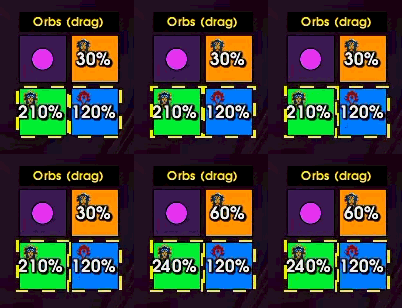
Customize: layout, square size, spacing, opacity, border (fixed or holding team's color), team icon, its size and position, font, text position, threshold, team filter, highlight style and sound.
Power-up Rune Timer
Deepwind Gorge (off by default)
A 90-second respawn timer for the power-up rune. The game doesn't tell addons when a rune is taken, so you press a key when a rune is picked up and the bar counts down to its respawn, with an optional "about to respawn" alert.

Customize: key bindings (start / clear), bar size, texture, colors, icon, font, alert.
Carrier Frames
Any battleground with flag or orb carriers (off by default)
Fade the game's flag and orb carrier frames to any opacity, or hide them completely (they become click-through while hidden).
General
- Hide the quest tracker inside battlegrounds (off by default). It comes back as it was when you leave.
- Queue Rated Blitz with one key: a key binding opens the Group Finder, selects Rated Blitz and joins the queue.
- PvP gear reminder (off by default): pick an equipment set per character. When you enter a battleground or arena without that set equipped, a warning shows with a sound. Click it to equip the set, right-click to dismiss.

Alerts
Base unlock, base capture, cart arrival, track switch and rune respawn alerts can each be shown as:
- On-screen text: movable, with your own font, size, color and duration.
- Bar highlight: the matching timer bar glows (pixel glow or pulsing border), with your own color, thickness, speed and duration.
- Both.
Each alert can play a sound of your choice. The orb threshold glow uses the same highlight styles.


Settings
Open the options with Esc > Options > AddOns > Blitz Toolkit, or type /btk.
Settings are split into eight tabs: General, BG Start, Base Timers, Mine Carts, Capture Bar, Carriers, Power-ups and Orbs. Most tabs show a live preview and have a Test mode button that shows fake timers so you can place and style the bars outside a battleground. Every tab has a Reset settings button.
The All settings menu at the top of the options (above the tabs) acts on every tab at once:
- Export settings: a string holding all your settings, to share or keep as a backup.
- Import settings: paste such a string to replace all your settings. Your per-character PvP gear set choice is kept.
- Reset all settings: resets every tab after asking.

Fonts, bar textures and sounds from LibSharedMedia-3.0 are available when another addon provides it.
Key bindings
Under Esc > Options > Keybindings > AddOns > Blitz Toolkit, or straight from the Power-ups and General tabs:
- Start power-up rune timer
- Clear power-up rune timer
- Queue Rated Blitz
Slash commands
| Command | What it does |
|---|---|
/btk |
Open the options |
/btk test |
Show test base timers |
/btk select |
Show / hide the base alert selection frame |
/btk lock / /btk unlock |
Lock or unlock the base timer frame |
/btk scale <n> |
Set the base timer frame scale |
/btk reset |
Reset the base timer settings |
/btk export / /btk import |
Export or import all settings as a string |
/btk start test |
Test the battleground start timer |
/btk mines test |
Test the mine cart timers |
/btk carts test |
Test the capture bar |
/btk runes test |
Test the power-up rune timer |
/btk orbs test |
Test the orb tracker |
The start, mines, carts, runes and orbs commands also take lock and unlock.
Feedback
Found a bug or have an idea? Leave a comment.
Blitz Toolkit Team