Blingtron.app - RCLootCouncil bonus roll's and guild tools
Synchronizing guild data with blingtron.app and show RCLootCouncil BiS items
Screenshot 2026-08-16 194012.png

Screenshot 2026-08-16 194207.png
Screenshot 2026-08-16 194658.png
Description
Blingtron.app - World of Warcraft AddOn
A World of Warcraft addon for bonus-roll targeting, BiS columns in RCLootCouncil, and guild officer/public notes from CSV data.
Website: blingtron.app
Features
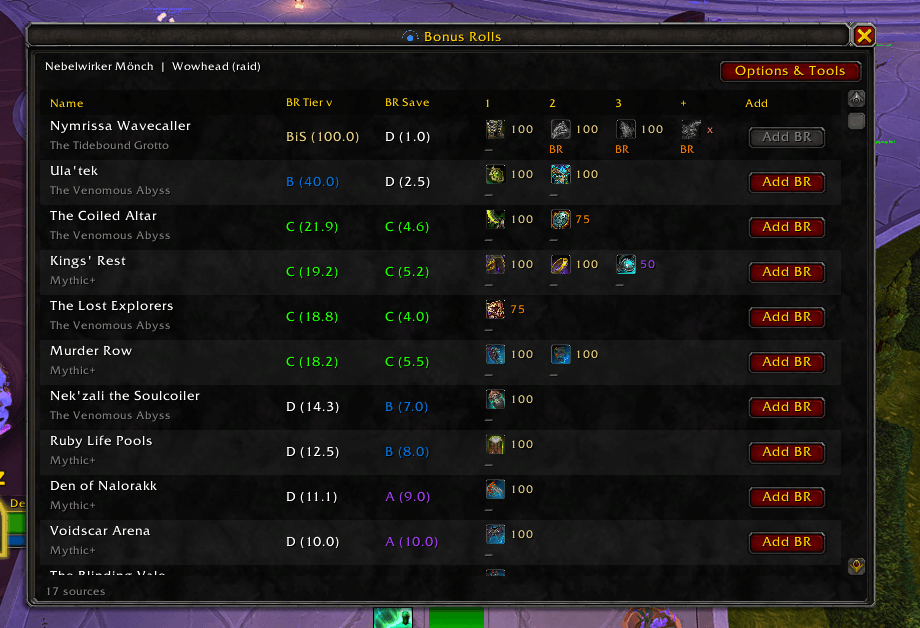
- Bonus-roll tracker — rank current-season raid bosses and Mythic+ dungeons as bonus-roll targets for your spec
- RCLootCouncil columns — show each candidate's BiS Tier and BR Save for the item being awarded
- BiS lists — bundled lists from Blingtron (All Average), Wowhead, Archon, Icy Veins, and Method (overall, raid, and M+)
- Custom BiS — per-player and per-spec CSV overrides
- Guild note sync — import CSV data to set guild officer notes and/or public notes
- Support for clearing notes for guild members not in the CSV
- Minimap button (drag to reposition)
Usage
Opening the AddOn
- Left-click the minimap button to open Bonus Rolls
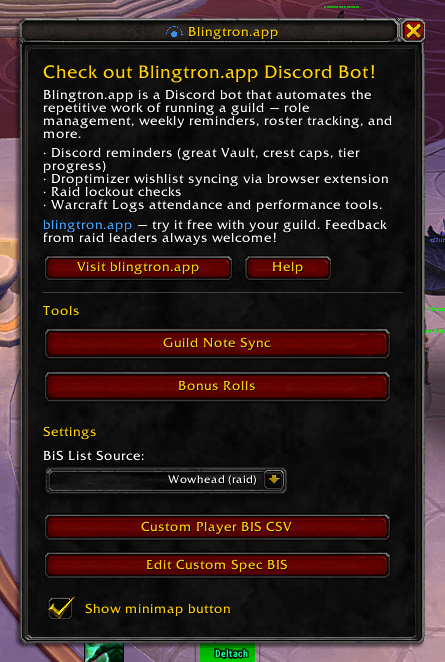
- Right-click the minimap button to open the main menu (Options & Tools)
- Type
/blingtronor/blingtronappin chat for the main menu /blingtron bonusrollor/blingtron bropens the bonus-roll window
The bonus-roll window has an Options & Tools button that opens the main menu.
Bonus rolls
The bonus-roll window ranks every current-season raid boss and Mythic+ dungeon for your current spec, using the BiS list selected in the main menu.
Loot pools are spec-specific: only items your spec can actually loot are counted (equippable gear, plus tier-set tokens that turn into gear). Toys, recipes, and other non-gear drops are ignored.
| Column | Meaning |
|---|---|
| BR Tier | How good this boss or dungeon is as a bonus-roll target. Based on the expected value of remaining wanted loot. The best source is BiS; others are S–D relative to it. Higher means spend bonus rolls here. |
| BR Save | Value of getting a piece as regular loot so bonus rolls can be spent elsewhere. Higher means this source is a worse bonus-roll farm (more junk). Shown as a tier plus score: item weight divided by that source's bonus-roll EV. |
Click an item's status to cycle:
- — not looted yet
- BR bonus-rolled (removed from that source's remaining pool)
- Loot looted normally (still in the bonus-roll pool)
Add BR on the right of each row marks other loot-pool items (not on your targeted list) as bonus-rolled. Those items appear in extra + columns with an x to remove them.
Hover BR Tier / BR Save column headers for a short explanation. Click a header to sort.
Slash commands for tracking (item = numeric ID or shift-clicked link; source = raid:197169 or mplus:588):
/blingtron bonusroll (br)           open bonus-roll window
/blingtron have <item>              mark owned from normal loot
/blingtron unhave <item>            clear owned
/blingtron rolled <item> [source]   mark bonus-rolled
/blingtron unroll <item> [source]   undo a bonus-roll mark
/blingtron bonusstatus (brstatus)   show tracked items
/blingtron bonusclear               clear this character's tracking
/blingtron help                     this list
RCLootCouncil
When RCLootCouncil is loaded, two columns are added to the voting frame:
- Tier — this player's rank for the current item on the selected BiS list (or a custom player/spec list). BiS is best in that slot. S, A, B, C, and D are lower ranks. A percentage is the list's recommendation when available.
- BR Save — value of giving this as regular loot so they can spend bonus rolls on better targets. Higher means that source is a worse bonus-roll farm.
Hover a column header or a cell for details.
BiS lists
In the main menu, choose a BiS List Source. Custom lists take priority:
- Custom player BIS (if that player has any CSV rows, only that list applies)
- Custom spec BIS (if that spec has saved rows, only that list applies)
- The selected bundled source
Custom Player BIS CSV format: name-realm,itemid,specid(optional),note(optional)
- Omit spec id and note → all specs, note
BiS - Third column: spec id (number) or a note (text)
- Saving replaces the entire override list
Custom Spec BIS format: one line per item, itemid,note (note may contain commas). Empty file + Save clears that spec.
Guild notes (CSV)
The CSV file should be in the following format:
charname-realmname,noteWhere:
charname-realmnameis the character name and realm (e.g.,PlayerName-RealmName)noteis the note to set (can contain commas)
Example:
John-Dalaran,This is a note, with commas
Jane-Stormrage,Another note
Bob-Tichondrius,Simple note
Setting notes
- Open Guild Note Sync from the main menu
- Paste your CSV data into the text area
- Select which note types to set:
- Set officer note: Sets the officer note for matching guild members
- Set public note: Sets the public note for matching guild members
- Clear missing: Clears notes for guild members not in the CSV (optional)
- Click Process CSV to apply the changes
Notes
- You must be a guild officer with permission to set notes
- The addon requires you to be in a guild
- Character names are matched case-insensitively
- At least one note type checkbox must be selected before processing
Requirements
- World of Warcraft Retail
- Optional: RCLootCouncil for voting-frame columns
- Guild membership and officer permissions for guild note sync
License
This addon is licensed under the GNU General Public License v3.0. See the LICENSE file for details.
The Blingtron.app - RCLootCouncil bonus roll's and guild tools Team