bistracker
- By
Track your Best-in-Slot gear progression with phase and spec support, drop alerts, and a searchable item database.
UI.png
Description
BIS Tracker
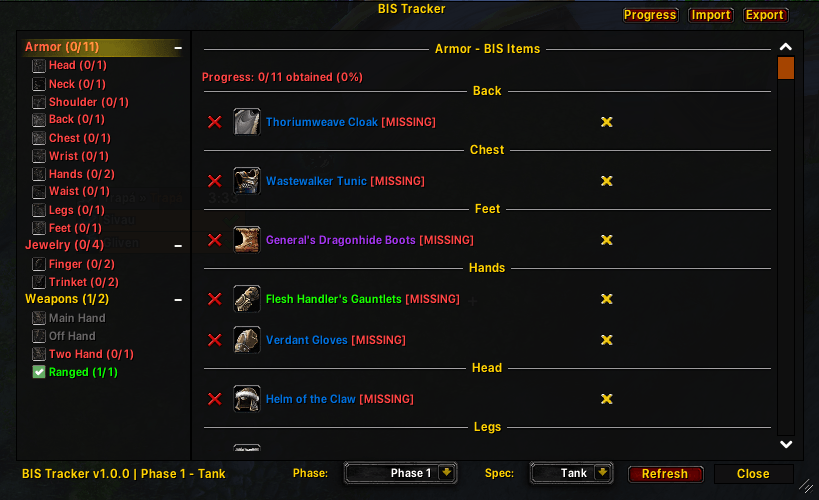
A World of Warcraft addon for tracking your Best-in-Slot (BIS) item progression in TBC Classic.
Features
Item Tracking
- Track any item - Add items to your BIS list by item link (shift-click) or item ID
- Automatic slot detection - Items are automatically placed in the correct equipment slot
- Obtained status - Tracks whether you have items in your bags or equipped
- Visual progress - See your progress at a glance with checkmarks and color coding
Organization
- Phase support - Organize your BIS lists by content phase (Phase 1-5)
- Spec support - Maintain separate lists for different specs (DPS, Tank, Healer)
- Per-slot breakdown - Items organized by equipment slot (Head, Chest, Weapons, etc.)
Item Search
- Built-in item database - Search from 35,000+ Classic and TBC items
- Real-time search - Find items by name instantly
- Async loading - Database loads in the background without lag
Notifications
- Drop alerts - Get notified when a tracked item drops in your loot window
- Sound alerts - Optional sound notification for BIS drops
- Chat notifications - See when you obtain or equip tracked items
Interface
- Minimap button - Quick access with progress tooltip
- Tree view - Expandable categories for easy navigation
- Clean UI - Matches WoW's native aesthetic
Slash Commands
| Command | Description |
|---|---|
/bis |
Open/close the main window |
/bis add [itemlink] |
Add an item to your BIS list |
/bis remove [itemlink] |
Remove an item from tracking |
/bis list |
List all tracked items |
/bis search [name] |
Search for items |
Usage
- Open the addon - Click the minimap button or type
/bis - Select phase and spec - Use the dropdowns at the top
- Add items - Click "Search" on any slot to find and add items
- Track progress - Items turn green when obtained
Installation
- Download the BIS folder
- Place it in your
World of Warcraft/_classic_/Interface/AddOns/directory - Restart WoW or type
/reload
Requirements
- World of Warcraft: The Burning Crusade Classic (2.5.x)
- No other addon dependencies required
Version
1.0.0
License
This addon is free to use and modify for personal use.
bistracker Team