BiS or Miss | Best in Slot Gear Advisor & Upgrade Tooltips
Best-in-Slot upgrade tooltips plus a filterable BiS gear browser showing the upgrades you can still get for your class & spec vs what you're wearing — with a cross-character raid lockout tracker. TBC Classic.
Description
BiS or Miss
Stop guessing which drops are upgrades — and what to put in them.
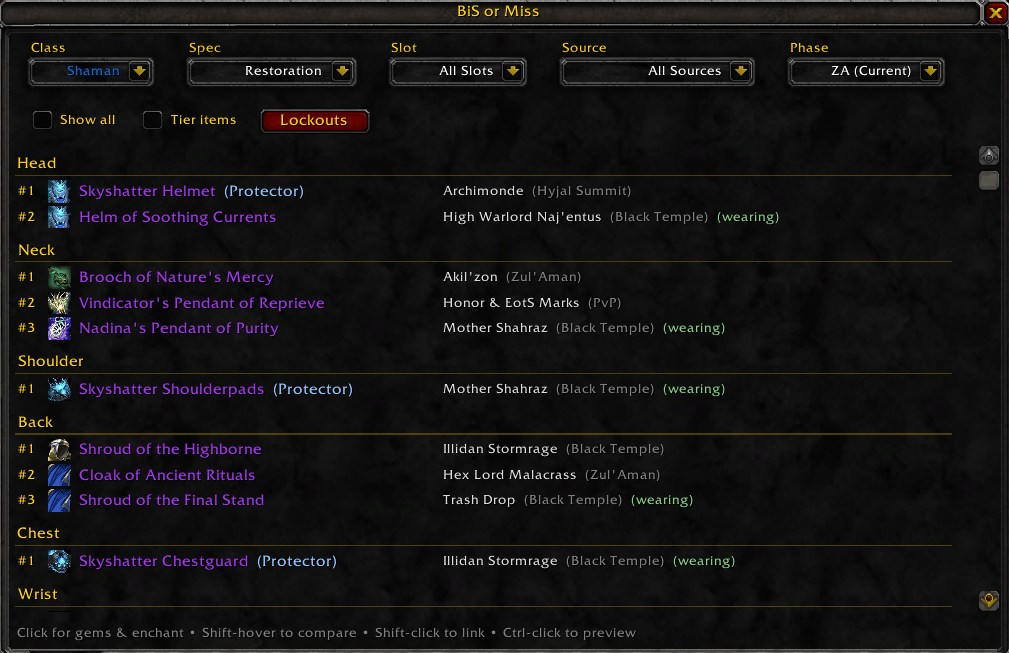
BiS or Miss shows you, at a glance, every Best-in-Slot upgrade you can still get for your class and spec, compared against the gear you're wearing right now. Then it tells you how to gem and enchant it. A browsable, filterable BiS window; spec-aware item tooltips; and gem, enchant and socket-bonus advice for any item you hover or click.
Gear
- Items tab — open with
/bismor the minimap button. It opens on your class and current talent spec and lists, slot by slot, what you're wearing and the BiS upgrades above it, each tagged with its rank (#). Flip Show all to browse the complete ranked list for every slot. - Spec-aware tooltips — hover any item, anywhere, and see which specs want it and at what rank. For your own spec you get an instant verdict versus your equipped gear: upgrade, already wearing, or downgrade.
- Phases — Pre-Raid, T4, T5, T6, ZA and Sunwell Plateau (SWP). The window opens on the current phase, marked (Current) in the Phase dropdown; later phases are there for planning.
- Filters that combine — phase, slot, source (each raid and dungeon, Badge of Justice, reputation, crafted, PvP, quest, world drops) and a Tier-items toggle for token gear.
- Already own it / can't get it yet — items in your bags or bank are tagged
(owned); items you can't use yet are flagged in yellow with the reason: missing profession or specialization, opposite Aldor/Scryers side, reputation not yet earned, level not yet reached. - Tier tokens — hover a token to see exactly which set pieces it turns into; token groups are shown next to tier pieces so you know what to roll on.
- Compare, link, preview — Shift-hover to compare against what you're wearing, Shift-click to link in chat, Ctrl-click for the dressing room.
Gems & Enchants
- In the tooltip — hover any socketed item and the BiS or Miss section adds Gems: what goes in that item's actual sockets for your spec and phase (the socket bonus is taken when it's worth it), and Enchant: the recommended enchant for the slot. Works on anything, not just items on the lists.
- Click for the panel — click an item in the Items tab and a panel opens beside the window with the enchant, one line per socket with the gem and its colour, the socket bonus, and the meta gem's requirement. Hover for tooltips; Shift-click a gem or enchant to link it in chat — handy for "LF enchanter".
- Gems tab — every gem your spec could consider, grouped by colour, epics first, each with its Design and where the Design comes from (trainer, vendor and reputation, or dungeon drop).
- Enchants tab — the enchants, glyphs, inscriptions and spellthreads recommended for your spec, by slot, with the Formula or Pattern to link, and a yellow tag when you don't yet meet a level or reputation requirement.
- Phase-aware — gems and enchants that only arrive in a later phase stay hidden until you view that phase, so the list shows what you can actually get today.
Raiding
- Lockouts — a window showing which of your characters are free for each raid this week (Karazhan through Sunwell Plateau) plus heroic lockouts and reset timers. Log in on an alt and it's recorded automatically.
- BiS drop HUD (beta, off by default) — a small overlay in raids that lists BiS items for your class as they drop, read from the loot announcements, and marks who won them. Enable it in the Options tab.
- Drop sound (beta, off by default) — hear a short, quiet "bruh" the moment a BiS item for your class drops, so you don't miss it mid-fight. Follows your Sound Effects volume; Test button in the Options tab.
/bism export— copies your character as a WoWSims import string (gear with gems and enchants, talents, professions) to paste into Import → Addon on wowsims.com/tbc.
Supported
- Classes / specs: all ten classes, 27 specs including Feral DPS and Feral Tank separately. Discipline shares the Holy Priest list.
- Phases: Pre-Raid, Tier 4, Tier 5, Tier 6, Zul'Aman and Sunwell Plateau.
- Game version: Burning Crusade Classic (2.5.6).
- Fully offline — all data is bundled. No web calls, no setup, no other addons required.
Notes
- Gear, gem and enchant recommendations follow popular community Best-in-Slot lists and guides for each phase (list-based, not simulation based).
- Feral DPS and Feral Tank can't be told apart from talents alone, so Druid tooltips show both Feral lines.
- Under active development — feedback and bug reports are very welcome.
Commands: /bism (or /bisormiss) toggles the window; /bism export opens the WoWSims export; /bismdrops controls the drop HUD.
BiS or Miss | Best in Slot Gear Advisor & Upgrade Tooltips Team