
File Details
V2.0.4
- R
- Jan 27, 2026
- 784.51 KB
- 129
- 12.0.1+1
- Retail
File Name
BetterTransmog.2.0.4.zip
Supported Versions
- 12.0.1
- 12.0.0
Version 2.0.4
Quite a major update containing many requested features and improvements! As usual, thank you for your feedback and support and bug reports, if you have any, don't hesitate to open a issue on the github page!
Added outfit swapping mode
Added outfit swapping mode with expandible outfit prieview that you can open anywhere, anytime to change in between of, or look at - your saved outfits!
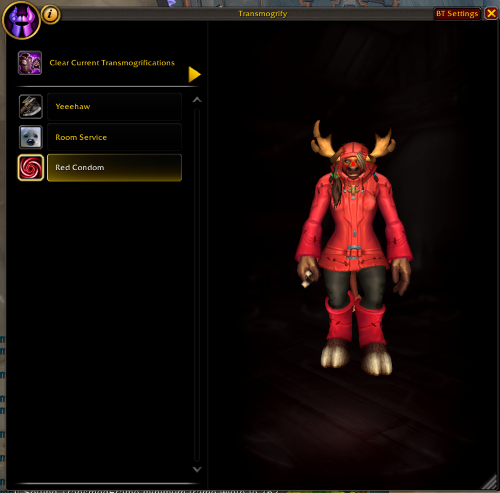
You can access it with the new minimap button, or by using /bt outfits
Special thanks to: Smashbru, No-Geologist3092 and Bodehn for requesting this freature!
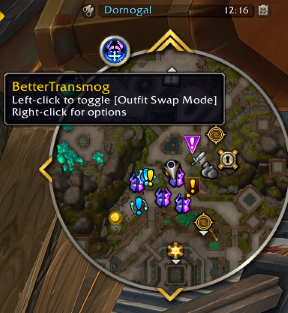
Added BetterTransmog Minimap button
Added a better transmog minimap button that lets:
- [Left-Click] Open Outfit swapping panel
- [Right-Click] Open BetterTransmog Settings Panel
Added new /slashcommands and massively improved the /slashcommand system
The new /slashcommand system supports aliasing, so you can write the same command in different ways. For example, you can use either /bettertransmog or /bt
Here are the new /slashcommands:
/btor/bt settings | options(opens settings panel)/bt outfits | outfit | fits(Opens the outfit swapping panel)/bt changelog | changes(Opens the changelog panel)/bt help(shows a list of the available commands)
a "|" means "OR", so for example /bt settings and /bt options both are the same command.
Improved frame position + size saving & restoring
The transmog frame has 2 modes now.
- Outfit swap
- Regular Positions and sizes for these 2 modes are saved and restored seperately for your convenience!
Improved changelog frame and system
Made the changelog frame more user-friendly with better readability and smoother interactions, so you can enjoy reading about updates without any hassle!
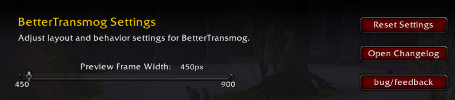
Added new buttons in the settings
The bug/feedback button allows for copying a URL to the github issues page, which is the preferred place to give me feedback!
Codebase upgrades
I won't bore you with the technical stuff, but under the hood, things are changing and improving! and if you are interested, you can always have a peek at the GitHub repo <3