BetterTrackpad
BetterTrackpad transforms WoW into action-combat style gameplay
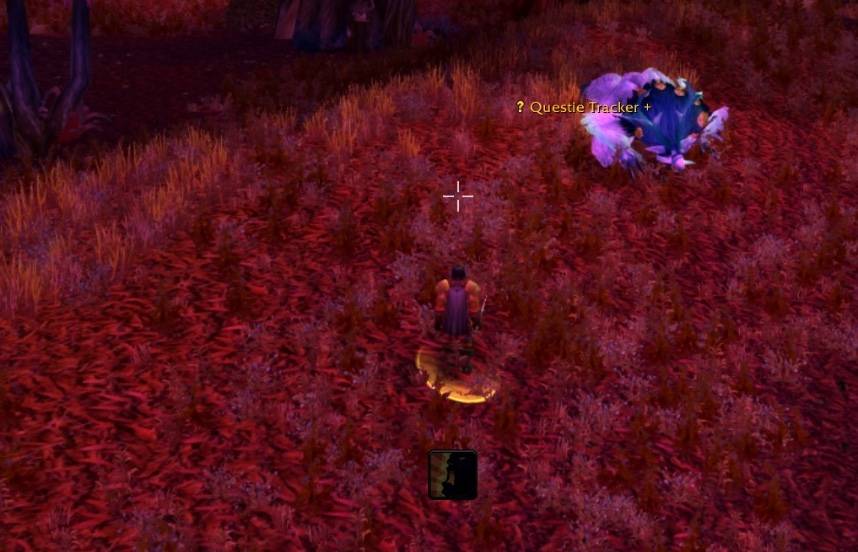
SCR-20260126-pfwj.jpeg
Description
Transform WoW into action-combat style gameplay!
Move your trackpad or mouse to look around AND turn your character simultaneously — no need to hold right-click. Inspired by modern action MMOs like Throne & Liberty.
Perfect for MacBook trackpad users or anyone who wants seamless action-style camera controls.
✦ How It Works
When Action Mode is enabled:
- Moving your mouse/trackpad rotates the camera
- Your character automatically faces the direction you look
- A customizable reticle appears on screen
- The reticle changes color based on what you're targeting
Press F12 to toggle, or use the on-screen button.
✦ Features
Action Mode Controls
| Action | Input |
|---|---|
| Toggle Action Mode | F12 or click button |
| Loot Corpse | Right-Click on gold reticle |
| Exit Action Mode | Double Right-Click |
| Temporary Cursor | Hold Alt + Click |
Smart Reticle System
- 8 Styles — Crosshair, Crosshair+Dot, Plus, Dot, Small Dot, Circle, Brackets, Diamond
- Full Customization — Size, thickness, length, gap, color, opacity
- Adjustable Position — Offset from screen center
Target Awareness
Your reticle automatically changes color based on what you're looking at:
| Color | Meaning |
|---|---|
| 🔴 Red | Enemy |
| 🟢 Green | Friendly |
| 🟡 Gold | Lootable (+ bag icon) |
| ⚪ Gray | Dead |
Easy Loot
- Reticle turns gold when hovering over lootable corpses
- A bag icon appears next to the reticle
- Simply Right-Click to loot instantly
- Optional auto-loot grabs all items automatically
Smart Behavior
- Auto-pauses when opening bags, menus, or UI windows
- Combat detection with optional auto-enable
- Remembers state when menus close
Installation
- Download and extract to your AddOns folder
- Enable BetterTrackpad in the character select AddOns menu
- Press F12 in-game to start!
✦ Slash Commands
/bt Toggle action mode /bt on Enable action mode /bt off Disable action mode /bt options Open settings panel /bt help Show help
✦ Configuration
Access settings via /bt options or Right-Click the toggle button.
Customize:
- Toggle key (F1-F12, Backtick, Insert, Delete, Home, End)
- Cursor modifier key (Alt, Ctrl, or Shift)
- Double-click exit speed
- Reticle appearance and position
- Button visibility, size, and opacity
- Combat and menu behavior
- Notification preferences
Tips
- Use Alt as your cursor modifier so auto-loot (Shift) still works
- Drag the toggle button anywhere on screen
- The reticle pulses when acquiring an enemy target
- In combat, the reticle turns red for visual feedback
Compatibility
- ✅ Retail (Dragonflight, The War Within)
- ✅ Classic Era
- ✅ Classic Anniversary
- ✅ Cataclysm Classic
Requires Ace3 libraries (embedded in the addon).
Feedback & Support
Found a bug or have a suggestion? Please open an issue on the project page!
BetterTrackpad Team