World of Warcraft 08_10_2026 14_59_18.png
Description
BetterMacro
Build your macros with blocks, and read in plain language what they will do.
Writing a macro in World of Warcraft means learning a small language of slashes, brackets and semicolons. BetterMacro replaces that with blocks you click together, and explains the result in full sentences, so you know what your macro does before you press the button.
It is made first for players who have never written a macro. Players who have will simply go faster.
How it works
Open the window with /bm, the minimap button, or the BetterMacro button under the game's own macro window.
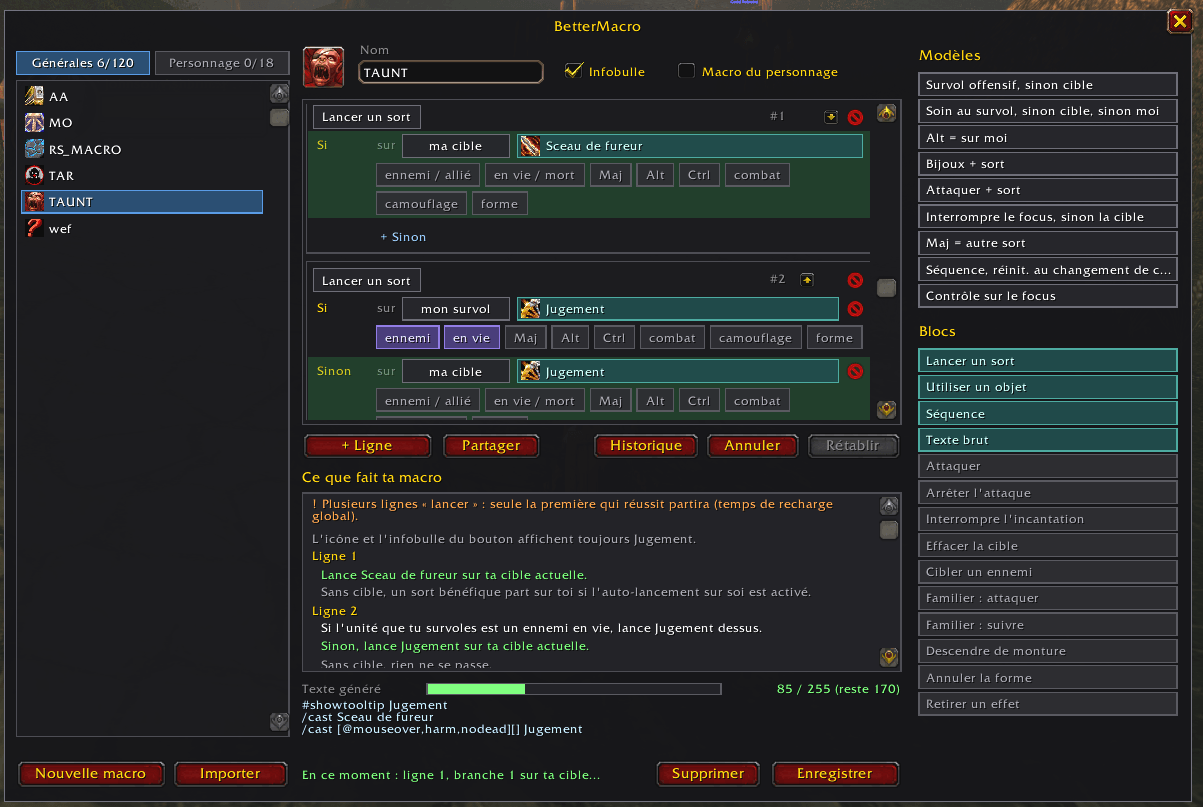
- Left: your macros, general and character-specific.
- Centre: the blocks that make up the macro you are editing.
- Right: ready-made templates and the blocks you can add.
Every block is a line of your macro. Pick a spell or an item by searching for it, or drag it straight from your spellbook or bags.
What you can build
- Cast a spell or use an item, with "if / otherwise" branches: if my mouse is over a living ally, heal them; otherwise heal my target; otherwise heal me.
- Targets: your target, mouseover, yourself, your focus, your target's target, your pet.
- Conditions: enemy or ally, alive or dead, Shift / Alt / Ctrl held, in or out of combat, stealthed, stance or form.
- Cast sequences, with reset rules (after a few seconds, on target change, when leaving combat, with a modifier key).
- Common commands: start or stop attacking, stop casting, clear target, target nearest enemy, pet attack and follow, dismount, cancel form, cancel an aura.
- Tooltip and icon:
#showtooltipis handled for you, and you can choose the icon.
What makes it different
- It explains your macro. Under the blocks, BetterMacro writes out what the macro does, step by step, and warns you about common traps, such as a branch that can never be reached or a healing spell aimed at an enemy.
- Live test. The branch that would fire right now is highlighted in green as you change target, hover over a unit or hold a key.
- Built-in safety checks. Mouseover and focus branches get an enemy-or-ally check and an "alive" check by default, so the macro moves on to the next branch instead of getting stuck. You can see them and remove them.
- Length gauge. A bar shows how much of the 255-character limit you have used, and a Compress button shortens the text when you run over.
- Undo and history. Ctrl+Z and Ctrl+Y work in the editor. Each time you save a change, the previous version is kept, and deleted macros can be brought back.
- Share with friends. Turn any macro into a short code, paste it in Discord or in a whisper, and your friend imports it in one click. Nothing is saved on their side until they have read what it does.
- Works with the macros you already have. Open an existing macro and it is rebuilt as blocks. Anything BetterMacro does not recognise is kept as a "raw text" block, so nothing is lost.
Good to know
- Available in English and French.
- In combat the window stays readable and the live test keeps running, but editing and saving are locked. This is a game rule, not a choice of the addon.
- Your macros remain normal WoW macros. If you remove BetterMacro, they keep working.
- This is an early version built for WoW Forever. Bug reports and ideas are welcome.
Commands
/bm or /bettermacro opens and closes the window.
Licence: MIT. Author: Wapaz.
BetterMacro Team