BetterErrands
- By
Sells junk and the items on your sell list, repairs your gear and keeps your supplies topped up, every time you open a vendor. In the vendor window it adds a search box, shows how many of each item you carry, and marks recipes you already know.
be-settings.png
be-sell-list.png
be-restock.png
Description
BetterErrands
BetterErrands does the chores at a vendor for you: it sells your junk, repairs your gear and restocks your supplies. It also adds a search box to the vendor window.
What it does
Every time you open a vendor:
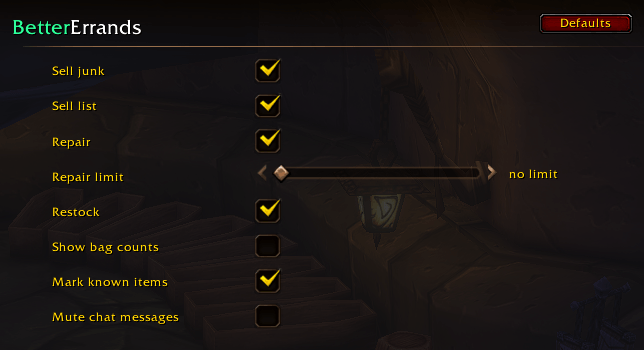
- Repairs all your gear. You can set a gold limit in the settings; by default there is none.
- Sells every grey item and prints what it got for them.
- Sells the items on your sell list, so old food, drink and other leftovers go without you thinking about it.
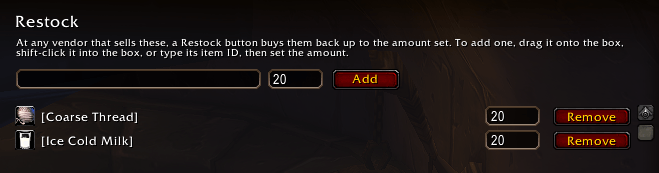
- Shows a Restock button when the vendor sells items on your restock list that you are short of. One click buys them back up to the amount you set.
It waits half a second so that other vendor addons go first, then only does what they left. If Leatrix Plus is set to sell junk or to repair, BetterErrands leaves that to it and says so once.
Vendor window
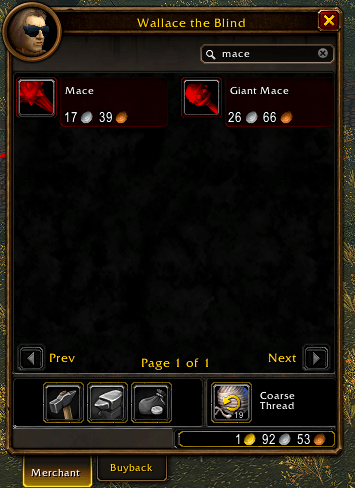
- A search box at the top. Items that don't match are hidden, matches from every page are collected into their own pages, and the page counter counts matches. Clear the box to get the normal pages back.
- Each item shows how many you already carry, in its top-right corner.
- Recipes, mounts and pets you already know are marked "known".
Sell list
Three ways to add an item:
- Alt-click it in your bags while a vendor is open. The item's tooltip reminds you of this, and shows when an item is on the list.
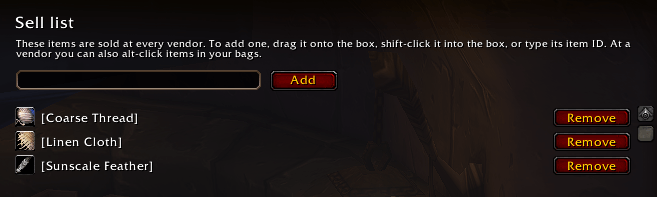
- On the sell list page in the settings (Options > AddOns > BetterErrands > Sell list), drag an item onto the box, shift-click it into the box, or type its item ID. The page lists everything on the list, each with a Remove button.
/be sellfollowed by a shift-clicked item link.
Items on the list are sold at every vendor, after the junk and at most 12 stacks at a time. That is what the vendor's Buyback tab holds, so if something went that shouldn't have, you can always buy it back right there. When more stacks are waiting, a button in the vendor window sells the next 12; each batch replaces the previous one in Buyback, so check it first.
Restock
The Restock page in the settings (Options > AddOns > BetterErrands > Restock) lists what you restock: drag an item onto the box, shift-click it into the box, or type its item ID, set the amount, and change it later in the list. /be restock <item> 20 does the same from chat; shift-click the item into the chat line for <item>, and an amount of 0 stops restocking it. The item's tooltip shows its restock amount. Items sold in bundles are bought by the bundle, so you can end up with a little more than the amount.
Settings
Open Options > AddOns > BetterErrands, or type /be. Each feature has its own switch: sell junk, sell list, repair and its gold limit, restock, bag counts, known marks, and chat messages.
Commands
/be: opens the settings/be sell <item>: adds the item to the sell list, or removes it/be restock <item> <amount>: keeps that many in your bags; 0 stops/be listor/be sell: opens the sell list page/be restock: opens the restock page
Good to know
Selling goes a few items at a time, so a bag full of junk takes a moment. Built for the WoW Forever beta.
BetterErrands Team