Better Damage Text
- By
Screenshot 2026-10-04 051413.png
Description
Better Damage Text
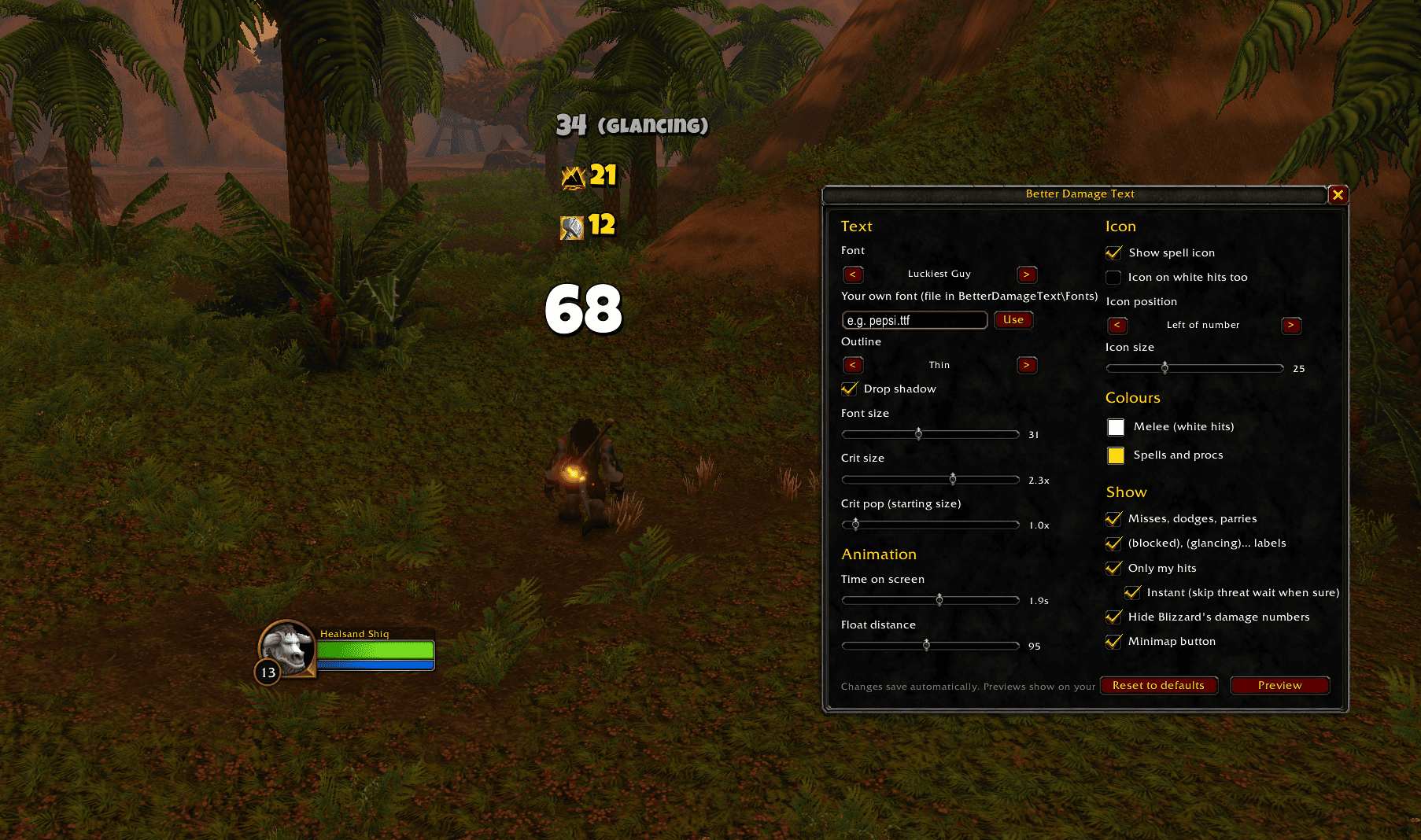
See exactly what hit. Better Damage Text replaces the default floating damage numbers on enemies with its own, and puts the icon of the spell that caused each hit right next to the number. Heroic Strike, Earth Shock, Flametongue procs, Lightning Shield zaps and DoT ticks each show their own icon.
Built for World of Warcraft: Forever.
Features
- Spell icon next to every number. Works with any class and any spell you cast, with no setup.
- Procs and passive damage are recognised too:
- Weapon enchants: Flametongue, Frostbrand, Instant Poison.
- Damage shields: Lightning Shield, Thorns, Fire Shield, Retribution Aura.
- Damage over time: ticks get the icon of the spell that applied them.
- Channelled spells.
- Only your damage. Other players' and pets' hits on your target are filtered out.
- Blizzard-style crits: they pop in big and settle at a larger size.
- No overlapping: new numbers push older ones up.
- Misses, dodges, parries and partial hits: "Miss", "Parry", "(blocked)", "(glancing)" and so on.
- 10 bold fonts included (Luckiest Guy, Bangers, Titan One, Bowlby One and more), plus the game's own fonts.
- White melee hits are shown in white, spells and procs in yellow. Both colours can be changed.
Settings
Type /bdt, or go to Options → AddOns → Better Damage Text.
| Section | Settings |
|---|---|
| Presets | One-click looks: Blizzard, Big & Bold, Fountain, Arcade, Minimal |
| Text | Font (10 bundled bold fonts plus the game's own), outline, drop shadow, font size, crit size, crit "pop" size |
| Animation | Style (Rise, Fountain, Fall, Scatter, Pop), time on screen, distance |
| Icon | Show or hide, icon on white hits on or off, left or right of the number, size |
| Colours | Melee colour, spell colour |
| Show | Misses and dodges, partial-hit labels, only my hits, hide Blizzard's numbers, minimap button |
Changes save automatically, and each one shows a short preview. The minimap button opens the settings with a left-click and shows a preview with a right-click.
Any fonts shared by other addons through LibSharedMedia also appear in the font list.
Commands
| Command | What it does |
|---|---|
/bdt |
Open the settings window |
/bdt test |
Show some sample hits |
/bdt minimap |
Show or hide the minimap button |
/bdt mine on / off |
Only show your own hits |
/bdt blizzard |
Turn Blizzard's own damage numbers on or off |
/bdt debug |
Print every hit and why it was shown or hidden |
/bdt record |
Save that output to disk, for bug reports |
How it works
WoW: Forever doesn't let addons read the combat log, so no addon can be told directly "spell X hit for Y". Better Damage Text works it out from what addons can see:
- the damage each mob takes, and its damage type
- the spells you cast, and the damage type and duration in each spell's description
- the steady 3-second rhythm of DoT ticks
- your weapon enchants and shield buffs
- your threat on your target, which only rises from your own damage
Bug reports
Please include:
- What you expected and what you saw.
- A recording: type
/bdt record, reproduce the problem, type/bdt recordagain, then/reload. - The log file:
WTF\Account\<your account>\SavedVariables\BetterDamageText.lua.
Better Damage Text Team