


Screenshot from 2026-10-15 11-39-28.png
Description
Best Value
Never sell yourself short on quest rewards again.
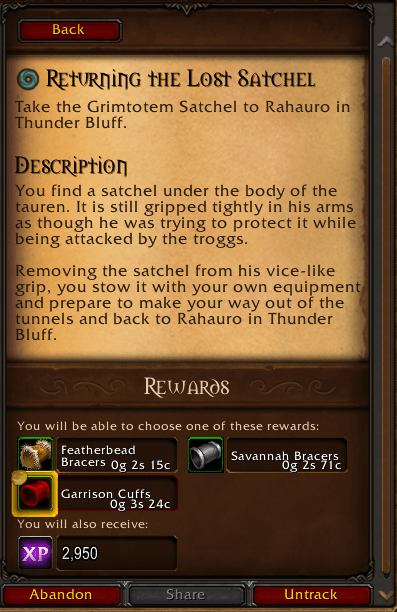
Best Value shows which quest reward is worth the most at a vendor, and can sell it for you at the next merchant.
Features
Find the best reward at a glance
- A gold coin marks the reward with the highest vendor value.
- Every reward choice shows its sell value (price × quantity), or Not sellable.
- Works both in the quest turn-in window and in the quest log.
- Optionally prints the best reward to chat when you turn in a quest.
Auto-sell
- Tick Sell chosen reward at next vendor on the turn-in window, and the reward you pick is sold automatically the next time you open a merchant.
- Built to be safe:
- It only sells items from your bags, never equipped gear.
- It never sells more than the quest gave you, so identical items you already had stay in your bags.
- The queue is cleared after each vendor visit, so nothing gets sold by surprise later.
- The queue is saved between sessions and reloads.
Clean settings window
- Open it with /bv, or under Options → AddOns → Best Value.
- Turn each feature on or off: best-reward highlight, sell values, chat announcement, auto-sell, and whether the sell box starts checked.
- Sell queue overview with item icons, values and total. Right-click an item to remove it, or clear the whole queue.
Titan Panel & data broker support
- Shows your auto-sell state, or the number and total value of queued items, right in your panel.
- Click to open settings. Shift-click or right-click to toggle auto-sell.
- The tooltip lists everything in the sell queue.
- Also works with ChocolateBar, Bazooka, ElvUI and any other LibDataBroker display.
Retail
- Listed in the AddOn Compartment menu next to the minimap.
Commands
┌───────────────────┬───────────────────────────────────┐
│ Command │ Action │
├───────────────────┼───────────────────────────────────┤
│ /bv or /bestvalue │ Open or close the settings window │
├───────────────────┼───────────────────────────────────┤
│ /bv autosell │ Toggle auto-sell │
└───────────────────┴───────────────────────────────────┘
Supported versions
- World of Warcraft: Forever
- World of Warcraft Retail
Each game version has its own download, so make sure you grab the right one.
Notes
Item values come from the game's own item data. If an item isn't cached yet, it shows ... for a moment and updates automatically.
Best Value Team


![Titan Panel [CritLine Forever] project image](https://media.forgecdn.net/avatars/thumbnails/2120/88/256/256/639276436138900718.png)