Bento Bags
- By
Your bags and bank as one tidy window of named sections that you arrange yourself. Built for WoW Forever.
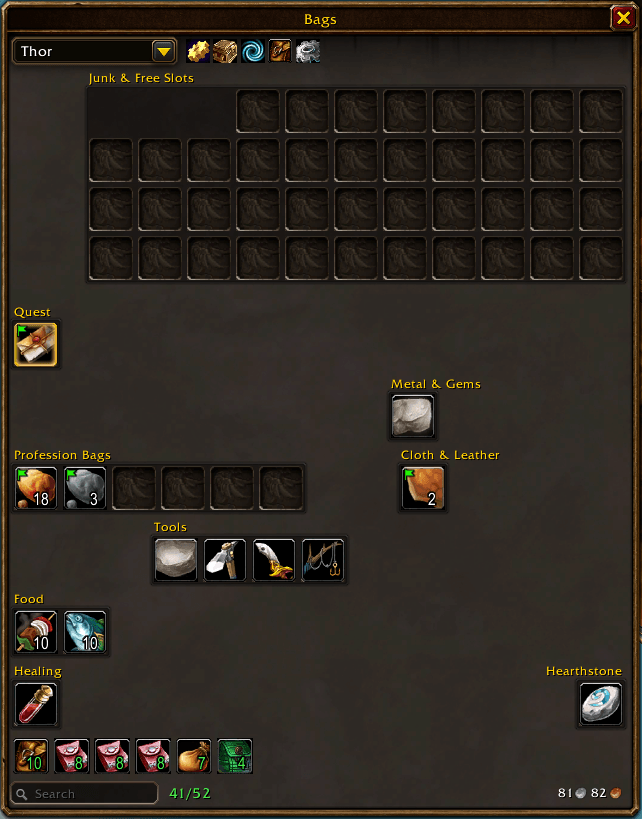
The game's own panel style, with section names shown.
Description
Bento Bags replaces the bag and bank windows with one window laid out like a bento box: a grid of sections, each holding the kinds of items you decide belong together.
Every item is sorted into a category (healing potions, food, quest items, worn gear, cloth, junk and so on), and every category lives in a section. Move a category to another section, rename a section, recolour it or hide it, and the window keeps that arrangement for all your characters.
What it does
- Sections you arrange. In edit mode, click a category and then the section it should go in. Sections can be renamed, recoloured, hidden and sorted by name, by kind or in bag order.
- Sorting that works out of the box. Around 55 categories for consumables, gear, trade goods, quest items, keys, recipes, junk and more. Put a single item somewhere else by hand, or make your own categories.
- Sorts by item type, in any game language. A few finer splits (healing or mana potion, food or drink) read English text; elsewhere those land in the general category beside them.
- Stays put while open. New loot appears without shuffling everything else around; the window tidies itself the next time you open it, or when you press Sort.
- Bank in the same layout, including bank bags and buying bank tabs.
- Other characters' bags and bank, viewable from anywhere, and a search that finds an item across all of them.
- Quest starters first. An item that begins a quest you have not taken sits ahead of everything else until you take it.
- Keyring as its own section.
- Sells junk at vendors (can be turned off), and item counts across your characters in tooltips (can be turned on).
- Bags full? A small notice offers to delete the junk stack worth the least; nothing goes without your click (can be turned off).
- Markers for bind-on-equip gear and for items you cannot use.
- Two looks: the game's own panel style, or a flat dark theme with pixel-exact borders.
- Right-click a bag slot to empty that bag into your others.
Plays well with
- Masque for button skins and Pawn for upgrade arrows, when installed. Both are untested so far; reports welcome.
- ItemTree badges show on Bento Bags' item slots.
Good to know
- It replaces the default bags, so turn off any other bag addon while using it.
- Selling junk is on by default: only the Junk section, at most 12 items per visit, so everything can be bought back. The first time it sells something it tells you where the switch is.
- A character's bank opens empty until its first tab is claimed: click "Buy tab" in the bank window (the first one is free).
- It marks two of the game's tutorial pop-ups (mount equipment, reagent bag) as seen, because they interfere with bag buttons. It changes no other game setting.
- It sends nothing anywhere and reads no other addon's saved data.
Commands
/bentoopens and closes the bags/bento bankshows the bank (what was there at your last visit, when away from a banker)/bento configopens the settings
Thanks
Bento Bags began as a remake of TBag and keeps its central idea: numbered regions that hold categories. Parts of the item-button and bank handling follow BetterBags (MIT).
Bento Bags Team