Beast Collector for Petopia
- By
Collects information that can be exported to a CSV and sent to Petopia for the new Forever version
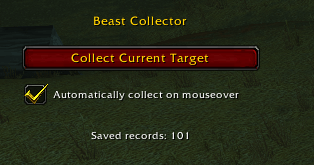
image_2026-10-17_035133023.png
Description
WHAT IT DOES
============
Beast Collector records information about beast NPCs you encounter and lets you
export the collected data to a CSV file for Excel or Google Sheets.
Recorded information:
- NPC ID, family, and name
- Level and classification (Normal, Elite, Rare, Rare Elite, or Boss)
- Zone and subzone/area
- Tameability: Yes, No, or Unknown
- Player map coordinates for Rare and Rare Elite observations, when available
COLLECTING BEASTS
=================
Automatic mouseover collection:
- Enabled by default.
- Hover your mouse over a beast NPC in the game world to collect it.
- Use the "Automatically collect on mouseover" checkbox in the addon window
to turn this feature on or off. The setting is saved.
- Mouseover collection does not change your current target.
Manual collection:
- Target a beast NPC.
- Click "Collect Current Target" in the Beast Collector window, or use the
assigned collection keybinding.
- Set the keybinding in WoW's Key Bindings settings; it may appear under Other.
- Non-beast targets are not collected.
TAMEABILITY
===========
The addon observes Tame Beast when you cast it normally using your spellbook,
action bar, or a normal WoW macro such as:
/cast Tame Beast
Yes: Tame Beast starts channeling on your current beast target.
No: The client displays the exact error "Creature not tameable."
while that beast is targeted.
Unknown: No conclusive result has been observed.
A conclusive Yes or No also collects that beast automatically if it was not
previously recorded. Keep the beast targeted while the cast or error occurs.
The addon does not cast Tame Beast for you. This is a real taming spell: if you
let it complete, you may tame the creature. "Yes" means the channel began;
it does not guarantee the tame will finish successfully.
EXPORTING TO CSV (WINDOWS)
==========================
First you need to download the Exporter zip located at:
https://drive.google.com/file/d/1OhQCLHwwVkQjNu3JalqvLOVFUhOAUvND/view?usp=sharing
- Extract the .bat and .ps1 to the ..Interface\AddOns\BeastCollector addon folder
- In WoW, type /reload or log out to write SavedVariables to disk.
- Open ..Interface\AddOns\BeastCollector in Windows Explorer.
- Double-click Export-BeastData.bat.
- If prompted, choose the WoW account's SavedVariables file.
- Find BeastData.csv in the same BeastCollector addon folder.
- Import BeastData.csv into Google Sheets or open it in Excel.
Beast Collector for Petopia Team