Both Clocks, Please
- By
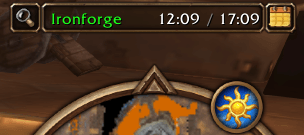
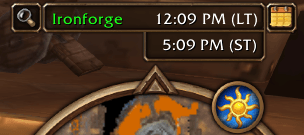
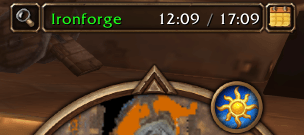
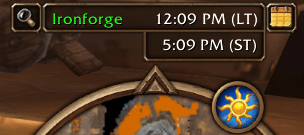
Two clocks, server and local time, side by side on your minimap, so you never mix up time zones. Lightweight and unobtrusive, it blends right into the default UI.
Screenshot 2026-11-09 120939.png
Screenshot 2026-11-09 121000.png
Screenshot 2026-11-18 124418.png
Description
Local time and server time on your minimap clock, side by side or stacked.
It needs no setup. It blends into the default clock bar and barely uses any memory, CPU or disk space.
- It shows whichever time your clock isn’t showing.
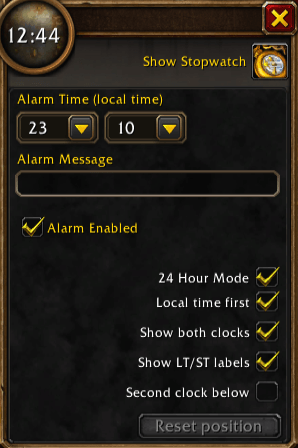
- It follows your clock settings for local/server and 12h/24h.
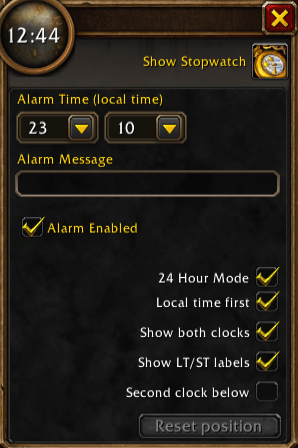
- Clicking anywhere on the clock opens the default UI clock settings.
- The clock settings get extra options: turn the second clock on or off, show or hide the LT/ST labels, or put the second clock in its own box just below the normal one, styled like the default clock bar.
- Move the zone & clock bar anywhere in Edit Mode. The position is saved per Edit Mode layout, and “Reset position” in the clock settings puts it back on the minimap.
- The alarm shows whether it’s set to local or server time.
Works with every Edit Mode layout, including the minimap header underneath, and with square minimap addons like Leatrix Plus (the second clock is always side by side there). However, not made for full UI replacements that build their own minimap and clock, like ElvUI.
Found a bug? Type /bcp diagnostics, copy the report from the window that opens and send it to me on Discord: vesel7343.
You can also leave feedback and suggestions in the comments.
I can also be contacted in-game: Lege Salvesen on Forever-EU-PvE-Alliance.
🇺🇦 Donate to the Ukranian Armed Forces 🇺🇦
Both Clocks, Please Team