Basecamp - Camping Made Easy
- By
A camping helper for WoW Forever: one movable camp sphere that fills with your camp cooldown and counts your kits, with an animated ring for your campfire kits, camp objects by profession and the Cozy Sleeping Bag.
Basecamp-1.0.0-beta3-shapes.png
Basecamp-1.0.0-beta3-fill.png
Description
# Basecamp
A camping helper for WoW Forever's camping system. One small, movable sphere replaces digging through your bags for kits and camp objects. It only helps you place and use what you already carry.
**Early beta.** This is a beta build, so bugs may occur. You'll see a one-time notice about it in game. Please tell me what breaks in the comments on this page.
## The sphere
- It fills as the shared one-hour camp cooldown runs out. Full means you can place a camp object now
- In the centre: READY or the time left, and under it the total campfire kits in your bags (KITS)
- A small green badge on its edge shows how many camp items you can craft right now from what's in your bags. Open each profession window once so Basecamp learns its camp recipes, and after that it just works. The tooltip lists what you can craft and what you're one ingredient short of
- It fades when you have nothing to place or craft. It stays shown and movable
## Sphere shapes
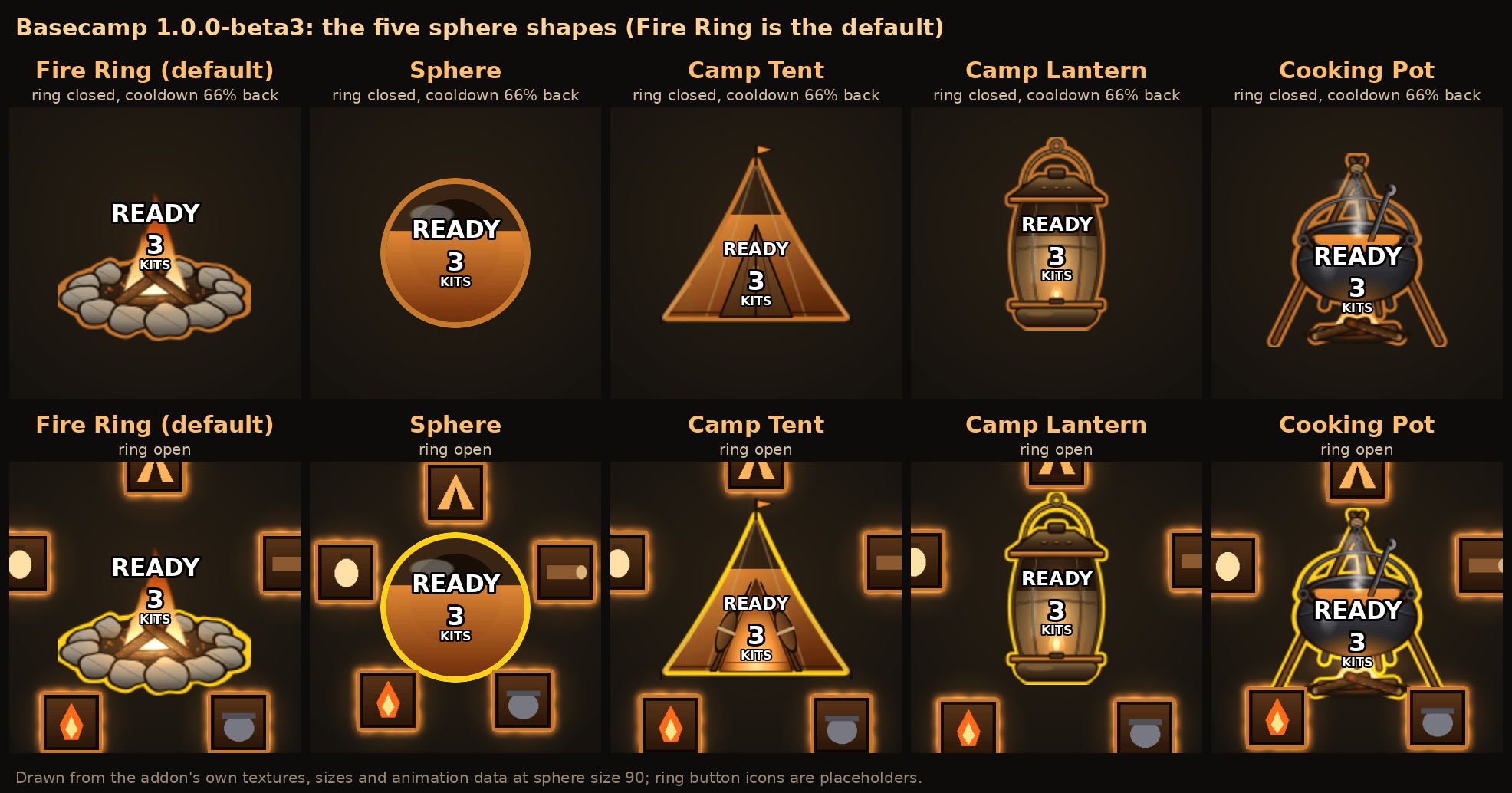
Pick a look under Sphere shape. They all click the same way:
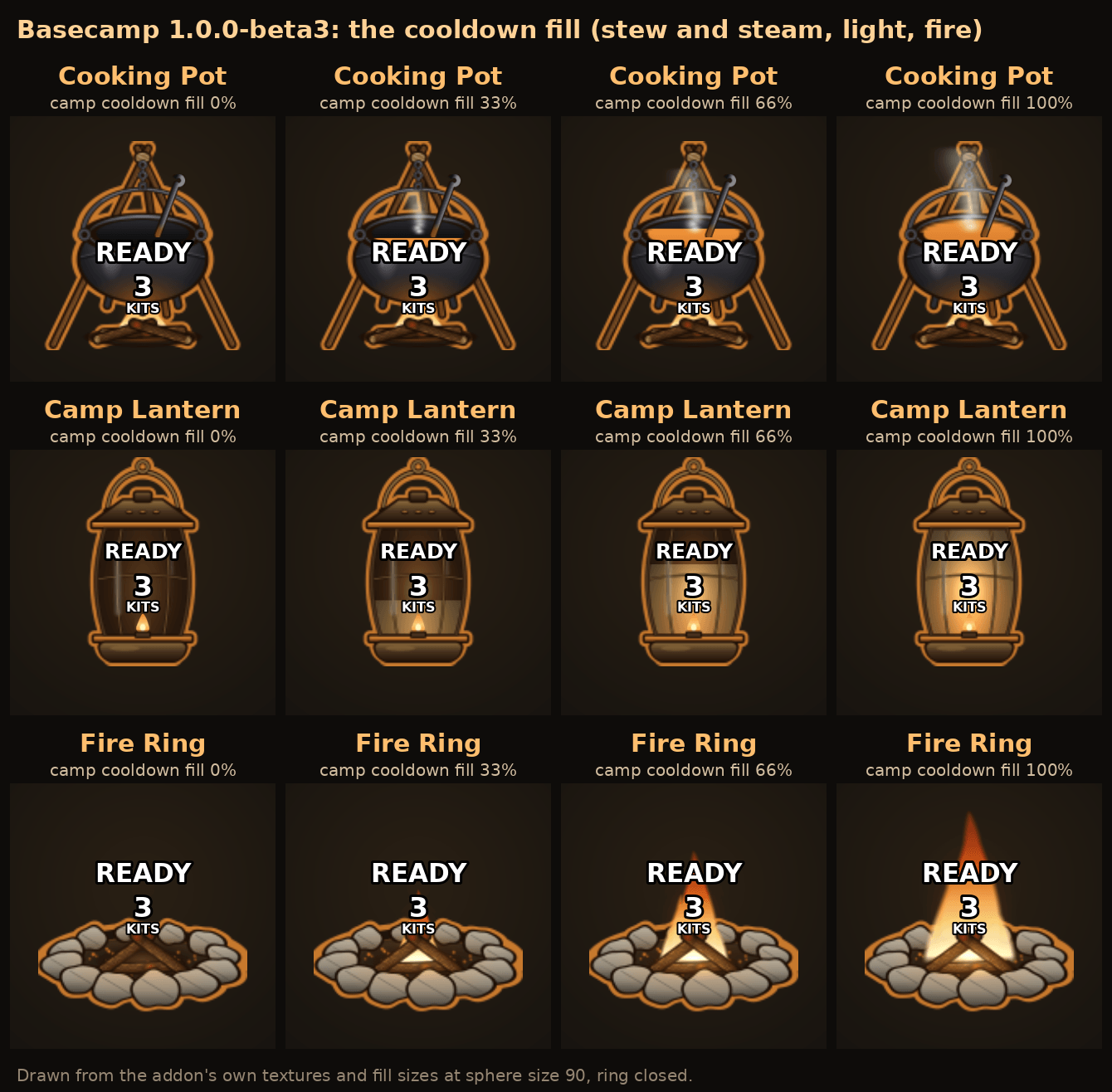
- **Fire Ring** (default): a ring of stones round a fire pit with crossed logs. The flame builds over the logs as the cooldown comes back, and the embers glow brighter. Open the ring and the fire flares, embers drift up and the stones catch the firelight. Close it and the fire settles with a curl of smoke
- **Sphere**: the round ember sphere. The cooldown fills it like a little ember pot
- **Camp Tent**: a canvas tent with guy ropes, pegs and a pennant. The door flaps are down while the ring is closed. Open the ring and the flaps tie back, warm light spills out, and a firefly floats out of the door to each button. The cooldown fills the tent from the ground up
- **Camp Lantern**: a hanging glass lantern. The warm light rises inside the glass as the cooldown comes back, and the glass glows brighter as it fills. Open the ring and the wick turns up and a soft ring of light spreads out to your buttons. Close it and the flame turns down with a wisp of smoke
- **Cooking Pot**: a black iron pot hung from a wooden tripod over a small fire. The stew rises in the pot and starts to steam as the cooldown comes back. Open the ring and the steam puffs up, the ladle gives the stew a stir and the fire lights up the pot. Close it and a last wisp of steam drifts up. It suits Basecamp's right-click, which opens your Cooking window
Fire Ring is the look you start with. You can switch any time and Basecamp remembers your pick.
## Clicks
- **Hover**: opens the ring. It closes shortly after the mouse leaves
- **Left-click**: the best campfire kit in your bags that your Cooking skill can place (Expert, then Journeyman, then Basic). With no kit, it crafts a Basic Campfire Kit if you know the recipe and carry Simple Wood. Otherwise nothing happens, and the tooltip tells you what's missing
- **Right-click**: opens your Cooking window, where kits are made. No Cooking? It opens the first profession that makes a camp object you carry. Prefer the old way? Set Right-click to Sleeping bag in the settings
- **Middle-click**: opens the settings
- **Shift + Left-click**: opens and closes the ring, if you set the ring to open on click
Moving never places anything: you move the sphere in move mode (see below), never by dragging the sphere itself. Everything is used by item, not by bag slot, so sorting your bags breaks nothing.
## The ring
Clockwise from the top, and each button only shows when it has something to offer:
- **Campfires**: a list of your kits with counts and cooldowns, and how many camp objects each fire holds, plus a "Craft Basic Campfire Kit" entry when you know the recipe (greyed out with "Needs Simple Wood" when you're short)
- **One button per profession** that has a camp object in your bags, opening a list of that profession's objects in tier order. Each shows the shared camp cooldown, and is greyed out with the reason if your skill is too low
- **Found**: camp items that don't belong to a profession, like the Scarlet Banner
- **Sleeping bag**: the Cozy Sleeping Bag, with its own cooldown and your Well-Rested stacks
The ring makes room for itself when many buttons are shown. Put the sphere in a screen corner and the buttons spread along the side that has room, so none of them end up off screen. Lists can grow up, down, left, right or toward the open side of the screen, and tooltips sit outside the ring so they never cover your buttons.
## In combat
Whatever is open when combat starts stays open, and every button on it still works. Whatever is closed stays closed. The sphere's own left and right clicks work in combat too. Anything you ask the ring to do mid-fight (open, switch lists) happens as soon as combat ends.
## Ring animations
Pick how the ring opens and closes, with a Preview button to try it on your own ring:
- **Spark Burst** (default): a flame flares up behind the sphere and spits a spark at each button. A star flashes, the icon lights up inside a warm ember rim, and the rims glow softly while the ring is open. On close the embers drop away
- **Lantern String**: a string runs round the ring from button to button and a paper lantern unfolds and lights up behind each one, flickering softly. On close the lights snuff out one by one and the lanterns fold away
- **Fade**: a simple fade and scale, no decoration
- **Off**: no animation
Animation speed goes from 0.5x to 2x, and Reduced motion swaps everything for a quick, soft fade. The lists off each ring button use the same style, and every sphere shape works with every style.
## Moving the sphere
Click **Move** at the top of any settings page (or type /basecamp unlock). You get a box over the sphere, a faint alignment grid with a gold cross through the middle of the screen, and a small move bar. Shift+drag the box to move the sphere. It snaps to the grid while Snap is ticked and onto the centre lines when it gets close; hold Alt to place it freely. Right-click the box to put the sphere back. The move bar has Lock, Reset, Back to settings, Centre horizontally, Centre vertically, Grid (off, 16, 32 or 64 pixels) and Snap. While you're in move mode the Move button reads Lock, so one click ends it. Escape and combat end it too.
The spot is shared by all your characters, so you place it once. Tick **Use a separate position on this character** to give one character its own spot. The Position page also has X and Y sliders in whole pixels with - and + buttons, and Centre and Reset buttons. The sphere always stays on screen, whatever your resolution or UI scale.
## Hiding Basecamp
- Turn on **Hide inside instances** and Basecamp hides itself in dungeons, raids, battlegrounds and arenas (pick which ones count)
- **/basecamp hide** hides it on that character until /basecamp show, even after a /reload, so one alt can keep it tucked away. **/basecamp toggle** flips between the two
- Inside an instance, /basecamp show brings it back until you leave
- While it's hidden your camp timers and saved stuff keep going, and the minimap button still opens the settings
## Camp features
- **Camp sit timer**: sit by your fire and the ring around the sphere pulses while you wait. When the camp boons really land (the Camp Benefits buff), you get a notice and a chime listing what landed. Sit again to refresh and it tells you again. Walk away and it quietly cancels
- **Well-Rested stacks** from the Cozy Sleeping Bag show as "Well-Rested 2/3" in the tooltip and on the Sleeping Bag button, with one short "Fully rested" notice at 3/3
- **Camp buffs**: /basecamp buffs lists your camp buffs and the time left on each
- **Wood tally**: the sphere tooltip counts your Simple Wood and how many kits it makes
- **Camp planner**: Basecamp users in your party can see which camp objects each other carry, whose camp cooldown is ready and where the camp is, and the tooltip shows who can fill the fire's remaining slots. Only outdoors, never inside dungeons, and you can turn it off
- **Ember mood**: embers crackle on the sphere while a fire is lit nearby, it glows warmer at night (game time), and a spark puff plays when you cook at camp
- **Campfire journal**: after each camp, a little postcard of where you camped, who was with you, how many objects and how long. An optional screenshot of it is off by default
- **Starred camps**: star a favourite campsite with a note, then list them by zone and set a map pin with one click
- **Teach**: if Basecamp spots a camp item it doesn't know yet, you can file it under a profession or Found
- **Messages**: Basecamp's yellow messages stay up for 6 seconds by default (2 to 15 in settings), and /basecamp notices shows any you missed
## Settings
Type /basecamp, click the minimap button or the addon compartment, or middle-click the sphere. The settings window matches the rest of my addons: pages down the left (Sphere, Ring, Animation, Position, Visibility, Features) and a live preview of your own sphere and ring on the right, with Open, Closed and Play. In combat it opens read-only. You'll find scale, sphere size, sphere shape, ring radius (Auto by default), open the ring on Hover or Click, close the ring after N seconds (default 9, 0 keeps it open), fan direction, tooltip side, fade when idle with an opacity slider, fade when there's nothing to place, show greyed-out objects you can't place, a sparkle on Campfires, the right-click choice, the craft badge, the ring animation, speed and reduced motion. Every camp feature above has its own switch on the Features page.
## What's New
After an update a small What's New window shows once, a few seconds after you log in, with what changed. /basecamp news opens it again anytime, and it has a button to stop it showing at login.
## Masque skins
Masque is optional and not included. Install it and the ring buttons and the list buttons take your Masque skin. They're separate groups ("Ring" and "Ring Menus") in Masque's settings, so you can skin or turn off each one. The sphere keeps its own look. Without Masque nothing changes.
## Commands
/basecamp - settings
/basecamp lock, /basecamp unlock - leave or enter move mode
/basecamp reset - put the sphere back (/basecamp reset all also resets this character's own spot)
/basecamp hide, /basecamp show, /basecamp toggle - hide or show Basecamp on this character
/basecamp scan - look through your bags again
/basecamp status - what Basecamp found in your bags, in a window you can copy from
/basecamp welcome - explains the clicks
/basecamp news - the What's New window
/basecamp buffs - your camp buffs and their time left
/basecamp teach - file a camp item Basecamp doesn't know yet
/basecamp journal - your camp postcards
/basecamp star [note] - star the camp you're standing at
/basecamp camps - your starred camps, with map pins
/basecamp unstar <number> - remove a starred camp
/basecamp notices - messages you might have missed
/basecamp help - the command list
It never places, crafts or uses anything by itself. Every action is your click.
This is an early beta, so please report anything odd in the comments.
For WoW Forever, Made by TheNerdyBox & SasiRawr (Alliance, PvP ruleset). Questions? Say hi in game or on Discord.
Check out our other addons and our website here!
Basecamp - Camping Made Easy Team