BarSwap
- By
All action bars change when you change form/stance/stealth/aura. Not just bar 1. Authentic default Blizzard UI with zero macros needed.
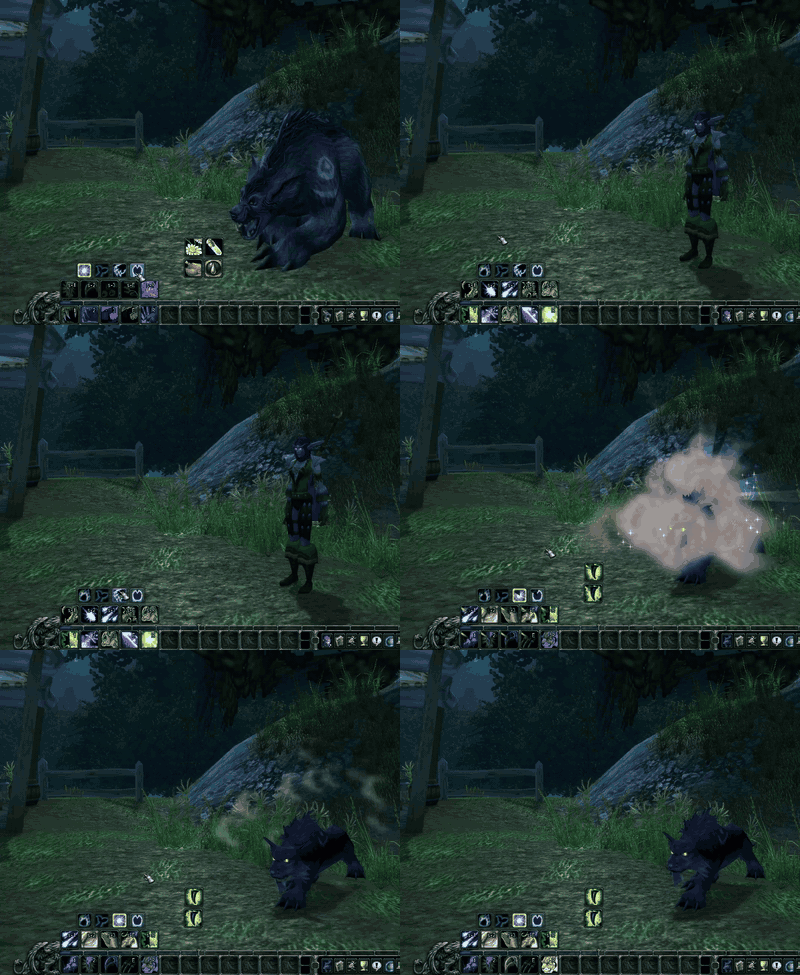
Had a low level druid i went ahead and used as an example. Every single action bar changes with her forms.
Description
BarSwap
All your action bars change when you change form/stance/stealth/aura. Not just bar 1.
Normally in WoW Classic, going into Bear Form, Cat Form, Defensive Stance, or Rogue Stealth only flips your main bar (Bar 1). Your other bars (Bar 2, bottom bars, and side bars) stay completely frozen. Most people try to fix this by writing complicated form macros, but you run out of character macro slots fast and it's tedious for alts.
BarSwap gives every single stance/form/stealth/aura etc. its own full set of bars across your whole screen without needing Bartender, Dominos, or a full UI overhaul. It keeps the authentic default Blizzard UI, keeps your gryphons, keeps your keybinds, and works in combat without causing UI errors.
Supported classes
| Class | What gets its own bars |
|---|---|
| Druid | Default, Cat (and Prowl), Bear, Moonkin |
| Warrior | Battle, Defensive and Berserker Stance |
| Rogue | Default, Stealth |
| Priest | Default, Shadowform |
| Shaman | Default, Ghost Wolf |
| Paladin | Default, Devotion, Retribution and Concentration Aura |
How to use it
- Install it and log in. Your spells are copied everywhere, so nothing is lost.
- Go into a form/stance/stealth/aura and drag spells onto all your bars like normal.
- Done. Your bars change every time you switch.
Edit your bars with the spellbook open
Open your spellbook and you are in edit mode. Under it you will see a tab for each form/stance/stealth/aura used for referencing your layouts.
- Empty slots show your other forms' spells faintly, so it's easy to put things in the same spot. For example Growl in Bear Form on the same key as Entangling Roots when you're not shifted.
- Hover a slot to see its keybind and every form's spell there. If there are a few, they rotate in the slot.
- Right-click a slot to copy the spell you see into it.
- Every tab is ticked. Untick one to hide that form's spells, tick it again to show them.
- The one you are in glows gold. The ones you haven't learned yet are greyed out until you learn them.
- Made a mistake? Ctrl+Z to undo, Ctrl+Y to redo.
Settings
You find them in Options > AddOns > BarSwap (or type /barswap).
- Turn each form/stance/stealth/aura's own bars on or off
- Default Layout: put your normal spells onto one of them
- Clear one of them, with an Undo button
- Small spell previews on your spells for quick copying (off by default)
- Show or hide the spellbook tabs and slot tooltips
Good to know
- When you learn a new rank of a spell, your bars update by themselves.
- Got dual spec? Each talent spec has its own bars too.
- Mounts and pets from your collection can go on your bars too, just drag them on.
- Dragged a spell off by accident? Ctrl+Z puts it back.
- Press Shadowform, Ghost Wolf, Stealth or a druid form again to turn it off.
- Like normal bars, you can't move spells around in combat. Switching and casting work as normal.
Paladins
- Your bars switch when you change aura out of combat.
- If you change aura during a fight, your bars catch up when the fight ends.
- Only your own aura counts, so another paladin in your group won't switch your bars.
- Small and light. No extra addons needed
Special to WoW Forever
- Mouseover Cast works too, just turn it on in WoW's Options.
- In the spellbook, spells you can't use in your current form/stance/stealth are faded.
- Hover to see them normally, you can still drag them onto your bars.
- Icon Size in Edit Mode works on BarSwap's bars too.
- Press and hold casting doesn't work with BarSwap. WoW only allows it on Blizzard's own action bar keys, not on addon bars.
Made for WoW Classic Era and Wow Forever. Enjoy!
PS: made this addon for myself. Then I realized this might be just what a new player needs, and honestly what everyone needs. No setup, no long list of options, it just works. Warrior stances, Rogue stealth and the rest work the exact same way.
BarSwap Team