Wow_APlhQtUuhD.png
Description
Bankbox
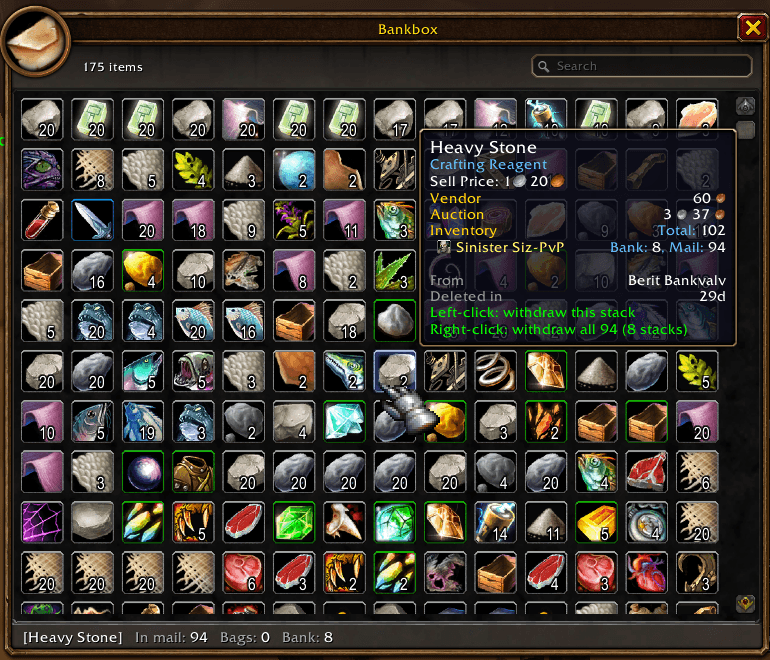
Lots of players keep items in their mail as a second bank. Bankbox shows all of them at once in a bank-style window, so you can find and take items without opening mails one by one.
Use
Open a mailbox and click the Bankbox tab next to Inbox and Send Mail (or type /bankbox).
| Action | Effect |
|---|---|
| Left-click | Take that stack. |
| Right-click | Take every stack of that item from all your mail, one at a time. |
| Shift-click / Ctrl-click | Link the item in chat / preview it in the dressing room. |
| Hover | The bottom bar shows how many you have in mail, in your bags and in your bank. |
- Items whose mail expires in less than 7 days get a red border. Under 3 days the slot also shows the days or hours left.
- The search box dims items that don't match.
- The bottom right shows the total gold sitting in your mail.
Limits
- Cash-on-delivery and GM mail are shown greyed out. Open those in the inbox.
- The server sends at most 50 mails at a time. If you have more, the bottom bar says so, and the rest load as you empty mails.
- Bankbox only takes items out. It never sends, returns or deletes mail.
Bankbox Team