BagSections
- By
A bag addon for WoW: Forever that combines all bags into one window. Create named sections like “Essentials” or “Weapon Swap” containing only assigned items. Everything else and empty slots go into “Rest.” Sorting happens separately within each section.
BagSections
One combined bag, split into your own sections. Keep your hearthstone, tools and weapon swaps in their own spots, and let everything else land in "Rest". Each section sorts on its own, so the things you always carry stay put. Your bank works the same way.
Watch the overview on YouTube (abit outdated now..)
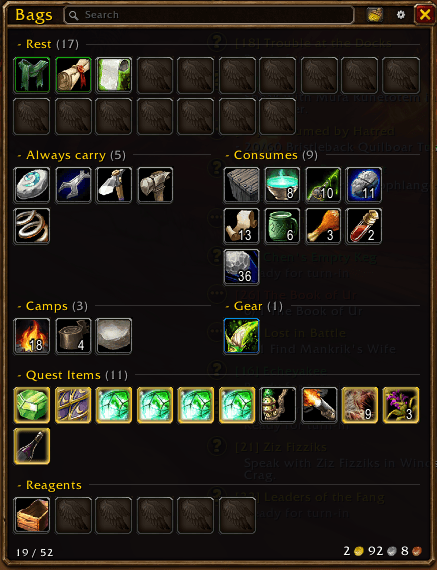
Semi-compact layout
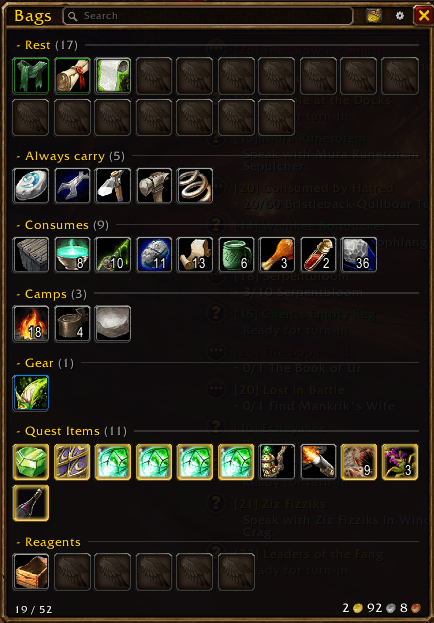
Stacked layout
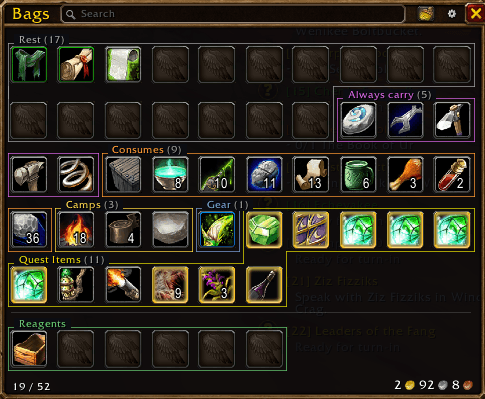
Compact layout
Features
- Your own sections: create, name, colour and reorder as many as you like.
- Drag and drop: drop an item on a section to add it, or on Rest to take it out. Places you can drop light up blue, like Blizzard's own bags.
- Sorts per section: uses Blizzard's sort, and every section stays sorted on its own.
- Smart matching: add "every Hearthstone" or just "this exact sword".
- Automatic sections: Quest Items and Reagents collect themselves. Reagents in your normal bags join your reagent bag in one Reagents section. You can turn each one off in Settings.
- Three layouts:
- Semi-compact (default): sections side by side in rows. Unlock it and drag sections to build the rows you want.
- Stacked: each section at full width.
- Compact: one tight grid like the combined bag, with each section outlined in its colour.
- Bank:
- Replaces Blizzard's bank: same look, with its own sections, layout and size.
- Linked sections: a bag section and its bank copy share their items, so things land in the right place when you deposit or withdraw.
- Bag slots: see every bank bag slot, swap bags, and buy new slots with the price shown.
- View it from anywhere: right-click the "Bags" title or type
/bs bank.
- See which slots a bag uses: hover a bag button and its slots light up, so you know what to empty before swapping it.
- Currencies: tracked currencies show next to your gold.
- Profiles: save your section setup, load it on any character, or share it with a copy-and-paste code.
- Looks at home: Blizzard's bronze border and background, or a plain dark style. You can adjust opacity, text sizes and spacing.
- Live preview: the bags stay open while you change settings, so you see every change right away.
- And more: collapse any section, search, and see gold and free slots at a glance.
Getting started
- Press B. BagSections replaces the default bags.
- Click the gear icon and choose New section…
- Drag items from Rest onto your new section.
- Visit a banker. BagSections offers to copy your bag sections to the bank.
Alt + Right-click any item for quick options. Right-click a section name to rename, recolour or move it. Type /bs to see the slash commands.
Good to know
- Sections are saved per character. Settings and profiles are shared across your account.
- Items aren't moved around in your real bags. Sections only change how the bag window shows them, so turning the addon off is always safe.
- Made for World of Warcraft: Forever.
Feedback and bug reports are very welcome in the comments!
BagSections Team