Bagnon Extra
- By
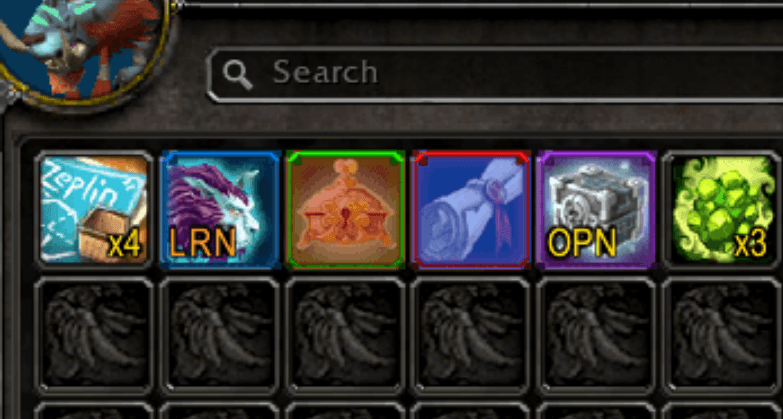
Bagnon Extra - A small companion for Bagnon / Bagnonium that adds: tints (different colors) on unusable items, text on charges, text on openable and learnable items.
MuCX9zYNch.png
Description
* NEW FEATURE: The ability to add favorite items with starred yellow, while opening the bag hover on an item that you would like to favorite, then type the command "/bagnonextra fav" -- to unfavorite an item do the same steps.
* NEW FEATURE: All consums will have purple star on top-left, if you would like to ignore a consumable hover on it and type "/bagnonextra ignore" - to add an item as a consums if the game doesn't detect it, hover on the item then type "/bagnonextra add"
A small companion for Bagnon / Bagnonium that adds:
1) Locked containers (lockboxes, chests, anything you don't currently
have the key/skill/tool to open) get a red tint.
2) Items with charges, not stacks (e.g. "Charges: 3 in the tooltip") get a
yellow "x3" label in the bottom right corner.
3) (Bagnonium only, when Bagnon isn't loaded) Profession recipes
for a profession you haven't learned get a blue tint. Bagnon
already does this natively; Bagnonium doesn't, so it's added to Bagnonium only.
4) (Same condition as #3) Class-restricted tokens whose tooltip
"Classes:" doesn't include your class get the same blue tint.
5) Equippable gear (weapons, armor, trinkets, etc.) whose tooltip
shows a requirement you don't meet -- profession skill, zone,
faction, level, and so on -- gets a pink tint.
6) Openable containers (caches, chests, anything with a "Right
Click to Open" tooltip, or a name suggesting the same) get
a yellow "OPN" text in the bottom left corner.
7) Learnable mounts, companion pets, and toys get a orange "LRN"
text in the same bottom-left corner.
8) Consumables (potions, elixirs, flasks, food, throwables, etc.)
get a purple'ish star icon in the top-left corner, on by default
for every item the game itself classifies as a Consumable.
9) For consumables, it can be overridden per item: "/bagnonextra ignore"
while hovering a consumable removes its star; "/bagnonextra add"
while hovering a non-consumable forces one on (or if the game doesn't detect it, example juju power on classic because in reality this is a quest item, but usability its a consumable). Running either
command again on the same item undoes it.
10) "/bagnonextra favorite" or you can also use "/bagnonextra fav"
while hovering any item marks it with a yellow star instead
-- independent of whether it's a consom or not.
A favorited item always shows the yellow star rather
than the purple one.
Bagnon Extra Team