Bagmeter Forever
- By
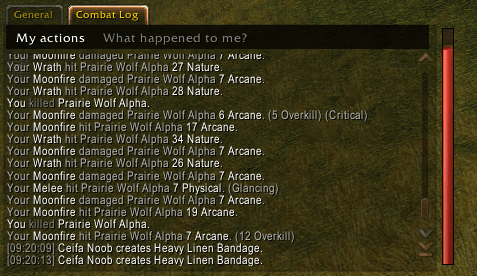
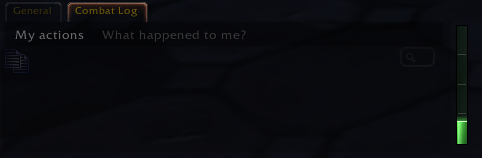
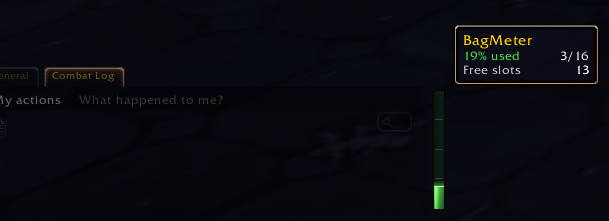
A sleek, animated bag-space bar beside your chat that glides from green to yellow to red as your bags fill up.
bagmeter1.png
Bagmeter2.png
Bagmeter3.png
Description
# BagMeter
### Never get caught with full bags again.
You are deep in a dungeon, the boss drops, you click the loot... and nothing happens. **Your bags are full.**
**BagMeter** puts a slim, animated meter right beside your chat window, the spot your eyes already visit a hundred times a minute. One glance tells you exactly how much room you have left. No bag opening, no counting slots, no surprises.
---
## Why players love it
- **Instant read, zero thinking.** The bar shifts smoothly from **green** (plenty of space) through **yellow** (half full) to **red** (time to vendor).
- **Looks like it belongs in the game.** A polished glass-tube style with soft shading, a glowing top edge and a gentle light sweep.
- **Feels alive.** The bar fills with smooth easing and gives a quick flash every time you loot something.
- **Calm when it matters.** No blinking, no sounds, no pop-ups. It informs you and stays out of your way.
- **Fits your layout automatically.** It sits just outside the visible chat edge and follows your chat when you resize or move it.
- **Detailed when you want it.** Hover the bar for used %, free slots and a per-bag breakdown, each bag colored by how full it is.
- **Featherweight.** Event-driven and throttled. It only animates while the value is changing, so it costs essentially nothing when idle.
- **Zero setup.** Install it, log in, done.
---
## Features at a glance
| Feature | Details |
|---|---|
| Smooth color gradient | Green, yellow, orange, red, with no hard steps |
| Animated fill | Bottom-to-top with smooth easing |
| Loot flash | Quick highlight when your bags gain items |
| Light sweep | Subtle shine that travels up the bar every few seconds |
| Guide marks | Discreet lines at 25%, 50% and 75% |
| Smart tooltip | % used, used/total, free slots and every bag listed |
| FULL warning | The tooltip says FULL at 100% |
| Auto-anchoring | Stays beside the chat, even after you resize it |
| Modern API | Built on C_Container for WoW Forever |
---
## Installation
1. Install with the CurseForge app, or download the file.
2. If installing manually, extract the **BagMeter** folder into `World of Warcraft\_forever_\Interface\AddOns\`.
3. Restart the game or type `/reload`.
The bar appears to the right of your main chat window.
---
## Commands
| Command | What it does |
|---|---|
| `/bagmeter` | Shows the version and available commands |
| `/bagmeter demo` | Plays the full 0% to 100% color sweep |
---
## Feedback
Found a bug or have an idea? Leave a comment on this page. Every report helps make BagMeter better.
**If BagMeter saved you a trip back to town, leave a like. It helps other players find it!**
Bagmeter Forever Team