AzerothAutoSkill
- By
Spot outdated spell ranks on your action bars, upgrade them with a click, and keep the lower ranks you still use.
AzerothAutoSkill-1.0.0-01-Upgrade-Alert-and-AutoPilot.png
AzerothAutoSkill-1.0.0-02-Settings.png
AzerothAutoSkill-1.0.0-01-Upgrade-Alert-and-AutoPilot.png
Description
AzerothAutoSkill
Spell rank upgrades for World of Warcraft: Forever
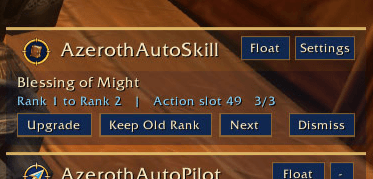
AzerothAutoSkill checks your action bars against the spell ranks you’ve learned. When a higher rank is available, it shows you which button has the older rank and lets you upgrade that slot with a click outside combat.
Spell ranks and action bars
- Find outdated ranks. See the spell, its current rank, the highest learned rank, and the affected action-bar slot. The higher rank can still be in your spellbook.
- Upgrade the selected slot. Click Upgrade outside combat to place the higher rank in that slot. If the spell appears on your cursor, click the intended action-bar button to place it.
- Keep lower ranks you use. Choose Keep Old Rank for a specific spell and slot so you can use different ranks side by side.
- Dismiss a suggestion. Dismiss clears the alert and pulse. If you remove the old rank and later put it back in the same slot, the addon can alert you again.
Alerts and layout
- Spot outdated buttons. An optional gold pulse marks visible action-bar buttons with older ranks. Control flashing and pop-up alerts separately in Settings.
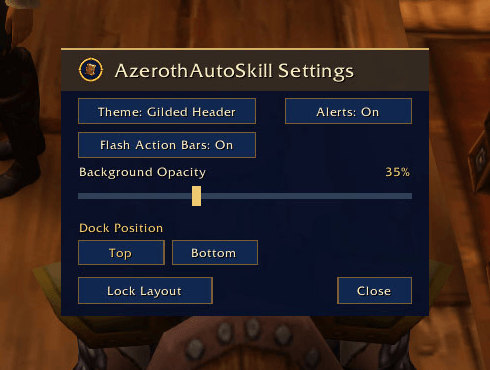
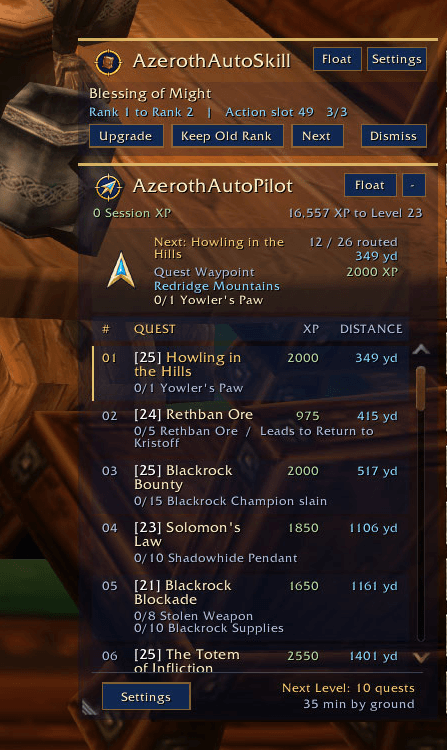
- Set up the panel your way. Dock it above or below AzerothAutoPilot, or choose Float to place it yourself. Save and lock your layout per character, and adjust the theme and background opacity in Settings.
- Open it from the minimap. Left-click the spellbook emblem to review suggestions, right-click for Settings, or drag it around the minimap rim.
Getting started
-
Install and enable AzerothAutoSkill for WoW Forever 1.60.1.
-
Click the spellbook button beside the minimap or type
/aasto review your action bars. -
Select Upgrade or Keep Old Rank for the slot shown. Right-click the minimap button or type
/aas settingsto adjust your preferences.
Use /aas unkeep <slot> to restore upgrade suggestions for a slot where you previously chose Keep Old Rank.
Compatibility and credits
Release 1.0.0 targets World of Warcraft: Forever 1.60.1.
Addon compatibility
- AzerothAutoPilot. AzerothAutoSkill works alongside our quest routing and navigation addon. Dock AutoSkill above or below the AutoPilot tracker and it follows the tracker’s position and width as you resize it. AzerothAutoSkill also works on its own. AzerothAutoPilot on CurseForge
Credits
AzerothAutoSkill uses the shared AzerothAutoPilot palette and button styling. The spellbook emblem and cover art are AI-generated artwork created for this addon.
Feedback and bug reports
Have an idea, found a bug, or worked out a fix? Leave a comment on this CurseForge project.
For bug reports, include your addon version, the spell and ranks involved, and what you were doing when it happened. An error message or a screenshot of the affected action-bar button helps.
AzerothAutoSkill Team