Azeroth Guidebook
- By
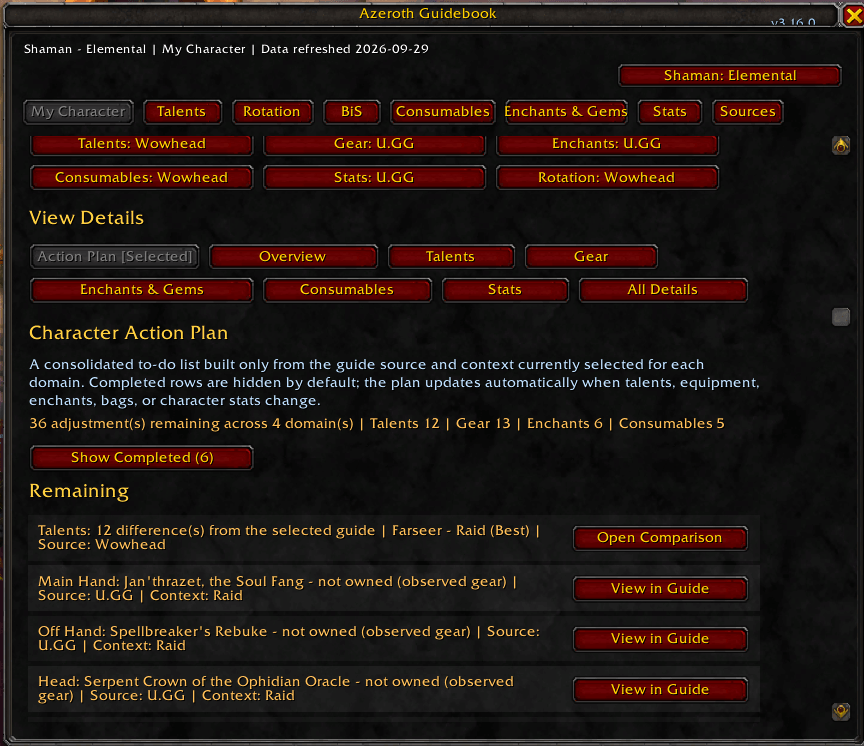
Turn your selected guides into an actionable checklist for talents, gear, enchants, and consumables.
Description
Azeroth Guidebook is an in-game PvE reference and character-auditing addon for Retail World of Warcraft.
It brings reviewed guide information from Wowhead, Icy Veins, and U.GG into one interface so you can choose the guide source you want to follow, compare it against your character, and make adjustments without constantly switching between browser tabs.
Guide Coverage
Azeroth Guidebook supports all 40 Retail specializations and can provide source-backed information for:
- Talent builds
- Rotation and cooldown guidance
- Best-in-Slot / observed gear
- Consumables
- Enchants and gems
- Stat priorities
Each guide domain keeps its selected source independently, so you can follow the sources you prefer rather than having Azeroth Guidebook combine recommendations into its own build.
Wowhead and Icy Veins are treated as editorial guide sources.
U.GG information is clearly labeled as observed player data rather than editorial Best-in-Slot recommendations.
My Character
The My Character dashboard audits your current character against the guide sources you selected.
It can identify things such as:
- Talent differences
- Recommended gear already equipped
- Recommended gear owned in your bags
- Gear you do not currently own
- Missing or different enchants
- Detected gems
- Source-listed consumables in your bags
- Current character stats
The audit updates automatically as your talents, equipment, bags, enchants, gems, specialization, or character state changes.
Character Action Plan
The Character Action Plan turns the character audit into a practical to-do list.
Instead of showing only raw comparison information, it separates:
Remaining
- Talent changes
- Gear adjustments
- Missing enchants
- Missing consumable categories
Completed
- Correct talents
- Equipped recommendations
- Verified enchants
- Owned source-listed consumables
Guide References
- Stats
- Rotation
- Gem alternatives
- Other informational recommendations
Completed entries are hidden by default so the plan stays focused on what you still need to do.
Each actionable row can jump directly to the relevant location in the selected guide.
Activity Profiles
Save separate guide configurations for:
- Raid
- Mythic+
- Delves
Profiles remember your selected sources, contexts, talent builds, gear selections, and rotation presets.
Switching profiles reapplies the saved guide configuration and immediately recalculates My Character and the Character Action Plan.
Profiles are stored independently for each specialization.
Talent Tools
When an exact source-validated talent build is available, Azeroth Guidebook can:
- Display the guide build in-game
- Compare it with your current build
- Highlight individual talent differences
- Copy the build string
- Import the build through WoW's native talent-loadout system
Builds that cannot be verified exactly remain fail-closed rather than being guessed or reconstructed.
Refresh Change Intelligence
Azeroth Guidebook can keep a short refresh history and show What's New Since Last Refresh?
When refreshed guide data changes, it can identify affected domains such as:
- Talents changed
- Gear / BiS slots changed
- Consumable recommendations changed
- Enchant recommendations changed
- Stat priority changed
- Rotation changed
- Source date advanced without a recommendation change
Changed entries can jump directly to the updated guide section.
Optional Azeroth Guidebook Companion
Azeroth Guidebook works normally using its bundled reviewed guide data and does not require any external program.
An optional Windows companion enables one-click source refresh functionality. With the companion installed, the Sources tab provides:
- Refresh Current Source
- Refresh Current Spec
- Refresh All Sources
- Refresh notifications
- Recent refresh history
- “What’s New Since Last Refresh?” change summaries when detailed snapshots are available
The companion runs outside World of Warcraft because WoW addons cannot make arbitrary web requests.
It accepts only Azeroth Guidebook’s validated source-pack workflow and writes fail-closed local updates. Invalid, ambiguous, partial, mismatched, or corrupt data does not replace accepted guide data.
The companion is distributed separately from the CurseForge addon and is completely optional.
Companion source, documentation, and releases are available through the Azeroth Guidebook GitHub repository linked under this project’s Source tab.
The current public companion is Azeroth Guidebook Companion v1.1.0 for Windows.
Opening Azeroth Guidebook
Use any of the following:
- The Azeroth Guidebook minimap button
- The WoW AddOn Compartment
/agb
The minimap launcher can be dragged around the minimap and remembers its position.
Design Philosophy
Azeroth Guidebook does not attempt to create its own theorycrafted recommendations.
The goal is to make established guide sources easier to use in-game while preserving:
- Source attribution
- Source-specific recommendations
- Content context
- Exact validated builds
- Fail-closed behavior when source data cannot be verified
You choose the guide. Azeroth Guidebook helps you follow it.
Source Attribution
Guide recommendations displayed by Azeroth Guidebook are concise structured references derived from their respective source guides.
Azeroth Guidebook is not affiliated with or endorsed by Blizzard Entertainment, Wowhead, Icy Veins, or U.GG.
World of Warcraft and related trademarks are property of Blizzard Entertainment.
Azeroth Guidebook Team