Azeroth Explorer - Leveling Guide
- By
Screenshot 2026-10-21 185246.png
Description
Azeroth Explorer- Leveling Guide
Find your route. Follow every objective. Explore Azeroth one step at a time.
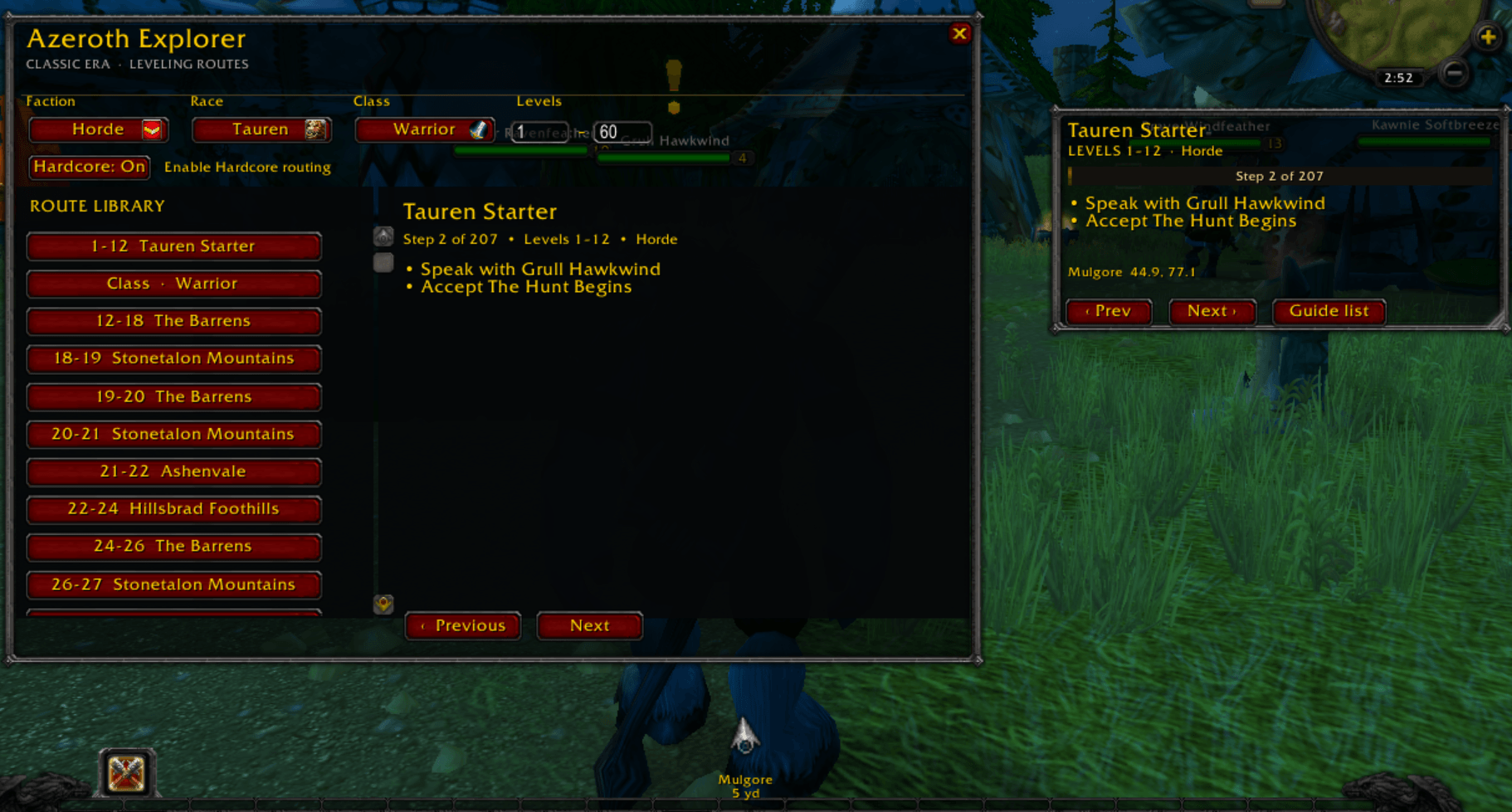
Azeroth Explorer is a leveling guide addon for World of Warcraft Classic Era. Choose a route suited to your faction, race, class, and level, then follow clear instructions as you travel through the world.
Your current step appears in a separate movable tracker, while the waypoint arrow guides you toward the step’s destination. Azeroth Explorer can display kill and collection progress from your quest log, advance eligible steps automatically, and save your route progress and settings separately for each character.
Whether you’re starting your first character or returning to a familiar zone, Azeroth Explorer keeps your next objective close at hand.
🧭 Features
- Leveling Routes for Both Factions
Browse Alliance and Horde zone routes covering levels 1–60, with additional class quest routes. - Character-Aware Guide Selection
Filter routes by faction, race, class, and level range. Starter and class quest steps are filtered to match your character where supported. - Live Step Tracker
Keep the current instruction in a separate, movable and resizable panel. Review the route without reopening the main guide window. - Waypoint Arrow and Map Destinations
Follow the current step with a continuously updating arrow. Coordinate points and route paths can be selected on the map; multi-point paths show their start and end coordinates, with the arrow guiding you to the endpoint. - Kill and Collection Progress
See matching quest objective counts for kill and collection steps. Supported objectives update from the game’s quest log, and eligible steps advance automatically when their objectives are complete. - Automatic Step Advancement
The addon can advance steps when listed quests are accepted or turned in, supported objectives are completed, or a level target is reached. - Per-Character Progress and Settings
Each character keeps its own selected route, step, filters, window positions, and addon settings. - Optional TomTom Support
If TomTom is installed, Azeroth Explorer can use its Crazy Arrow and map waypoint support. TomTom is optional. - Classic Era Interface
Open the guide with/ae. Left-click the minimap button to open the guide; right-click it for addon options.
🧠 Why Use Azeroth Explorer?
- Leveling often means juggling quest objectives, route notes, and map coordinates while trying to decide where to go next.
- Azeroth Explorer brings the current instruction, supported quest progress, and destination together in one place. The guide follows your character’s selected route and keeps progress separate for each character, so switching to another toon won’t pick up someone else’s step.
⚙️ How It Works
-
Install and enable Azeroth Explorer from the AddOns screen.
-
On first launch, confirm your detected faction, race, and class, and choose whether to enable Hardcore routing.
-
Open
/aeand select a route from the guide list. -
Follow the current step in the separate tracker and use the arrow to head toward its destination.
-
Azeroth Explorer updates supported quest objectives from the game and advances steps when their completion conditions are met.
The addon reads quest progress reported by the game client. It does not award quest credit or complete quests for you.
📌 Notes
Designed for World of Warcraft Classic Era.
- TomTom is optional; the built-in arrow works without it.
- The built-in waypoint provides directional guidance and does not calculate terrain-aware routes. TomTom is recommended for additional waypoint features and cross-continent navigation.
- Quest objective tracking depends on the objective information exposed by the game client. Some steps may still need to be advanced manually.
- Hardcore routing filters guide steps; it does not enforce Hardcore rules or protect a character from death.
- Azeroth Explorer does not load or call Zygor.
- Progress and settings are saved per character.
📜 Changelog
Version 2.8.0
- Made flight path, Hearthstone, purchase, learning, and travel instructions easier to read.
- Fixed collection objective tracking and path start/end navigation.
📬 Support & Feedback
- Found a bug or have a suggestion? Please share the addon version, your character’s faction/race/class, the guide and step you were using, and what you expected to happen.
Choose a route, follow the arrow, and make every step through Azeroth count.
Azeroth Explorer - Leveling Guide Team