Azeroth Adventurer
- By
Banner.png
Screenshot 2026-11-11 220813.png
Screenshot 2026-11-11 220743.png
Screenshot 2026-11-11 220723.png
Screenshot 2026-11-11 220711.png
Description
Your personal adventure log for World of Warcraft: Forever.
Azeroth Adventurer quietly records your adventures as you play: every mob you kill, what it dropped and what that's worth, your fights, what you gather and craft, and where it all happened. Then it puts that to work, telling you where to farm, what a mob is worth, and how far you are from your goals.
Everything stays on your computer. The addon never sends anything anywhere.
Features
- Best places to go. Your busiest spot for every mob and node, on mob tooltips, in every window and on your goals. One click sets a TomTom arrow.
- Characters. All your characters side by side: level, XP and rested, gold, time played, zone and when last seen, kills and professions.
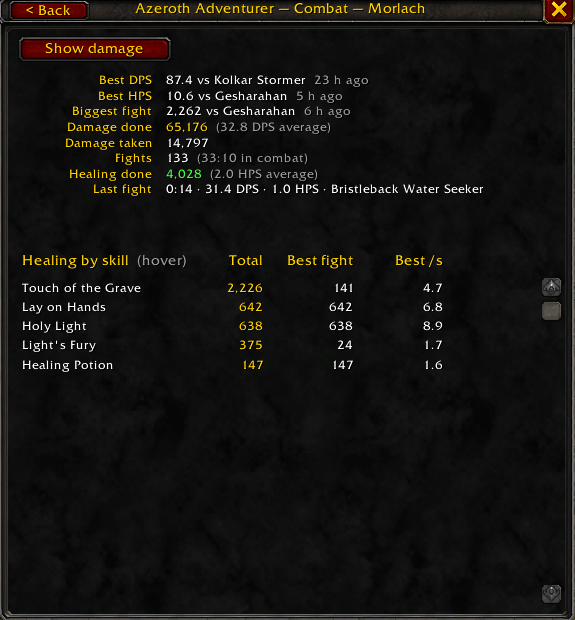
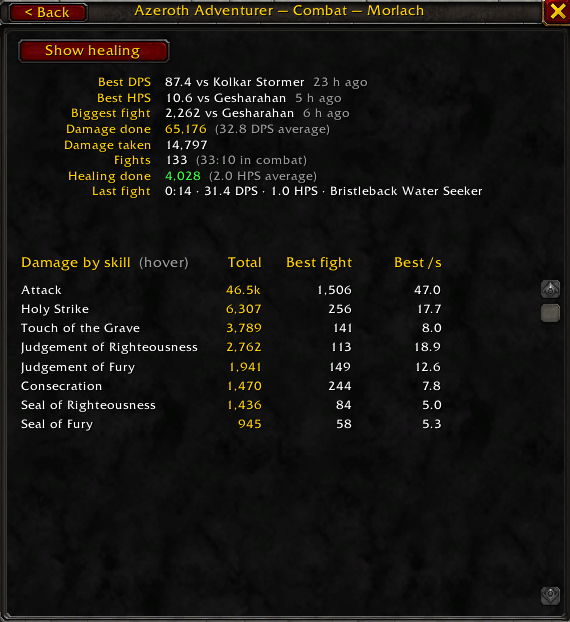
- Combat meter. Your own damage and healing per fight, with DPS and HPS records and every skill's best fight. Only your numbers, nobody else's.
- Farm finder. "Where do I farm Wool Cloth?" Every mob and node you've had an item from, ranked by how many you get each time, with the zone and the spot.
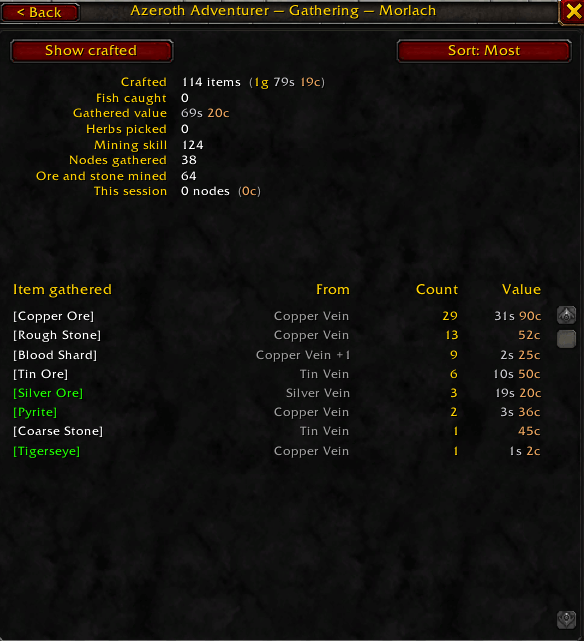
- Gathering and crafting. Herbs, ore and fish from named nodes (Copper Vein, Peacebloom, fishing pools), everything you craft, and profession skill-ups.
- Goals. Kill a number of a mob, collect a number of an item, or a number of kills of anything, with progress bars. Each goal suggests where to go.
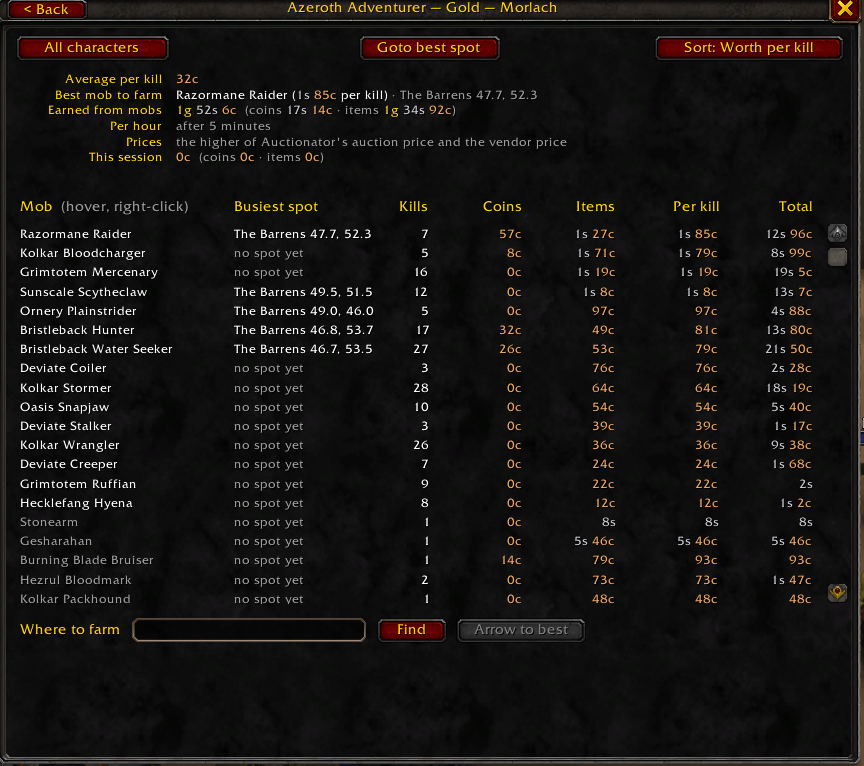
- Gold. What each mob is really worth per kill: its coins plus its drops at auction or vendor prices, your gold per hour, and the best mob to farm.
- Heat map. Your kills or gathering drawn on the world map, as squares or soft glows, for one character, all of them, or a single mob.
- History log. Every kill, drop, coin, fight, node, craft, death and level-up, kept in your saved data in a documented format, ready for your own website or spreadsheet.
- Kills and loot. Kills per mob and in total, XP, kills to the next level, rares and elites, kill streaks, each mob's drops with drop rates, and dry spells ("12 kills since your last Prowler Claws").
- Session summary. Each play session's kills, XP, gold, best drop, fights and busiest area, with a welcome-back toast for the last one.
- Toasts. Small popups for every 100 kills, your first rare and boss kills, good drops, new combat records, finished goals and profession milestones.
Getting started
- Install, log in and play. Tracking starts straight away.
- Type /aza for your stats, or use the minimap button.
- Hover a mob or an item for its numbers.
- Right-click a mob in a list for Goal…, Goto, Heat map and Mob card.
- All the settings are under Esc > Options > AddOns > Azeroth Adventurer, or /aza options.
Commands
Type /aza (or /adventurer) followed by:
| Command | What it does |
|---|---|
/aza |
open or close your stats |
/aza about |
MouseWheel Digital credits, links and feedback email |
/aza alts |
all your characters side by side: level, gold, played, zone, kills, professions |
/aza combat |
your damage and healing meter (/aza combat help for more) |
/aza farm Wool Cloth |
where to farm an item: the mobs and nodes you've had it from, best first |
/aza gather |
herbs, ore and fish you've gathered, and what you've crafted |
/aza goal 50 Kobold Miner |
set a goal (mob, item link or name, or just a number of kills) |
/aza goals |
your goals window: progress, add, remove, finished goals |
/aza gold |
what each mob is worth, coins + drops (/aza gold help for prices) |
/aza goto Kolkar Stormer |
TomTom arrow to where you've killed that mob (or gathered that node) most |
/aza heat |
heat map status; /aza heat <mob> shows one mob, /aza heat clear shows all |
/aza milestones |
celebrate every 100 kills |
/aza mini |
show or hide the small tracker |
/aza minimap |
show or hide the minimap button |
/aza new |
message for each new kind of mob |
/aza options |
all settings (also in Esc > Options > AddOns) |
/aza reset |
wipe this character's stats |
/aza session |
end this session (saves its summary) and start a new one |
/aza status |
check which kill detection is working |
/aza summary |
this session so far (/aza last — your previous session) |
/aza toasts |
popups for milestones, rares, good drops and records |
/aza tooltip |
kill and loot stats when you hover a mob or item |
Works well with
All optional. Azeroth Adventurer works on its own and uses these when they're installed:
- Auctionator: prices drops at their auction value.
- Titan Panel (or any data broker display): this session's kills and your last fight's DPS on your bar.
- TomTom: the arrows for Goto, the farm finder and goals. Without it you get the coordinates in chat.
Also good alongside it:
- Recipe Master (a separate addon by BrenoLudgero, with a Forever version): every recipe for your professions, which ones you're missing and where to find them. Azeroth Adventurer doesn't track recipes, so the two don't overlap.
Good to know
- Made for WoW: Forever. It uses Forever's own client (game version 16001).
- Forever doesn't give addons the combat log, so kills are counted from the mobs you fight and the experience messages, and the combat meter reads the game's built-in damage meter after each fight. That meter doesn't report single hits, so skill records are per fight and per second.
- Some dungeons hide mob names from addons (Ruins of Lordaeron, for one), so kills there count as "Unknown", still with their level and zone.
- Spots and the heat map start from your first kill with the addon. Older kills still count everywhere else.
Status
Built to full scope, and honest about what has been seen working in game:
- Seen working in game (alphabetical): coins and loot per mob, combat meter, dungeon kills where the game hides mob names, farm finder, goals and their suggestions, gold values with vendor and auction prices, heat map, kill tracking, mining and skill-ups, options, session summary, TomTom arrows, tooltips, tracker.
- Newer, less tested (alphabetical): Characters window, crafted items, finishing a goal, fishing and herbs, Mob card and right-click menu, mob list search, Titan Panel display, toasts.
Found a problem? The feedback address is below; a screenshot helps.
A MouseWheel Digital product — Digital products. Built with purpose.
- Feedback: feedback@mousewheeldigital.com
- Support the work: Buy Me a Coffee
Built with the assistance of Claude Code by Anthropic. Copyright (c) 2026 Ben Kirtland (MorlachAU) · MIT licence
Azeroth Adventurer Team