
AXY_Timeline
- By
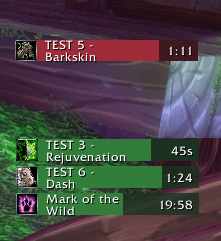
buff - debuff timers

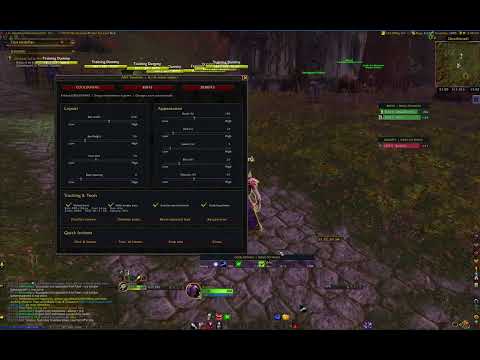
main bar
Description
AXY Timeline
Every cooldown. Right on time.
AXY Timeline is a lightweight, customizable cooldown tracker for World of Warcraft Classic Era, Retail, and Forever.
Track your abilities on a moving timeline, monitor supported buffs and debuffs, and customize your interface to match your playstyle.
Designed to provide useful cooldown information without cluttering your screen.
Features
Moving Cooldown Timeline
-
Display multiple ability cooldowns on a single horizontal timeline.
-
Spell icons move from right to left as they approach readiness.
-
Adjust the visible time window to 1, 3, 5, or 10 minutes, or select a custom duration.
-
Longer cooldowns remain at the right edge until they enter the selected time window.
Buff & Debuff Tracking
-
Track supported active buffs and debuffs.
-
Display spell icons and remaining durations.
-
Detect new effects and update existing timers.
-
Automatically scan available effects when entering the game.
Customizable Interface
-
Adjustable tracker width and height.
-
Custom icon size, spacing, and UI scale.
-
Customizable colors and opacity.
-
Independent positioning for cooldown, buff, and debuff trackers.
-
Drag-and-drop positioning with lock/unlock controls.
-
Fine-tune tracker positions using directional controls.
-
Save your settings between sessions.
Item Cooldowns
-
Track supported inventory item cooldowns.
-
Includes support for items such as Hearthstone where the client API provides the required information.
-
Improved handling of missing or unavailable item data.
Built-in Test Mode
-
Preview 8 or 16 sample timers.
-
Test multiple simultaneous cooldowns.
-
Experiment with layouts without using actual abilities.
Game Compatibility
| Edition | Status | Command |
|---|---|---|
| Classic Era | Active development | /axytime |
| Retail | Experimental Alpha | /axytime |
| Forever | Experimental Alpha | /axytime |
Classic Era: The primary edition, with moving cooldown icons, buff/debuff tracking, and customization controls.
Retail: Designed for the modern WoW client. Some cooldown and aura tracking capabilities may be restricted by Blizzard's protected combat data system.
Forever: A dedicated experimental edition. Feature availability may vary depending on the client API and game version.
Not every feature is guaranteed to behave identically across all three editions.
Slash Commands
All supported editions use the same command:
/axytime
| Command | Description |
|---|---|
/axytime |
Open addon settings |
/axytime unlock |
Unlock tracker positions |
/axytime lock |
Lock tracker positions |
/axytime scan |
Refresh tracked data |
/axytime test 16 |
Preview 16 sample timers |
/axytime test off |
Disable test mode |
/axytime scale 3 |
Set the timeline to 3 minutes |
/axytime hide 123 |
Hide a specific spell or effect ID |
/axytime show 123 |
Remove an ID from the hidden list |
Important: Starting with Classic v0.1.1, Retail alpha.2, and Forever alpha.2, previous short commands have been replaced with /axytime.
Installation
-
Download the edition matching your World of Warcraft client.
-
Install it using CurseForge or extract it into your client's
Interface/AddOnsdirectory. -
Launch the game.
-
Type
/axytimeto open the settings panel. -
Customize the timeline and tracker positions.
Settings are saved automatically.
Current Development Status
AXY Timeline is under active development.
Our priorities include:
-
Improving cooldown and aura detection reliability.
-
Extending game client compatibility.
-
Refining the configuration interface.
-
Expanding customization options.
-
Maintaining a lightweight, responsive addon experience.
Retail and Forever are experimental editions. Please report issues rather than assuming all tracking features are fully supported.
Feedback & Bug Reports
Encountered a Lua error or an incorrectly displayed cooldown?
Please include:
-
Game edition (Classic Era, Retail, or Forever)
-
Game version
-
AXY Timeline version
-
Spell or item name
-
Lua error message, if available
-
Steps to reproduce the issue
Feedback and feature suggestions are welcome.
About AXY Timeline
Developed by AXYON
AXY Timeline is an independent addon project focused on clear, flexible cooldown tracking and practical UI customization.
Every cooldown. Right on time.
© AXYON — AXY Timeline.
AXY_Timeline Team
